Configure volume steps for HDMI CEC too

lemsto

New Member
Joined
Oct 20, 2025
Messages
2
Hi there 👋🏽
I have adjusted volume steps to increase/decrease by 5 steps at a time, both from remote and from knob. And Im happy with that

But when I am using TV and controlling Wiim Ultra volume through TV remote + HDMI CEC, it is only one step at a time. Which is way too slow. Especially as HDMI CEC adds some latency in the control.

Would it be possible to configure volume steps for HDMI CEC too ?

Bonus feature, what about volume steps for Qobuz Connect too ? 😁

Thank you !
 
Last edited:
Upvote 8
No, I am not.

Increasing the number of volume steps per event means giving up resolution. If the real problem is the frequency at which the events are caught, then giving up resolution is not a good countermeasure.

When you said that even the initial reaction to a volume change request using the TV's remote takes a long time I wanted to make sure if this is the underlying problem.
 
Last edited:
I have not mentioned a lag issue, there isn't.

The volume steps already work for HDMI/CEC using the Wiim app and Wiim remote, but with the TV remote it ignores the user's step setting and increments by 1. i.e. It takes a fair amount of time to affect the relative volume (say from 1 to 25). Frustratingly so. That's why the step setting exists.

The potential issues you raise, if existent, would be problematic when changing CEC volume from the Wiim app too, right?

Would be great to hear from a dev (@WiiM Team) to see if there was a reason for not honouring the user's step setting in this context. Perhaps it was simply an oversight and this is indeed a simple amendment.
 
I have not mentioned a lag issue, there isn't.
I probably didn't get "how long 'just holding the volume button'" the way it was meant to be.

Would be great to hear from a dev (@WiiM Team) to see if there was a reason for not honouring the user's step setting in this context. Perhaps it was simply an oversight and this is indeed a simple amendment.
If WiiM say it's possible, then why not. If they've had a good reason to not implement this, they might or just might not explain the reasons. Let's see.

the user's step setting and increments by 1. i.e. It takes a fair amount of time to affect the relative volume (say from 1 to 25).
Out of interest, what is the typical volume range you need when watching TV? I find myself usually setting the volume between 40 and 55 for most everything. My wife might sometimes reduce the volume to something like 35, her son might crank it up to 65 when he's alone. Adjustments within this range are really fast in this setup.
 
Subjective, but from quiet to normal volume levels can take clicking/holding for 10 seconds or more. 1 to 35, say.

Perhaps a more objective view is to compare the loudness intervals with what you'd expect from a non-cec TV. I'd estimate that being a step increment of 5 with the Wiim.

Without steps, it feels like something is wrong. Family here said similar unprompted. And this setup is too expensive to feel wrong 😅
 
Another upvote for this. There are configurable volume increments for the remote, the on-device dial, but not HDMI/ARC.

With ARC/TV selected, the volume changes two steps (as configured) when using the Wiim remote, but only 1 step when using the TV remote. Please just treat the TV remote like a Wiim remote and do the same number of steps.
 
Hi, I have same problem. But with Amp Ultra.
I have a new Samsung Neo qled 100" 2025 model.

The amp have 100 volume steps....
Suuuuper slow to adjust the volume...
 
Last edited:
I have the same problem with Samsung NeoQLED QN70F (2025)

Is the codebase available somewhere (github?), maybe I can help.
 
Basically I do not understand the logic in the implementation.
In Settings there is a step configuration for setting the sound volume using the volume knob, where basically you can also turn it fast if you want to increase/decrease fast.
But there is no step setting for the plus or minus buttons on the remote control of the Amp Ultra, where it is not possible to push/turn/whatever faster for a quick adjustment.
The same for the HDMI CEC setting, where in most cases there is a plus / minus button on the TV remote, hence not possible to do a quick adjustment.
The volume range is 101 points (from zero to one hundred), using the Amp Ultra remote it takes 10 seconds to go from 0 to 100, it is a long time if you have 100W speaker pumping sound in your ear. I am hoping it is less than that. The same with HDMI CEC.
Please implement fixed step (linear increase), or exponential step (the longer you keep the button the more the step increases) or something else.
 
The easiest would be if it was possible to choose 100,50,25 volume steps.

100 steps takes forever to lower or raise...

Choice for cec/remote control/volume knob separately
 
In Settings there is a step configuration for setting the sound volume using the volume knob, where basically you can also turn it fast if you want to increase/decrease fast.
But there is no step setting for the plus or minus buttons on the remote control of the Amp Ultra, where it is not possible to push/turn/whatever faster for a quick adjustment.
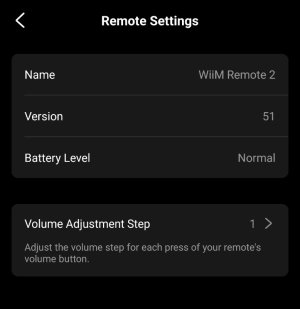
The setting is there, right in the Remote Settings, which is the right place, if you ask me:

IMG_20260331_162847.jpg

The same for the HDMI CEC setting, where in most cases there is a plus / minus button on the TV remote, hence not possible to do a quick adjustment.
HDMI CEC is a different topic, indeed. As of now there is no setting regarding the volume steps. In this case the TV's remote does not communicate with your WiiM Ultra directly. It just causes CEC commands to be sent to the Ultra.

If it was that easy to implement this step control for CEC commands (without breaking anything else), WiiM would have probably done it by now. It's been requested more than once. The best way to make sure that this feature is important to you is sending feedback through the WiiM Home App, though.

For an "emergency off" the mute button is the much better choice than the volume control buttons.
 
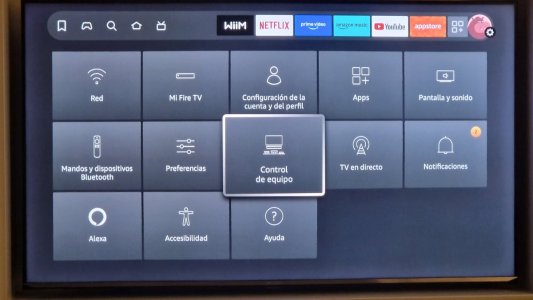
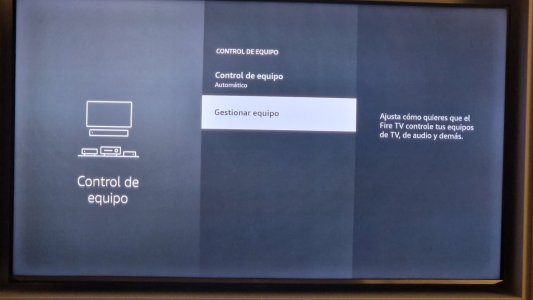
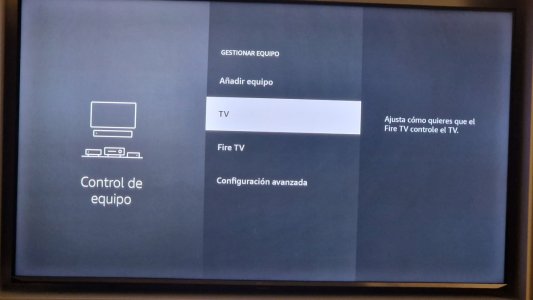
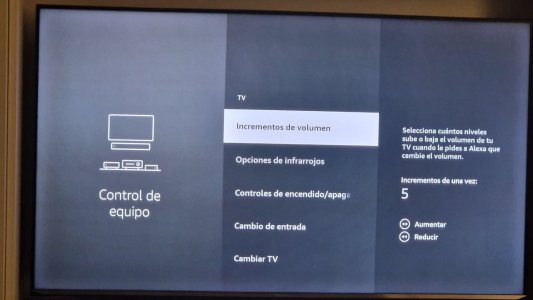
Fire TV control of TV volume steps which controls wiim ultra's volume when connected through HDMI input. It is in spanish but I guess you can figure out how to get there.
1000135245.jpg
1000135246.jpg
1000135247.jpg
1000135248.jpg
 
Back
Top