Filtering user logins

TonyE

Member
Joined
Apr 23, 2025
Messages
80
Location
USA
Can the Ultra be set up to filter users?

I mean, I got four Ultras and we got several devices.... Android phones, tablets, iPhone, Chromebooks and PCs.

It's way too easy to cast to the wrong Ultra... I'd like to set it up so that certain machines can only connect to certain Ultras.
 
I don't believe so.

Not fun when the other half has gone to bed and you accidentially cast to the speaker in the bedroom...

Some would suggest turning off (no power) the ones you're not using. I usually turn the volume way down once finished on ones most likely to cause an issue.
 
I don't believe so.

Not fun when the other half has gone to bed and you accidentially cast to the speaker in the bedroom...

Some would suggest turning off (no power) the ones you're not using. I usually turn the volume way down once finished on ones most likely to cause an issue.
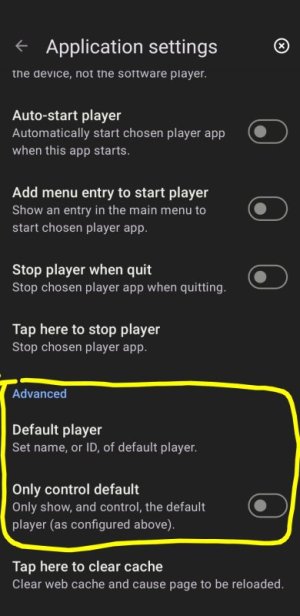
You could do it with Lyrion and the Material Skin plugin but that doesn't really help 🙂
Screenshot_20260115-074805~2.jpg
 
You could do it with Lyrion and the Material Skin plugin but that doesn't really help 🙂
Given Material is web based and that Lyrion doesn't have logins (I think), are you simply hiding the players from the current (depending on cookie settings) web session?
 
Given Material is web based and that Lyrion doesn't have logins (I think), are you simply hiding the players from the current (depending on cookie settings) web session?
I think so. You can probably specify the IP address of the player in a browser URL as an alternative to the setting provided in the Android APK shown above.
 
Interesting. Where do I find these settings in the Material Skin? I've looked under 'Player' settings but not found these. Are they under another area?
If you are using the Android APK they appear in Application settings. I am pretty sure Craig has also mentioned adding the player IP address when using a browser. It will be in the Material skin thread of the Lyrion forum.
 
If you are using the Android APK they appear in Application settings. I am pretty sure Craig has also mentioned adding the player IP address when using a browser. It will be in the Material skin thread of the Lyrion forum.
Ah, gotcha, thanks. I misinterpereted in the first place.
 
Our WiiMs, Android and Chromebooks all use DHCP for their IP ADDRs, so it's not guaranteed they will have the same address.

Only our wired components have static IP addresses. Even our two wired WiiMs use DHCP because I was lazy.

Ideally it should be based on the USER. Our Tidal subscription has four users, but that's not enough. I think we need a user login into WiiM Home as well... I don't know, the more I think about the harder it gets because that means binding user names when casting to a device.

I might use homeassistant to turn the power off to certain Ultras at given hours, that will fix waking someone up, but not walking on someone's listening session when someone else decides to listen in another room and connects to the wrong Ultra by mistake.
 
Reserved IP addresses with DHCP are ideal for the lazy.

Actually that's, IMHO, the hardest thing to do... to program the DHCP server to give IP addresses.... see, I got TWO DHCP servers, one is the back up for the other. Right now I have ranges of addresses reserved so that the static IP addresses don't overlap with the dynamic address ( don't ask, happened once ).

OTOH, for static IP addresses, all I got to do... is edit the etc/hosts file, figure out where to jam the device in the list and modify the configuration of the device. This requires me to learn how each device is configured... it can be fun, but if you're in a hurry...

Or, I can connect via WiFi... which requires a some work from me. SSID, password.

The easiest thing to do is to get a cable ( got lots ) plug it into the switch and the device (easy to do) and turn on the power.
 
Totally agree, giving static IP to many end points is a bit of a ballache.
Static IP for servers and network devices. Everything else can have something dished out by DHCP. End points with static IP should be unnecessary as long as they advertise themselves effectively over the network, unless it's a niche use case.
Oh hang on, this thread is about a niche use case. I wish I had so many Ultras lol.
So yeah, maybe the only way ahead is for static IP addresses.... Either reserved DHCP or static IP setup at the end point: take your pick.
 
Back
Top