
Grouped speakers need to Automatically "Ungroup" if they need to.

conn

Valued Contributor
Joined
Jan 1, 2025
Messages
184
Location
Floriduh
This has always been an annoyance for a few reasons but here's one example.

I have a WiiM edition Audio Pro (A10 MKII) that has a weekday alarm for 8am to play music (mellow Jazz for my Dog :))...

Anyway, over the weekend I had this speakers as the "main" or first speaker in a group of about 4 other speakers and some had the volumes up a bit. So come Monday morning the alarm went off and played through all the grouped speakers, some of which were loud... I of course was not home but my wife called me to ask why the hell speakers were blasting jazz music and how to stop it, lol.... I believe Sonos had a feature called "Auto ungroup on autoplay" or something like that.

We need more control over the multiroom aspects of this system. I'm really surprised that persistent L & R speaker >PAIR< assignment for a group is still not a thing yet with WiiM, to me it's basic multi-room/ whole home audio feature... Is it patented by only Sonos or something? Even Denon HEOS has this...

I feel like WiiM is neglecting the multiroom or "whole home audio" smarts as I've seen no improvements or added features within the last year.
 
Upvote 3
Perhaps a good place to deal with this is in the definition of the alarm and the scope of its 'sound-off'. Is more granularity in selecting the "Speaker or Group" and the volume to be used needed? I confess I've never configured a WiiM Alarm.

[Edit] Also - I sympathize with you on the 'WTF with all that Jazz!?' phone call😏! Enough to make me demand a new feature for sure.
 
[...] I had this speakers as the "main" or first speaker in a group of about 4 other speakers and some had the volumes up a bit. So come Monday morning the alarm went off and played through all the grouped speakers, some of which were loud...
If you had left the day-Jazz speaker as a follower in a WiiM Speaker Group rather than the current leader, I suspect it may have behaved as you expected and played its own Jazz for puppy?
 
This is what I would like. 2 wiim sounds that at all times act as a stereo pair of speakers as though they were just normal speakers plugged into one source. Same volume, same eq, same everything..........

........except for a morning alarm that just goes off through 1 speaker........

......then as you were, stereo, same volume, EQ etc etc
 
If you had left the day-Jazz speaker as a follower in a WiiM Speaker Group rather than the current leader, I suspect it may have behaved as you expected and played its own Jazz for puppy?
Yeah I believe this is the default behavior (but I have not confirmed). I've had this set up for about a month with the alarm and this is the first time where that has happened which leads me to believe this is the first time I had that particular speaker as the main and left it.
I have about 8 speakers and they're always grouped or configured differently.

And honestly I also don't like calling it an alarm, to me this is an "automation". I never even knew you could set these up to do this because they use the term alarm instead of automation so I just thought it was like a wake up alarm that beeped or something... Wasn't until I read somebody discussing the alarm settings or a realized you could configure it to play a specific station at a specific volume etc....
 
Last edited:
This is what I would like. 2 wiim sounds that at all times act as a stereo pair of speakers as though they were just normal speakers plugged into one source. Same volume, same eq, same everything..........

........except for a morning alarm that just goes off through 1 speaker........

......then as you were, stereo, same volume, EQ etc etc
WiiM is lacking in the configuration department.... I hate to harp on them but they really haven't made any progress in the multiroom smarts. I'm pretty sure their new speakers don't even hold a persistent left/right group pairing from what I've read. It's just bizarre.
 
I'm pretty sure their new speakers don't even hold a persistent left/right group pairing from what I've read.
Which is exactly what the Beta being tested right now is attempting to address.
 
Which is exactly what the Beta being tested right now is attempting to address.
So they released a multiroom speaker that they advertise in a pair, yet it lacks the ability to form a proper left/right perstaint group....?

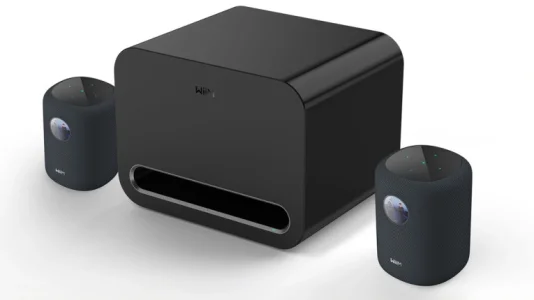
20250514094718_WiiM-Sound-SubPro-TWeb.webp

It's things like that that lead me to believe they are not truly going in the multiroom direction....
 
So they released a multiroom speaker that they advertise in a pair, yet it lacks the ability to form a proper left/right perstaint group....?

In my personal opinion, unlike Sonos, which started out as a smart speaker, WiiM has its roots in streaming devices. So, to be honest, I think that’s why it hasn’t prioritized features specifically designed for stereo pair group up until now.


This has always been an annoyance for a few reasons but here's one example.

I have a WiiM edition Audio Pro (A10 MKII) that has a weekday alarm for 8am to play music (mellow Jazz for my Dog :))...

Anyway, over the weekend I had this speakers as the "main" or first speaker in a group of about 4 other speakers and some had the volumes up a bit. So come Monday morning the alarm went off and played through all the grouped speakers, some of which were loud... I of course was not home but my wife called me to ask why the hell speakers were blasting jazz music and how to stop it, lol.... I believe Sonos had a feature called "Auto ungroup on autoplay" or something like that.

We need more control over the multiroom aspects of this system. I'm really surprised that persistent L & R speaker >PAIR< assignment for a group is still not a thing yet with WiiM, to me it's basic multi-room/ whole home audio feature... Is it patented by only Sonos or something? Even Denon HEOS has this...

I feel like WiiM is neglecting the multiroom or "whole home audio" smarts as I've seen no improvements or added features within the last year.
So I created I ticket and support gave me the old "Should the opportunity arise to implement this feature in the future, we will certainly consider it." which tells me they are not interested....

So proper multiroom control/behaviour/configurations is not something on the menu apparently from a brand owned by linkplay that's known for multiroom capabilities... To me it seems like they are more focused on making cute led displays for speakers, overrated room correction or new fancy VU meters for the ultra....
 
In my personal opinion, unlike Sonos, which started out as a smart speaker, WiiM has its roots in streaming devices. So, to be honest, I think that’s why it hasn’t prioritized features specifically designed for stereo pair group up until now.
And as we all know, the first release of something new by WiiM isn't always the end-product as they react to user feedback and enhance the feature. I see the new stereo pair feature as a step in the right direction, but only the first...
 
In my personal opinion, unlike Sonos, which started out as a smart speaker, WiiM has its roots in streaming devices. So, to be honest, I think that’s why it hasn’t prioritized features specifically designed for stereo pair group up until now.
Well, they are producing and selling multiroom speakers now and these are literally the most basic features... Amazon Echo's have had this for like the last 5/6+ years....

Releasing a smart multiroom, speaker that lacks the most basic, proper grouping features gives me big time cart before the horse vibes....
 
And as we all know, the first release of something new by WiiM isn't always the end-product as they react to user feedback and enhance the feature. I see the new stereo pair feature as a step in the right direction, but only the first...
You’re right, but I think it was anticipated from the start that the WS would be used for Stereo pair and Wireless surround. And the A10 existed as its predecessor.

So, I think they had time to improve stereo pair performance before the release.

Please don't get me wrong, I'm not blaming them; I'm simply trying to state the facts. I hope to see improvements in the future.🙂
 
Well, they are producing and selling multiroom speakers now and these are literally the most basic features... Amazon Echo's have had this for like the last 5/6+ years....

Releasing a smart multiroom, speaker that lacks the most basic, proper grouping features gives me big time cart before the horse vibes....
I read your first post, but to be honest, I’m still not quite sure what you’re trying to do. Are you trying to play alarm music using only the leader device?

If so, I suggest creating an automation in the Google Home app.

Turn on Google Cast for the leader device in the WiiM app, and add that device to a room in the Google Home app.

Next, create an automation.

Set the trigger to "Schedule" and set the time.

For the action, select "Ask Google" or "Custom Action."

Then, enter "Play music on 'Your device name'."

This will allow you to play any music from the music service set up in the Google Home app.


Note that music playback will only start on the leader device; no sound will come from the follower devices. So, there is no need to unlink the WiiM group.

However, the available music services are limited to YouTube Music, Spotify, Amazon Music, Apple Music, and others.
 
I read your first post, but to be honest, I’m still not quite sure what you’re trying to do. Are you trying to play alarm music using only the leader device?

If so, I suggest creating an automation in the Google Home app.

Turn on Google Cast for the leader device in the WiiM app, and add that device to a room in the Google Home app.

Next, create an automation.

Set the trigger to "Schedule" and set the time.

For the action, select "Ask Google" or "Custom Action."

Then, enter "Play music on 'Your device name'."

This will allow you to play any music from the music service set up in the Google Home app.


Note that music playback will only start on the leader device; no sound will come from the follower devices. So, there is no need to unlink the WiiM group.

However, the available music services are limited to YouTube Music, Spotify, Amazon Music, Apple Music, and others.
Hello Wiimer,

The task i'm trying to accomplish is not in question, it works fine. Play specific music station at specific time at a specific volume, on a specific speaker, this works 100%.

The problem is the way WiiM is managing multiple speaker grouping (or lack of proper management).

As you can see I have about 8 speakers, all in different rooms. I'm constantly changing which room plays music & which is the "leader" device etc... I have a mixture off WiiM and non WiiM speakers (Audio Pro) so depending on the combination I have to always select a WiiM device as the "leader device" to get the group to properly play together. I understand this as a constraint when "mixing" these Audio Pro speakers but it's fine and is not the cause of my issue.

I usually assign my Ultra (in my Den) as the lead device and add speakers to it, etc...

Now most likely I made the master bedroom (an Audio pro Wiim edition speaker) the main, grouped some speakers and then left it at that on the weekend. Then on monday when the "Alarm" did its thing the other speakers attached also played with it... This is the problem, the Alarm has no automation instruction to play to the other speakers, only the one I set it up on. WiiM should be smart enough to break it away automatically from the group. This is what I was referring to with the old Sonos feature "Auto ungroup on autoplay".

My point is multiple speaker users (and I know i'm not the only one) seem to be limited on the management/control/configuration of our multiple speakers. It's laughable honestly because the whole damn point of multiroom music is managing groups & how they behave....

Here's another example:

I have an Audio Pro C10 MKII (WiiM speaker) in my family room that an older occupant of my household likes to stream music to via Google cast (Sirius XM to be specific), it's easy for them to play music to this speaker directly from the SiriusXM app. But if I left this speaker in a group the day before, even if im not playing music this speaker it's now unavailable to stream to via Google cast. It does not show up as available as Its stuck in the group still even though Im not playing music on when logically it should have broken away from the group to make itself available to Google cast.

For my use, I would prefer if I had an option to have my grouped speakers automatically "ungroup" after use either by predetermined amount time (all speakers ungroup after 1 hour inactivity) which is the most logical or if something else calls upon that specific speaker (Google cast wants to play to this specific speaker).
 
Hello Wiimer,

The task i'm trying to accomplish is not in question, it works fine. Play specific music station at specific time at a specific volume, on a specific speaker, this works 100%.

The problem is the way WiiM is managing multiple speaker grouping (or lack of proper management).

As you can see I have about 8 speakers, all in different rooms. I'm constantly changing which room plays music & which is the "leader" device etc... I have a mixture off WiiM and non WiiM speakers (Audio Pro) so depending on the combination I have to always select a WiiM device as the "leader device" to get the group to properly play together. I understand this as a constraint when "mixing" these Audio Pro speakers but it's fine and is not the cause of my issue.

I usually assign my Ultra (in my Den) as the lead device and add speakers to it, etc...

Now most likely I made the master bedroom (an Audio pro Wiim edition speaker) the main, grouped some speakers and then left it at that on the weekend. Then on monday when the "Alarm" did its thing the other speakers attached also played with it... This is the problem, the Alarm has no automation instruction to play to the other speakers, only the one I set it up on. WiiM should be smart enough to break it away automatically from the group. This is what I was referring to with the old Sonos feature "Auto ungroup on autoplay".

My point is multiple speaker users (and I know i'm not the only one) seem to be limited on the management/control/configuration of our multiple speakers. It's laughable honestly because the whole damn point of multiroom music is managing groups & how they behave....

As mentioned earlier, I recommend deleting all WiiM alarms and trying out Google Home alarms instead. Apologies if you’re already aware of this, but here’s an explanation of how each type of alarm works.

WiiM Alarm
- Alarms set on the group leader play for the entire group.
- Alarms set on followers do not work.


Google Home Automation
- Alarms set for the group leader play only on the leader device. No sound is emitted from followers.

- Alarms set for a follower play only on the follower device. In this case, the WiiM group is unlink.

Therefore, I guess Google Home Automation is better suited for your needs.


Here's another example:

I have an Audio Pro C10 MKII (WiiM speaker) in my family room that an older occupant of my household likes to stream music to via Google cast (Sirius XM to be specific), it's easy for them to play music to this speaker directly from the SiriusXM app. But if I left this speaker in a group the day before, even if im not playing music this speaker it's now unavailable to stream to via Google cast. It does not show up as available as Its stuck in the group still even though Im not playing music on when logically it should have broken away from the group to make itself available to Google cast.

That’s strange.

As far as I know, here’s how Google Cast works when casting to a WiiM group:

- When you cast to the lead device,
playback occurs only on the leader device.
playback occurs across the entire group.

- When you cast to a follower device, the group is unlinked, and playback occurs only on the follower device.


So, the fact that there was no sound when you cast to C10 might be due to a different issue.
 
Last edited:
For my use, I would prefer if I had an option to have my grouped speakers automatically "ungroup" after use either by predetermined amount time (all speakers ungroup after 1 hour inactivity) which is the most logical or if something else calls upon that specific speaker (Google cast wants to play to this specific speaker).
Do you mean automatically unlinking them and then grouping them manually later?

To be honest, I’m not entirely on board with that, but I recommend submit a request ticket.
 
Do you mean automatically unlinking them and then grouping them manually later?

To be honest, I’m not entirely on board with that, but I recommend submit a request ticket.
Yes, automatically unlinking a group that is no longer being used (playing music). This is considered a temporary group and the way WiiM currently functions, right? we click the little chain "link" icon and then add the speakers....
>>>Except WiiM is not disbanding the group after use.<<< Why?

If you want a permanent or "persistent group" or persistent stereo (L/R pair) group then that's another thing (example "Family room", "Party Mode", "Record player", etc...) This speaker grouping would stay together permanently if you so choose.

A persistent group in multi-room audio is a pre-defined, saved configuration of two or more speakers that function as a single, consistent playback unit. Unlike temporary groups that dissolve when playback stops, a persistent group remains active in the system's interface, allowing users to select one zone (e.g., "Downstairs") rather than manually grouping individual speakers every time they want to listen.
 
Yes, automatically unlinking a group that is no longer being used (playing music). This is considered a temporary group and the way WiiM currently functions, right? we click the little chain "link" icon and then add the speakers....
>>>Except WiiM is not disbanding the group after use.<<< Why?

If you want a permanent or "persistent group" or persistent stereo (L/R pair) group then that's another thing (example "Family room", "Party Mode", "Record player", etc...) This speaker grouping would stay together permanently if you so choose.

A persistent group in multi-room audio is a pre-defined, saved configuration of two or more speakers that function as a single, consistent playback unit. Unlike temporary groups that dissolve when playback stops, a persistent group remains active in the system's interface, allowing users to select one zone (e.g., "Downstairs") rather than manually grouping individual speakers every time they want to listen.
I see. That’s interesting.🙂

However, in the sound profile feature currently in beta testing, I can change the group configuration using the preset buttons. I don’t need to manually create groups using the link icon. If anything, I’m actually looking forward to this feature.
 
This is my problem that is very similar.

I have 3 devices
Living Room - Wiim Amp (I believe this is set to the leader device)
Kitchen -Wiim Pro
Office - Wiim Pro

I have them grouped as "Apartment Devices" .... If I use Spotify and to "Apartment Devices" everything works, no problem. I stop playing to Spotify and sit down to watch TV with the HDMI ARC on the Amp.... it is still sending ARC audio to "Apartment Devices" ... I have to manually go in and break the connection.

What I would LIKE to happen is ARC is only played out of the Living Room Amp.

Does this have to do with what device I set as leader?

Thanks
 
Back
Top