

You are using an out of date browser. It may not display this or other websites correctly.
You should upgrade or use an alternative browser.
You should upgrade or use an alternative browser.
Home assistant integration?
- Thread starter antkn33
- Start date

hgo58
Major Contributor
Have you enabled Google Cast (Chromecast)?:I saw a support article that mentioned Wiim submitted an integration to Home Assistant, but I don't see it in Home Assistant.
Is it still being worked on?
Thanks

How to Control WiiM Device via Google Assistant
TABLE OF CONTENTS WiiM Devices Compatible with Google Assistant Setting Up Your WiiM Device with Google Assistant Step 1: Enable Google Cast on Your WiiM Device Using the WiiM Home App Step 2: Add Your WiiM Device to a Room in the Google Hom...

They’re asking about Home Assistant the home automation system, not the Google voice assistant.Have you enabled Google Cast (Chromecast)?:
How to Control WiiM Device via Google Assistant
TABLE OF CONTENTS WiiM Devices Compatible with Google Assistant Setting Up Your WiiM Device with Google Assistant Step 1: Enable Google Cast on Your WiiM Device Using the WiiM Home App Step 2: Add Your WiiM Device to a Room in the Google Hom...faq.wiimhome.com
It does show up as a generic media device in home assistant. But the official integration looks much nicer. https://faq.wiimhome.com/en/support...-integrating-wiim-devices-with-home-assistant
hgo58
Major Contributor
Maybe the full driver integration is delayed as Gemini is about to replace the Google Assistant on smart displays and speakers?
As above, nothing to do with Google, Gemini etc - see the link in comment #5Maybe the full driver integration is delayed as Gemini is about to replace the Google Assistant on smart displays and speakers?
hgo58
Major Contributor
Yes, you are of course right. I read it as Google Assistant, as I have never taken any notice of "Home Assistant" software. Not my kind of usageAs above, nothing to do with Google, Gemini etc - see the link in comment #5

As mentioned in the info box at the top of the documentation page created on Aug 26th:
Here's the Pull Request in the home-assistant's Core repository on Github: https://github.com/home-assistant/core/pull/148948
I know this is not really helpful, but at least you can subscribe to notifications there and see when it's approved and merged into the Core component. Otherwise, I will try remembering to post here once I see this being pushed.
The WiiM driver for Home Assistant has already been submitted for review and will be available in Home Assistant soon.Here's the Pull Request in the home-assistant's Core repository on Github: https://github.com/home-assistant/core/pull/148948
I know this is not really helpful, but at least you can subscribe to notifications there and see when it's approved and merged into the Core component. Otherwise, I will try remembering to post here once I see this being pushed.

Lomax_hjs
Active Member
Came across this relatively new HA integration yesterday. Looks promising.

 github.com
Releases · mjcumming/wiim
WiiM (LinkPlay) Audio Integration for Home Assistant with multiroom support - mjcumming/wiim
github.com

Yes, you are of course right. I read it as Google Assistant, as I have never taken any notice of "Home Assistant" software. Not my kind of usage


You are missing GREATLY. I just started installing Home Assistant yesterday and this thing is awesome.
Not only is there a huge amount of effort that went into it, but the features are mind boggling... and guess what, I DON'T NEED A WORKING INTERNET to make it work. It's all in my local server.
I did notice something interesting.... using Home Assistant Green, when I fired it up and found the Three WiiM Ultras that I have powered up... I wonder if I can somehow tie Tidal into that.... I've configured one android Tablet in the den to run a user... I also have my PC where I'm configuring it and my android cell phone for the initial device installation.
I figure I'll likely set up a Chromebook.... but it'd be sweet to have a tablet on the wall in the front hall that can control the house and play some music in the stereo.
I mean, I have not tried the Chromecast interface to the WiiM Ultras, it doesn't connect ( didn't configure the WiiMs for it ) since I normally use the TIDAL Connect interface. But it'd be sweet to tie in Tidal to a command to turn on the audio amps and run some music from Tidal to the WiiM Ultra... while the lights get turned on to a soft glow and the Courvoisier is served.... ;-)
Hmmmm... been playing... let me guess, the model is where Home Assistant then has access to the media and it chromecasts it to the Ultra?
Right now, my Ultras already have the music servers (NAS) installed. Ideally, I want to tell the Ultra to either play from "my Music" or via Tidal Connect...
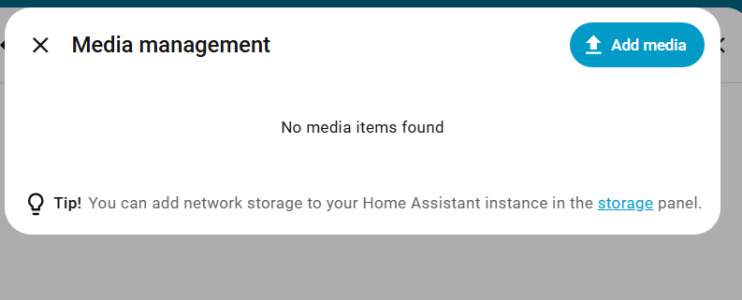
Right now, my Ultras already have the music servers (NAS) installed. Ideally, I want to tell the Ultra to either play from "my Music" or via Tidal Connect...
OK, i managed to get some music through...
I added a song from my NAS and then I can play it... but I don't have the controls working.... I guess it sorts of automates WiiM Home.
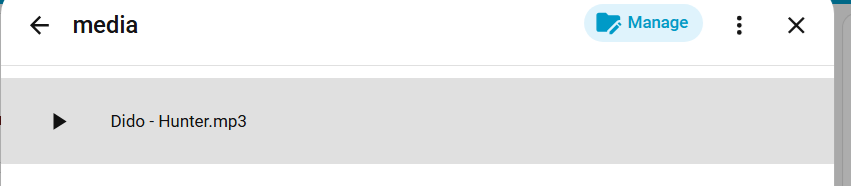
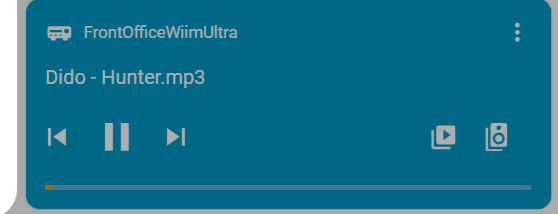
It works from my android phone and the PC... so I image it will work via anything that is hooked to the Home Automation... now, I need to figure out how to tie the automation to turn power to a trigger signal to the amps...
So this works for music I got in the NAS.... which is quite a bit, but so far no Tidal Connect... hmm... one thing at a time... I'll try 24/96 files too...
It does look like WiiM Ultra is working with Home Assistant.
The method is to mount the media files into the Ultra via Home Assistant, then select them from the HA interface. There are some issues that I need to figure out, and for some reason the sound from running WiiM Home -> myMusic to an NAS file seems to be better sounding than using the HA->media->WiiM Home as media player.
I don't know, tubes and amps are warming amp and it's an MP3 file that I chose as first test....
I added a song from my NAS and then I can play it... but I don't have the controls working.... I guess it sorts of automates WiiM Home.
It works from my android phone and the PC... so I image it will work via anything that is hooked to the Home Automation... now, I need to figure out how to tie the automation to turn power to a trigger signal to the amps...
So this works for music I got in the NAS.... which is quite a bit, but so far no Tidal Connect... hmm... one thing at a time... I'll try 24/96 files too...
It does look like WiiM Ultra is working with Home Assistant.
The method is to mount the media files into the Ultra via Home Assistant, then select them from the HA interface. There are some issues that I need to figure out, and for some reason the sound from running WiiM Home -> myMusic to an NAS file seems to be better sounding than using the HA->media->WiiM Home as media player.
I don't know, tubes and amps are warming amp and it's an MP3 file that I chose as first test....
Last edited:
Similar threads
- Replies
- 8
- Views
- 487

- Suggestion
- Replies
- 5
- Views
- 1K
- Replies
- 0
- Views
- 320
