Spotify I can't switch between Wiims streaming from spotify

zeke

New Member
Joined
Dec 19, 2022
Messages
6
I have 2 Wiims, a mini and a pro. I want to switch between them and play from one at a time. Using the wiim app, this is easy to do when streaming from my home music share. Using the required Spotify app to stream from spotify, the app shows a perpetual "Connecting" status when trying to switch to the pro. I'd appreciate any suggestions as to how to get this to work.

 
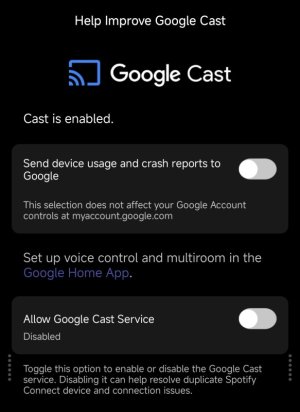
I figured out a solution. I don't exactly know what Google cast does, but disabling it on the pro removed my issue. Im going to guess that the pro's default settings are slightly different from the mini because of the wired vs. wifi connection to my LAN for the two models.
 
You may have read about the ongoing issues with spotify and chromecast vs spotify connect.
The mini doesn't have chromecast so works well :)
imo, v. unlikely to be due to wired vs wireless.
 
I figured out a solution. I don't exactly know what Google cast does, but disabling it on the pro removed my issue. Im going to guess that the pro's default settings are slightly different from the mini because of the wired vs. wifi connection to my LAN for the two models.
How did you disable Google cast? In my app it is not enabled, but Spotify shows only my Pro via Google Cast. So no connection to Spotify possible.
 
How did you disable Google cast? In my app it is not enabled, but Spotify shows only my Pro via Google Cast. So no connection to Spotify possible.
You need to enable Google Cast in order to access the screen with the toggle to disable it.


I also never enabled Google Cast but my WiiM Pro still advertised _googlecast._tcp. via mDNS/DNS-SD before I turned it off with that option. It's possible enabling Google Cast (which involves agreeing to Google terms of service/privacy policy) is required to actually use Google Cast (I never tried) but the service is running by default. The toggle shown in the screenshot in the linked post stops the service running.
 
Last edited:
Instead of starting new thread….Newbie here from Sweden..( 65 yo ) Got a Wiim Amp Ultra a week ago , excellent device. Did a setup with wifi and spotify lossless …worked well..played different songs for an hour. Then I changed to Paradise Radio and listened an hour from different stations. Issue is…Now I cant get Spotify to work/connect. Is there a way to correct leave Radio listening for being able to come back to Spotify ?
 
Instead of starting new thread….Newbie here from Sweden..( 65 yo ) Got a Wiim Amp Ultra a week ago , excellent device. Did a setup with wifi and spotify lossless …worked well..played different songs for an hour. Then I changed to Paradise Radio and listened an hour from different stations. Issue is…Now I cant get Spotify to work/connect. Is there a way to correct leave Radio listening for being able to come back to Spotify ?
Hi,
I don’t know the exact details of your situation, but the simplest solution is to register your Spotify favorites as presets in WiiM.

After putting WiiM into standby mode, can you play music normally when you connect to WiiM via the Spotify app? If you can start playback, please try registering the presets using the steps below.

From now on, you can play Spotify simply by pressing the Preset button in the WiiM app or buttons 1–4 on the remote.


Note that double-clicking button 1 on the remote will launch Preset 5. Similarly, button 2 corresponds to Preset 6, button 3 to Preset 7, and button 4 to Preset 8.
 
Now I cant get Spotify to work/connect. Is there a way to correct leave Radio listening for being able to come back to Spotify ?
What @Wiimer said.

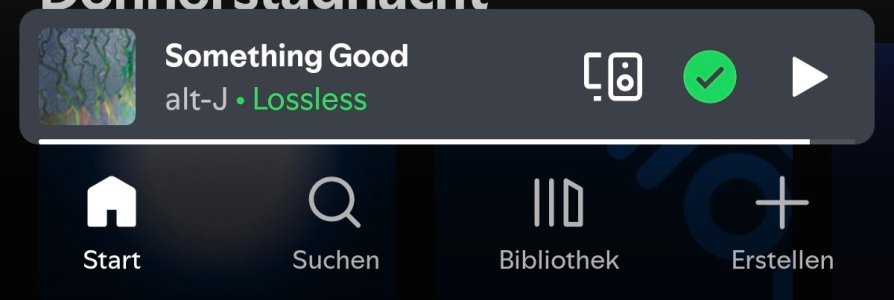
And just to be clear: Spotify does not allow the integration of their service into third party apps like e.g. the WiiM Home App. If you want to stream from Spotify again, you must open the Spotify app on your phone (or on your PC or your tablet) and search for and tap the little icon that somewhat looks like a speaker.

IMG_20260402_230002.jpg

This should pop up a list of devices containing at least your WiiM Amp Ultra (and your phone, your PC or your tablet).

If the Amp Ultra doesn't show in this list we have to talk again.
 
Back
Top