Listening from usb stick

tim3838

New member
Joined
Nov 6, 2025
Messages
3
Recently got my Wiim amp and slotted in my usb stick with 500 ish tracks on it .
On playing them back, if I want to skip to the next track it just starts the current song again . Once that song ends it stops playback until I choose another track. It won't continually play my library.
Also, can I shuffle playback once the above problem has been resolved ?
I realise I'm probably being very thick here but would appreciate any help.
Thanks
Tim
 
Hi, thanks for replying .
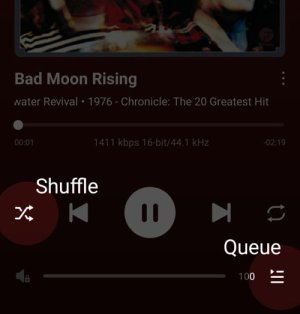
After seeing your screenshot I see you have to queue each track and then you can shuffle them . Is there a quick way to queue all 500 or so tracks without doing them one by one ?
 
First, I connected a USB stick with 5 albums... the Wiim Amp Ultra scanned them and everything was fine.

Then I connected an external USB hard drive including NT with approx. 260 albums, which took about 20 minutes to scan. So far, so good.

When I clicked on USB Input, chaos ensued.

Almost ALL albums were duplicated, the covers were assigned incorrectly, and the best is yet to come.

Earlier, I wanted to listen to the external hard drive again, but it no longer exists in the Wiim cache. Instead, the 5 albums that I imported on Wednesday with the USB stick are there.

So far, I'm treating it as a test before connecting my entire library (8 TB NAS).
 
Last edited:
Do I have to delete the contents of the USB stick first and then import new data?

I became suspicious when I removed the USB stick from the Wii, which was turned off, imported three new albums onto the stick, and they did not appear, or rather, the Wii did not want to import anything.
 
Last edited:
Next one :

When I click on USB Input, the 5 albums from the USB stick that is not connected appear, but when I click on one of the 5 albums, an album from the connected external hard drive appears...so something is being masked, right?
 
Next one :

When I click on USB Input, the 5 albums from the USB stick that is not connected appear, but when I click on one of the 5 albums, an album from the connected external hard drive appears...so something is being masked, right?
Did you eject the USB devices before removing them?

Note that the WiiM device is never off, only in standby. There is always power on the USB.
 
Next one :

When I click on USB Input, the 5 albums from the USB stick that is not connected appear, but when I click on one of the 5 albums, an album from the connected external hard drive appears...so something is being masked, right?
The WHA stores a copy (transformed for presentation purposes) of the database from the USB drive, so you'll need to perform a rescan each time you switch to make sure they're in sync.
 
Last edited:
Did you eject the USB devices before removing them?

Note that the WiiM device is never off, only in standby. There is always power on the USB.
I disconnected the 230 V power supply and, when I switched it back on, no scanning took place, at least as far as I could see.
 
Did you eject the USB devices before removing them?

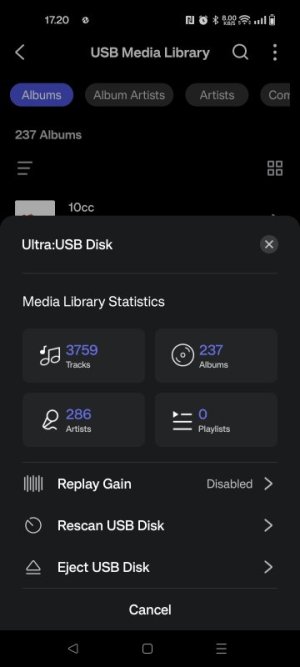
To rescan, use the menu (3 dots) in the USB Media Library page.View attachment 28977
Thanks for the input.

Due to a problem of my own making, at least part of it is okay, but

I ejected the hard drive and had it scanned again.
237 albums with ~ 10 tracks per album equals approximately 2370 tracks. The scanned result is 3326, ~ 40% of which are duplicates.

Just in Time

And the best part‼️

Even though the hard drive was ejected by the Wiim software, the albums are still there❓

Could it be because the external hard drive has its own power supply?

I read something similar on Reddit
 
Last edited:
I have a WiiM Ultra, which I bought exclusively to play music from a USB stick. I've had it almost a year now, and I am really getting disgusted with the thing. After re-scanning the USB, it persists in missing/ignoring entire drectories of tunes. I am NOT interested in complicated IT solutions, I just want it to work as advertised. If I had only wanted to battle some defective software, I surely wouldn't have needed to buy WiiM.

My expectation was a smooth consumer-friendly implementation of a USB player. It ain't that.
 
I have a WiiM Ultra, which I bought exclusively to play music from a USB stick. I've had it almost a year now, and I am really getting disgusted with the thing. After re-scanning the USB, it persists in missing/ignoring entire drectories of tunes. I am NOT interested in complicated IT solutions, I just want it to work as advertised. If I had only wanted to battle some defective software, I surely wouldn't have needed to buy WiiM.

My expectation was a smooth consumer-friendly implementation of a USB player. It ain't that.
Have you submitted a ticket to support?

How big is your library and is it subject to frequent additions?
 
I have a WiiM Ultra, which I bought exclusively to play music from a USB stick. I've had it almost a year now, and I am really getting disgusted with the thing. After re-scanning the USB, it persists in missing/ignoring entire drectories of tunes. I am NOT interested in complicated IT solutions, I just want it to work as advertised. If I had only wanted to battle some defective software, I surely wouldn't have needed to buy WiiM.

My expectation was a smooth consumer-friendly implementation of a USB player. It ain't that.
How big is your USB stick and how much power does it need?

There is a limit to the power the WiiM can deliver pn the USB. Maybe there are read or write faults when scanning, due to low power?

Have you tried adding a powered USB hub?
 
I have a WiiM Ultra, which I bought exclusively to play music from a USB stick. I've had it almost a year now, and I am really getting disgusted with the thing. After re-scanning the USB, it persists in missing/ignoring entire drectories of tunes. I am NOT interested in complicated IT solutions, I just want it to work as advertised. If I had only wanted to battle some defective software, I surely wouldn't have needed to buy WiiM.

My expectation was a smooth consumer-friendly implementation of a USB player. It ain't that.
I play from a 64GB USB thumb drive. It has nearly 600 albums roughly 10,000 (MP3) tracks. Works fine on my WiiM Ultra.
 
My USB stick is a 128GB, with approx 8800 MP3 tracks. The last six or so CDs (ripped to MP3s) that I got recently do not show up on the WiiM. and also do not show up in Windows Media Player on the PC that I keep the ripped files on. No idea what the malfunction is. I tried using the WiFi capability on the WiiM to cast from Windows Media Player my PC. Works very erratically, I'll play a track that way, then the WiiM thinks it needs to disconnect, and basically hourglasses as 'disconnecting', requiring a power cycle to snap out of it.

What does seem to work is to make a new USB stick, with fewer tracks on it. The WiiM seems to not have a problem with that. Altogether, the WiiM is NOT a good solution for me, as the ratio of time wasted and aggravation caused have taken the unit right up to the tipping point where it gets to meet Mr Sledge Hammer.

Have you submitted a ticket to support?
No. I really doubt they'd be able to help.

There is a limit to the power the WiiM can deliver pn the USB.
The manual states that the WiiM USB port can source 1.5A. That should be sufficient to power a USB stick, I would think.
 
What does seem to work is to make a new USB stick, with fewer tracks on it. The WiiM seems to not have a problem with that. Altogether, the WiiM is NOT a good solution for me, as the ratio of time wasted and aggravation caused have taken the unit right up to the tipping point where it gets to meet Mr Sledge Hammer.

No. I really doubt they'd be able to help.

If that’s how you feel, then good luck with whatever streamer you get to replace your WiiM…
 
Back
Top