Listening from usb stick

tim3838

New Member
Joined
Nov 6, 2025
Messages
3
Recently got my Wiim amp and slotted in my usb stick with 500 ish tracks on it .
On playing them back, if I want to skip to the next track it just starts the current song again . Once that song ends it stops playback until I choose another track. It won't continually play my library.
Also, can I shuffle playback once the above problem has been resolved ?
I realise I'm probably being very thick here but would appreciate any help.
Thanks
Tim
 
My USB stick is a 128GB, with approx 8800 MP3 tracks. The last six or so CDs (ripped to MP3s) that I got recently do not show up on the WiiM. and also do not show up in Windows Media Player on the PC that I keep the ripped files on. No idea what the malfunction is. I tried using the WiFi capability on the WiiM to cast from Windows Media Player my PC. Works very erratically, I'll play a track that way, then the WiiM thinks it needs to disconnect, and basically hourglasses as 'disconnecting', requiring a power cycle to snap out of it.

What does seem to work is to make a new USB stick, with fewer tracks on it. The WiiM seems to not have a problem with that. Altogether, the WiiM is NOT a good solution for me, as the ratio of time wasted and aggravation caused have taken the unit right up to the tipping point where it gets to meet Mr Sledge Hammer.


No. I really doubt they'd be able to help.


The manual states that the WiiM USB port can source 1.5A. That should be sufficient to power a USB stick, I would think.
If the new files on the USB stick aren’t visible on the PC either, looks to me more like an issue with the stick than anything else. If you have the files elsewhere, I’d suggest blowing the stick away, reformat it, put the files back on and rescan the library using the WiiM.
 
@tim3838 .. what make and spec is your usb thumb drive .. im no expert but i would suggest using 'quality' memory maybe 'samsung' etc with the highest 'read/write' speed. Also important to know its not fake, so do homework and get from reputable seller.
Cheap noname usb drives or any memory can be prone to errors including from external sources. If you are going to the trouble of storing all your precious stuff then maybe use the best container you can.
 
If the new files on the USB stick aren’t visible on the PC either,
Stating it more explicitly, the new files are not visible when the stick (which is a PNY) is in the WiiM, OR the stick is in the PC, but accessing the stick via Windows Media Player (WMP). All files on the stick, including the new ones, are visible when accessing the stick on the PC via File Explorer.

I don't know, and really don't want to know, vast amounts about streaming hardware and software. I am a retired EE, and I have spent my retirement years actively avoiding staying au courant with IT. I want a consumer electronics solution to play MP3 files, ideally one that does not involve WiFi, Bluetooth, or my phone. I almost had that with a Sony Walkman MP3 player, but I gave that to my wife when I got the WiiM as a more audio-rackable solution.
 
Stating it more explicitly, the new files are not visible when the stick (which is a PNY) is in the WiiM, OR the stick is in the PC, but accessing the stick via Windows Media Player (WMP). All files on the stick, including the new ones, are visible when accessing the stick on the PC via File Explorer.

I don't know, and really don't want to know, vast amounts about streaming hardware and software. I am a retired EE, and I have spent my retirement years actively avoiding staying au courant with IT. I want a consumer electronics solution to play MP3 files, ideally one that does not involve WiFi, Bluetooth, or my phone. I almost had that with a Sony Walkman MP3 player, but I gave that to my wife when I got the WiiM as a more audio-rackable solution.
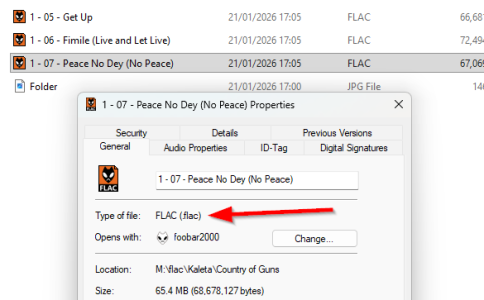
Sounds like you ripped the files into a non audio file format.

Right click on one of the files in File Explorer and select "Properties", what is the file type shown?

1769015297353.png
 
Last edited:
Stating it more explicitly, the new files are not visible when the stick (which is a PNY) is in the WiiM, OR the stick is in the PC, but accessing the stick via Windows Media Player (WMP). All files on the stick, including the new ones, are visible when accessing the stick on the PC via File Explorer.

I don't know, and really don't want to know, vast amounts about streaming hardware and software. I am a retired EE, and I have spent my retirement years actively avoiding staying au courant with IT. I want a consumer electronics solution to play MP3 files, ideally one that does not involve WiFi, Bluetooth, or my phone. I almost had that with a Sony Walkman MP3 player, but I gave that to my wife when I got the WiiM as a more audio-rackable solution.
The USB stick I’m using is from Sandisk. It has functioned well and without any issues since July last year when I got the Ultra… I do use the WiiM Home app to browse files, so phone or iPad to decide what to play.

I hope you get a resolution…
 
I don't know, and really don't want to know, vast amounts about streaming hardware and software. I am a retired EE, and I have spent my retirement years actively avoiding staying au courant with IT. I want a consumer electronics solution to play MP3 files, ideally one that does not involve WiFi, Bluetooth, or my phone. I almost had that with a Sony Walkman MP3 player, but I gave that to my wife when I got the WiiM as a more audio-rackable solution.
You came to the wrong place then. ;)
 
Yes, I guess so. I ran Validrive on my stick, it is OK and is a legit PNY 128GB. I think I'll build up a somewhat smaller file library on another stick, and hopefully the WiiM will play nice with that. Thanks for the advice and help.
The number of music files has absolutely nothing to do with it in your case.

It's hard to try and help you, though. You kind of made up your mind anyway and refuse to learn about what might help you (which has nothing to do with Bluetooth or streaming). Should you decide to change your mind and ask for help there are many community members willing to provide just that.
 
Should you decide to change your mind and ask for help there are many community members willing to provide just that.
Well, if I have an appx 1 year old WiiM, that has received all the software updates, why would it not function properly reading MP3 files off an USB stick? What things could I do to fix it? I have tried re-scanning the stick; it still does not see the recently added files. The stick tests good using Validrive. All files on the stick are MP3 type. Does it matter if there is directory structure on the stick? For example: Neil Young parent directory with child directories for each album of his.

Sorry if I came off as having my mind already set against the WiiM.
Memories of spending unproductive hours on the phone talking to call center "tech support" script readers about various dysfunctional gizmos has somewhat soured my outlook. I'm in my seventies, trying to keep music as a part of my life.
 
My USB stick is a 128GB, with approx 8800 MP3 tracks. The last six or so CDs (ripped to MP3s) that I got recently do not show up on the WiiM. and also do not show up in Windows Media Player on the PC that I keep the ripped files on. No idea what the malfunction is. I tried using the WiFi capability on the WiiM to cast from Windows Media Player my PC. Works very erratically, I'll play a track that way, then the WiiM thinks it needs to disconnect, and basically hourglasses as 'disconnecting', requiring a power cycle to snap out of it.

What does seem to work is to make a new USB stick, with fewer tracks on it. The WiiM seems to not have a problem with that. Altogether, the WiiM is NOT a good solution for me, as the ratio of time wasted and aggravation caused have taken the unit right up to the tipping point where it gets to meet Mr Sledge Hammer.


No. I really doubt they'd be able to help.


The manual states that the WiiM USB port can source 1.5A. That should be sufficient to power a USB stick, I would think.

Look into dedicated server
 
Well, if I have an appx 1 year old WiiM, that has received all the software updates, why would it not function properly reading MP3 files off an USB stick? What things could I do to fix it? I have tried re-scanning the stick; it still does not see the recently added files. The stick tests good using Validrive. All files on the stick are MP3 type. Does it matter if there is directory structure on the stick? For example: Neil Young parent directory with child directories for each album of his.

Sorry if I came off as having my mind already set against the WiiM.
Memories of spending unproductive hours on the phone talking to call center "tech support" script readers about various dysfunctional gizmos has somewhat soured my outlook. I'm in my seventies, trying to keep music as a part of my life.
I thought you said Windows Media Player also couldn't see your music files.
 
Sounds like defective sectors on stick, or defective ripping process. Do the 'missing' files actually play via media player?
He said they don’t appear in WMP but do in File Explorer. My money is on a failed rip that has created files that WMP/WHA can’t see or play.
 
@IjustwannaplayUSBstix .. its not about age its about willingness to learn new tricks, otherwise just put a 78 on the gramaphone :)
Now that @IjustwannaplayUSBstix has explicitly confirmed that he didn't just come to criticise WiiM (which suggests that he is open to solutions), I think we should stop picking on him.

We try to build a helpful community in the first place, not the most witty one. ;)
 
I think anyone serious about music integration should look into a server, whether it's on a NAS, PC, media box, pi, etc.

Until audio streamers are self contained ideally 3.5" (USB can cause problems) with good software (with ability to change it) a dedicated server is best. Browsing by folder is awful for large collections
 
Back
Top