

You are using an out of date browser. It may not display this or other websites correctly.
You should upgrade or use an alternative browser.
You should upgrade or use an alternative browser.
Solution

One final thing from OP. Here is my solution to play my music library ALACs 16/44 rips on macOS (in other room) to a WiiM Pro Plus: Airplay. I’m using Rouge Amoeba Airfoil to bypass the Apple audio processor. Then ethernet direct to the WiiM which plays the ALAC lossless. It sounds great. Disc art comes along too. I control volume from my amp app.
You don’t need to use Airfoil and could just choose the WiiM in macOS control center but Airfoil removes most of the audio processor for sure.
Note: if you do choose the WiiM or any Airplay 2 device while in macOS Apple Music, you will not get lossless. Must be from control center.
Airplay (1) devices will always play lossless 16/44. But the DAC is great in the Pro Plus. This get’s me...
You don’t need to use Airfoil and could just choose the WiiM in macOS control center but Airfoil removes most of the audio processor for sure.
Note: if you do choose the WiiM or any Airplay 2 device while in macOS Apple Music, you will not get lossless. Must be from control center.
Airplay (1) devices will always play lossless 16/44. But the DAC is great in the Pro Plus. This get’s me...

Rockbox? That rings bells - wasn’t that used on the Creative house brick or whatever they called it?yup needing to use itunes to sync music.
All my personal audio players use rockbox, you just transfer files like a USB drive, it can browse by folder or build a databse but you don't need any software like itunes to manage the music.
I still can use those players on a PC Windows or Linux.

Rockbox? That rings bells - wasn’t that used on the Creative house brick or whatever they called it?
Used on many players. Still going receives updates
Rockbox - Daily development builds
Yeah, I had rockbox on a sansa clip. Played flac and you could drag and drop your music in. That little thing was great.Used on many players. Still going receives updates
Rockbox - Daily development builds
www.rockbox.org
Yeah, I had rockbox on a sansa clip. Played flac and you could drag and drop your music in. That little thing was great.
Same one have Clip+
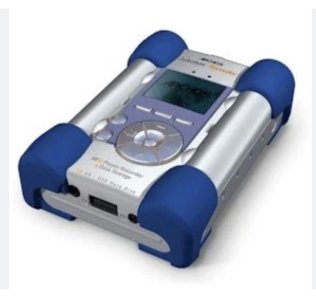
Just remembered - I was actually thinking about the Archos Jukebox which weighed a ton for its size, and that’s what I loaded Rockbox on to. Must have had some other Creative players too…

Dude
Active Member
- Joined
- Dec 10, 2025
- Messages
- 84
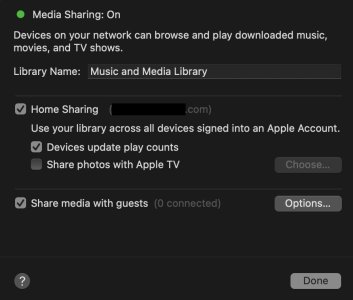
Thanks! I appreciate this strait-forward answer that explains a lot. I never had File Sharing checked on because, music…The Wiim supports accessing music from an SMB file share which macos supports.
Enable sharing in System Settings > General > Sharing by turning on "File Sharing" and configuring options via SMB.
The sharing option in your screenshot is for sharing with other Apple devices only which is all Apple expect you to have.
The alternatives are to play music from the Mac to the Wiim over Airplay, play from another app which supports the Wiim as a DLNA renderer, install a supported server which the Wiim can access (various UPNP, Plex) using the Wiim app, or install a server with its own interface to play to the Wiim (Lyrion, Roon, Music Assistant).

Dude
Active Member
- Joined
- Dec 10, 2025
- Messages
- 84
Strait up entirely AI text.A marshmallow is edible, but a mac isn’t unless it’s of the Big variety
It’s not truly DLNA viz.
“macOS does not natively support DLNA out of the boX.
While macOS has a "Media Sharing" feature, it is designed specifically for Apple ecosystem sharing (Home Sharing to Apple TV, iPad, etc.) or standard file sharing.
Therefore, to make your Mac appear as a DLNA server to non-Apple devices like smart TVs, receivers, or streamers (e.g., Sonos, WiiM), you will need to use third-party software.
Alternatives to Built-in Sharing
To enable DLNA on a Mac, you can use several third-party applications:
Why You Need Third-Party Software
- MinimServer: An excellent, specialized option for audio streaming.
- Plex Media Server: A popular, robust choice that serves content to most smart TVs and devices.
- Serviio: A free, full-featured DLNA server.
- Elmedia Player: A Mac app that can act as a DLNA server/player.
- Macast: A lightweight, free, and open-source UPnP/DLNA renderer.
If your goal is to simply share files and you are only using Apple devices, the built-in Media Sharing works. If you are sharing to a TV or network streamer that requires a DLNA server, you will need a third-party application.“
- Lack of Native DLNA: Apple focuses on AirPlay and Home Sharing, not the universal DLNA/UPnP standard.
- Format Compatibility: Third-party servers often handle transcoding, allowing your Mac to stream file formats that your TV might not otherwise support natively.
- Library Management: Tools like MinimServer or Plex provide better organization for large libraries compared to basic file sharing.
Dude
Active Member
- Joined
- Dec 10, 2025
- Messages
- 84
- I guess the shop never heard of adaptors.I started with digital music files in about 2007/8 after I saw an ipod. I was amazed. 80gb, fits in your hand and you can take 1000s of tunes around with you. I bought loads of gear to hook it up to various systems, wires and docks and such like. Most of it 3rd party (not Apple). I also paid quite a lot of money to someone to wire it into my car stereo.
When the 160gb (or whatever it was) came out I was so excited, I queued up for it. Took it home, loaded it up and none of that stuff I'd bought worked.
The guy in the shop said that this new ipod wouldn't work with any of this stuff I'd got and I needed to buy a whole load of new gear to connect it up to everything.
I told him to shove it up his waste disposal pipe, asked for my money back and have never entertained another apple product since.
- I’m using a 10 year old iPhone. No problems. I wonder how many Androids are that old?
Dude
Active Member
- Joined
- Dec 10, 2025
- Messages
- 84
Preach it!i think we are all very lucky to have so many options now. easy to take it for granted
Dude
Active Member
- Joined
- Dec 10, 2025
- Messages
- 84
Got it. WiiM can see my files on a Mac.
1. “Media Sharing” vs. “File Sharing”
- Media Sharing creates a Home Share (DAAP protocol). This is limited to Apple devices (and PC iTunes).
- File Sharing creates an SMB Share (Server Message Block). WiiM Pro Plus DOES natively support SMB.
- You do not need third-party DLNA server software if you use the SMB method that macOS supports natively.
- Go to System Settings > General > Sharing.
- Turn OFF "Media Sharing" (This is the Apple-only DAAP protocol).
- Turn ON "File Sharing".
- Click the "i" (Info) button next to File Sharing.
- Under "Shared Folders," add your Music folder (where your ALAC files live).
- Click "Options..." and ensure "Share files and folders using SMB" is checked.
- In your WiiM Home App: Go to Browse > Home Music Share. Your Mac should appear there (you may need to enter your Mac's username/password).
I kind of knew all this (this server crap is not my day job) but, I think even SMB is not functional either lately.

Got it. WiiM can see my files on a Mac.
1. “Media Sharing” vs. “File Sharing”
- Media Sharing creates a Home Share (DAAP protocol). This is limited to Apple devices (and PC iTunes).
- File Sharing creates an SMB Share (Server Message Block). WiiM Pro Plus DOES natively support SMB.
- You do not need third-party DLNA server software if you use the SMB method that macOS supports natively.
Had to discuss this with AI and it veered off into thinking a barking chicken was surely a dog but, I think this makes sense now.
- Go to System Settings > General > Sharing.
- Turn OFF "Media Sharing" (This is the Apple-only DAAP protocol).
- Turn ON "File Sharing".
- Click the "i" (Info) button next to File Sharing.
- Under "Shared Folders," add your Music folder (where your ALAC files live).
- Click "Options..." and ensure "Share files and folders using SMB" is checked.
- In your WiiM Home App: Go to Browse > Home Music Share. Your Mac should appear there (you may need to enter your Mac's username/password).
I kind of knew all this (this server crap is not my day job) but, I think even SMB is not functional either lately.
The issue is with long filenames, I've had to truncate classical music as the filename is too long, therefore browsing by folder/file won't show it, only once you open it.
I'd move away from browse by folder ASAP, it's ok as a secondary browse method, for example I know where it is but can't remember the band (or because it's mistagged artist/album artist or something)
This is long before lightning cables (or whatever they're called). Before iphones even.- I guess the shop never heard of adaptors.
- I’m using a 10 year old iPhone. No problems. I wonder how many Androids are that old?
I dislike all smartphone equally

Dude
Active Member
- Joined
- Dec 10, 2025
- Messages
- 84
I know the cable you are talking about. Anyhow, I too was shocked when my horse was replaced by a car.This is long before lightning cables (or whatever they're called). Before iphones even.
I dislike all smartphone equally
While this isn't/won't be an issue for your Mac, many old devices only support the old and insecure SMB1 protocol while almost all properly supported products have blocked SMB1 and moved on to SMB2 or even SMB3. This may be where you were getting your impression above...I kind of knew all this (this server crap is not my day job) but, I think even SMB is not functional either lately.
Dude
Active Member
- Joined
- Dec 10, 2025
- Messages
- 84
Mac removed SMB1 long ago but supports SMB 2 and the standard on it is SMB 3. But, I simply cannot get WiiM to see it. I tried every trick in the book. I am giving up. This has been something I have messed with for months. Since I don't want Java DLNA or Plex or Jellyfin and, since I really do not care about absolute bit perfect (kind of a fantasy term now anyway) but do want lossless, I will just send via Airfoil to minimize the macOS audio processor and to WiiM Airplay 2, it will be 16/44 lossless, which are 99% of my files anyway. A bit more inconvenient but, is fine and actually, sounds incredible. Key is either send via Airfoil or Airplay from Control Center not apps. Set volume of Mac to max as well. Then control volume at amp.
Mac removed SMB1 long ago but supports SMB 2 and the standard on it is SMB 3. But, I simply cannot get WiiM to see it. I tried every trick in the book. I am giving up. This has been something I have messed with for months. Since I don't want Java DLNA or Plex or Jellyfin and, since I really do not care about absolute bit perfect (kind of a fantasy term now anyway) but do want lossless, I will just send via Airfoil to minimize the macOS audio processor and to WiiM Airplay 2, it will be 16/44 lossless, which are 99% of my files anyway. A bit more inconvenient but, is fine and actually, sounds incredible. Key is either send via Airfoil or Airplay from Control Center not apps. Set volume of Mac to max as well. Then control volume at amp.
Maybe something to remember in the future, don't buy apple products as they lock you into the eco system.
D
Deleted member 33971
Guest
And it is so cosy in there. Never back to Google/Android.Maybe something to remember in the future, don't buy apple products as they lock you into the eco system.
And it is so cosy in there. Never back to Google/Android.
Plenty of choices, UPNP does require a server/player type setup- unless you get a raspberry pi/picoreplayer and that can be a server and a audio streamer.
D
Deleted member 33971
Guest
Have to agree that none of these things are of interest for me. A few years ago we decided to go full MAC and ios in business and private. Everything is fine, but I got a stiff neck every time I hear such general bashing of Apple because of pure bias. So, play core as long as you want.Plenty of choices, UPNP does require a server/player type setup- unless you get a raspberry pi/picoreplayer and that can be a server and a audio streamer.
Similar threads
- Replies
- 6
- Views
- 1K

- Replies
- 33
- Views
- 2K
- Replies
- 5
- Views
- 622

- Replies
- 12
- Views
- 950
- Replies
- 6
- Views
- 3K
