
More detalied roomfit graph

gasolin75

Member
Joined
Apr 27, 2024
Messages
99
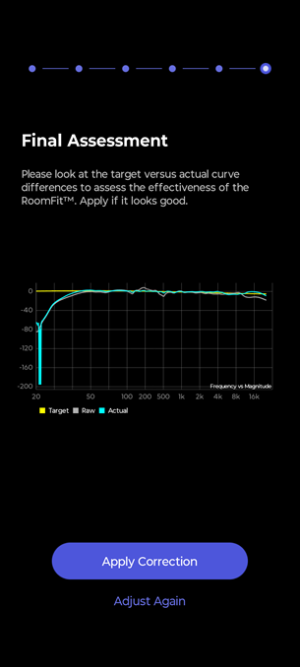
Why does the room corretion roomfit not show the result the same way every time ?

I want it with 10 db intervals but atm it only does it by 20 db Is there a way to change it, like zoom in and out and it's much more detailed with 1 db increments when you zoom in ?
5PXdqr8.png
 
Upvote 0
Why does the room corretion roomfit not show the result the same way every time ?

I want it with 10 db intervals but atm it only does it by 20 db Is there a way to change it, like zoom in and out and it's much more detailed with 1 db increments when you zoom in ?

View attachment 30582
That graph has a 40dB interval because of that massive dip just above 20Hz. Does that dip always appear in the results?
 
atm it does, i changed subwoofer, lowest setting for room fit is 30hz, it's rated at -10db 29hz (29-205hz)
 
I have issued a feature request to always limit the vertical range to 50 dB.

As of now the vertical axis always scales to the measurement results. That doesn't make too much sense, if the SPL is down by 60, 80 or 200 dB at 20 Hz, this part of the graph doesn't contain meaningful information.

WiiM did react quite positively, however, I don't know if and when they might implement such a change.
 
With 10 db increments ?

I have the dayton usb mic (calibrated) and im surprised that even when i set it down to 20 hz it's only half a db or 1 db ish in difference compared to 30 or 35hz, both in adjustments under 80hz (crossover is 60hz) not alot more than 1-1½ db difference under 80hz from the measured actual frequency response

According to dayton they say use 1/3 octave (not shure what that does) stock is 1/6 octave

Even when there is only 10 pk filter (like 10 band or what ever it's called), stock setting is like every eq 30,62.5 and 125hz but just don't at my end (what i have, use for room fit,room correction) do much at low hz like under 30 hz, 40hz can be at 30hz depending og the Q. 40hz ish is used alot and it can effect the bass at 30hz

I think results also depends on volume used when you're doing room correction like sound is different at high levels not just louder but frequency responce, compared to low volume,level
 
Last edited:
That is almost a brick wall. What device is your mic attached to that is running this correction? There appears to be a high-pass filter hitting the input.

-Ed
 
Back
Top