
Opinions on RoomFit correction?

Aziraphale

Member
Joined
Mar 30, 2025
Messages
18
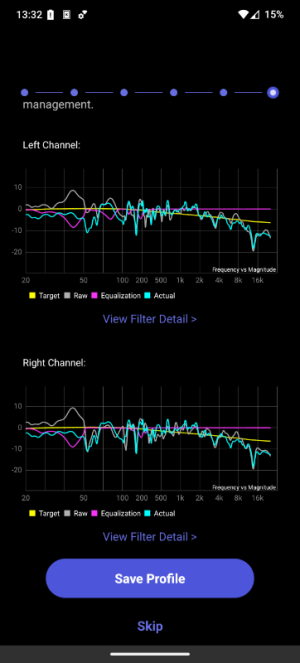
I had to change some thing in my listening room, which meant that I re-ran RoomFit. Would the experts here be willing to give me an opinion on the results? My setup was/is as follows:

- Fyne Audio 500 speakers
- BK XLS200-DF MK2 sub
- IMM6C mic, calibrated
- Settings in Wiim Home: Non-boost, 20-200Hz, max gain 10, min gain -10, max Q 10, 1/12th octave, multiple measurements and I tuned the channels separately to the B&K curve.Screenshot_20260115-133227_WiiM Home.png
 
I had to change some thing in my listening room, which meant that I re-ran RoomFit. Would the experts here be willing to give me an opinion on the results? My setup was/is as follows:

- Fyne Audio 500 speakers
- BK XLS200-DF MK2 sub
- IMM6C mic, calibrated
- Settings in Wiim Home: Non-boost, 20-200Hz, max gain 10, min gain -10, max Q 10, 1/12th octave, multiple measurements and I tuned the channels separately to the B&K curve.View attachment 32522
The cyan curve looks exactly the same for both channels. I wouldn't expect to see that. I would expect the cyan curve to lie on top of the raw curve above the maximum correction frequency.
 
The cyan curve looks exactly the same for both channels. I wouldn't expect to see that. I would expect the cyan curve to lie on top of the raw curve above the maximum correction frequency.
That depends which screen it is.
The "Results Overview" screen looks as what you expect.
The "Save Your Profile" screen looks like what @Aziraphale posted - the cyan curve in it is taken from the Evaluation/Final Assessment screen (which is done in L+R mode, so the same curve is overlaid on both channels).

I had to change some thing in my listening room, which meant that I re-ran RoomFit. Would the experts here be willing to give me an opinion on the results? My setup was/is as follows:

- Fyne Audio 500 speakers
- BK XLS200-DF MK2 sub
- IMM6C mic, calibrated
- Settings in Wiim Home: Non-boost, 20-200Hz, max gain 10, min gain -10, max Q 10, 1/12th octave, multiple measurements and I tuned the channels separately to the B&K curve.View attachment 32522
That looks quite OK to me, except that you seem to have some kind of cancellation around 55Hz - especially on the right channel.
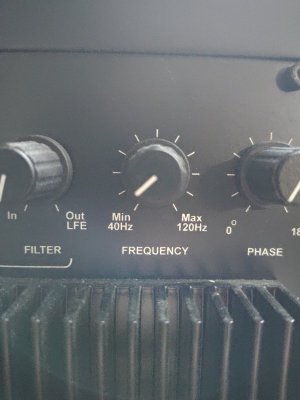
Which crossover frequency are you using?
 
That depends which screen it is.
The "Results Overview" screen looks as what you expect.
The "Save Your Profile" screen looks like what @Aziraphale posted - the cyan curve in it is taken from the Evaluation/Final Assessment screen (which is done in L+R mode, so the same curve is overlaid on both channels).
These screenshots awais confuse me 🤣
In that case I wouldn't expect the evaluation to be below the target at low frequencies if both channels were correct to be flattish.
 
That depends which screen it is.
The "Results Overview" screen looks as what you expect.
The "Save Your Profile" screen looks like what @Aziraphale posted - the cyan curve in it is taken from the Evaluation/Final Assessment screen (which is done in L+R mode, so the same curve is overlaid on both channels).


That looks quite OK to me, except that you seem to have some kind of cancellation around 55Hz - especially on the right channel.
Which crossover frequency are you using?

The one in the picture below. It's right in the middle between the first and second stripes. :) I have also found the following for frequency/crossover for my Fyne F500s, but I really don't know what (or if anything) to do with those specs.
- Frequency response (-6dB typical in room)45Hz - 34kHz

- Crossover frequency1.7kHz- Crossover type2nd order low pass, 1st order high pass

IMG_20260115_160115.jpg
 
The one in the picture below. It's right in the middle between the first and second stripes. :) I have also found the following for frequency/crossover for my Fyne F500s, but I really don't know what (or if anything) to do with those specs.

- Frequency response (-6dB typical in room)45Hz - 34kHz

- Crossover frequency1.7kHz- Crossover type2nd order low pass, 1st order high pass

View attachment 32524
Hm, how do you have the sub connected, are you not using the subwoofer output on your WiiM device? Which WiiM device are you using?
I'm asking because this looks like you are not using the bass management functionality in the WiiM Home app.

What I'd usually recommend is to have the sub connected to the sub out of your WiiM, to have the physical "Frequency" knob on your sub set to Max, and then have the subwoofer crossover frequency controlled in the WiiM Home app (usually 80Hz).
 
Hm, how do you have the sub connected, are you not using the subwoofer output on your WiiM device? Which WiiM device are you using?
I'm asking because this looks like you are not using the bass management functionality in the WiiM Home app.

What I'd usually recommend is to have the sub connected to the sub out of your WiiM, to have the physical "Frequency" knob on your sub set to Max, and then have the subwoofer crossover frequency controlled in the WiiM Home app (usually 80Hz).
I've got a Pro, so no sub out on the Wiim. I do have a sub out on my Cambridge CXA60 but BK recommended a high-level connection and that is how it's connected to the speaker outputs on my amp. So bass management in the Wiim app is not possible, unfortunately.
 
Back
Top