

You are using an out of date browser. It may not display this or other websites correctly.
You should upgrade or use an alternative browser.
You should upgrade or use an alternative browser.
Play simultaneously on wired speakers and Bluetooth
- Thread starter hgb
- Start date
-
- Tags
- bluetooth wiim amp pro

D
Deleted member 28380
Guest
Interesting you mention it. I was thinking about this just a few hours ago. Though the success of my 'plan' is questionable from the start.Hi,
For now the Amp Pro can only play on wires speakers OR Bluetooth speaker alternatively but not simultaneously (selecting 2 outputs at the same time).
Would be very nice to be able to do that.
Many thanks
I was thinking of creating a stereo pair consisting of a WiiM Sound and a Bluesound Pulse Flex 2i. Silly idea, I know, even if wired (or native on the Sound) and BT output did work simultaneously.
Would be a stretch no? As best case the Amp will stream stereo to the Sound AND stereo as well to the Flex but never Right and Left channels separately?Interesting you mention it. I was thinking about this just a few hours ago. Though the success of my 'plan' is questionable from the start.
I was thinking of creating a stereo pair consisting of a WiiM Sound and a Bluesound Pulse Flex 2i. Silly idea, I know, even if wired (or native on the Sound) and BT output did work simultaneously.
That’s a shame cause it would be so convenient. Anyone at WiiM to consider this for future upgrades?I feel it might be a baked in hardware design as all WiiM devices have had that constraint since day one.
A huge thank you!
To do multiroom in a degraded mode for relatively rare occasions I need it. With prior Powernode I was using Airplay 2 to cast in both living room and kitchen but with the Amp Pro I don't have that option anymore...@hgb
What‘s your intended use case?
Appreciating offering to play simultaneously on wired speakers and Bluetooth might be seen as cannibalizing potential WiiM speakers sales by LinkPlay but I don't think it would in practice given Bluetooth is pretty limited.
Adding that simultaneous wired + Bluetooth play feature would be great for many users I guess!
Raised a ticket and have been answered "that will maybe be considered" so no indication they will at all but no confirmation it is impossible due to hardware. Would be super convenient so I hope they will do something, fingers crossed!I feel it might be a baked in hardware design as all WiiM devices have had that constraint since day one.
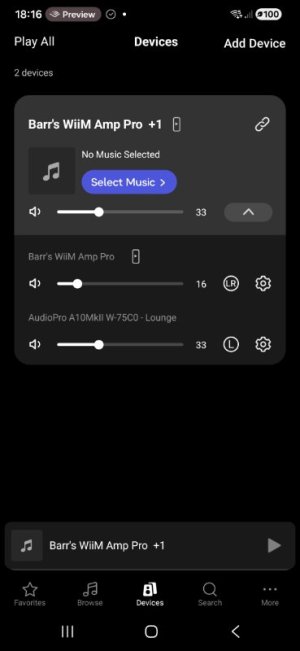
I'd like to add my 2 cents to this request, following up on my previous request regarding Bluetooth speaker out + subwoofer out.
I am requesting the ability to enable Simultaneous Output for the Wired connections (Amp/Line Out) and the Wireless/Digital Outputs (Bluetooth / LinkPlay / USB Out). This enables two distinct use cases:
1. Wireless Stereo Fill (Immersive Stereo) + Roaming Multiroom Speaker (The easy win)
In short: Duplicate the Stereo signal to secondary wireless speakers.
The Use Cases: I want to be immersed in music and use my existing Bluetooth speakers as fill speakers. So besides my main wired stereo speakers on the WiiM Amp / VibeLink / Pro / Ultra, I can have a speaker in the left back and a speaker in the right back of my room. This makes the sound come from everywhere.
This can be done by connecting a True Wireless Stereo (TWS) Bluetooth Speaker pair to the WiiM Amp / Vibelink / Pro / Ultra. When you connect a Bluetooth transmitter to the usb port, it's also possible to add a 5th speaker to the setup. And if its a TWS speaker, even a 6th.
Furthermore, I live with other people. They don't want me to install permanent multiroom speakers in the kitchen. When I'm home alone, I want to bring a Bluetooth speaker to my kitchen (which is in range of my FiiO Air Link transmitter) and play the same music as in my room in exact sync. This allows making my existing Bluetooth speaker a portable multiroom speaker.
Proposed "Advanced Bluetooth" / "Advanced USB Out" configuration:
2. True 4.1 / 5.1 Hybrid Surround (Dolby/DTS)
Transform the WiiM into a hybrid AVR by decoding multi-channel audio (via HDMI eARC) and distributing the discrete channels wirelessly.
I am requesting the ability to enable Simultaneous Output for the Wired connections (Amp/Line Out) and the Wireless/Digital Outputs (Bluetooth / LinkPlay / USB Out). This enables two distinct use cases:
1. Wireless Stereo Fill (Immersive Stereo) + Roaming Multiroom Speaker (The easy win)
In short: Duplicate the Stereo signal to secondary wireless speakers.
- The Goals:
- Use existing Bluetooth/TWS speakers or LinkPlay (Wi-Fi) speakers to fill dead zones or create an immersive 'rear fill' for music.
- Use existing Bluetooth/TWS speaker(s) as a portable multiroom speaker, which you can bring anywhere in Bluetooth range.
- The Easy Win: Since this only duplicates the PCM stream, no expensive Dolby/DTS licenses are required. It leverages the hardware users already own.
The Use Cases: I want to be immersed in music and use my existing Bluetooth speakers as fill speakers. So besides my main wired stereo speakers on the WiiM Amp / VibeLink / Pro / Ultra, I can have a speaker in the left back and a speaker in the right back of my room. This makes the sound come from everywhere.
This can be done by connecting a True Wireless Stereo (TWS) Bluetooth Speaker pair to the WiiM Amp / Vibelink / Pro / Ultra. When you connect a Bluetooth transmitter to the usb port, it's also possible to add a 5th speaker to the setup. And if its a TWS speaker, even a 6th.
Furthermore, I live with other people. They don't want me to install permanent multiroom speakers in the kitchen. When I'm home alone, I want to bring a Bluetooth speaker to my kitchen (which is in range of my FiiO Air Link transmitter) and play the same music as in my room in exact sync. This allows making my existing Bluetooth speaker a portable multiroom speaker.
Proposed "Advanced Bluetooth" / "Advanced USB Out" configuration:
- [Toggle] Use as multiroom or fill speaker
- Warning popup: "Note: Bluetooth processing introduces latency. Please adjust Output Latency in Syncing Subwoofer and Speakers settings."
- The following features are shown when "Use as fill speaker" is turned on:
- Use speaker as: Stereo / True Wireless Stereo (TWS), Left, Right, Mono, 4.1 rear speakers, 5.1 center speaker
- Volume slider: To control how soft or loud the fill speaker should sound, relative to the main volume.
- [Toggle] Enable Active Crossover: When enabled, the Crossover Frequency Slider appears immediately below.
- [Toggle] Apply Equalizer: When enabled, reveals the EQ settings for the Bluetooth device.
- [Dropdown] Codec Selection: Manually lock the codec to stabilize latency. Dropdown values: Automatic, SBC , AAC, LDAC - Connection Priority (330 kbps), LDAC - Balanced (660 kbps), LDAC - Quality Priority (990 kbps)
- [Toggle] Fixed Latency Mode: When enabled a Fixed Latency slider appears below. The WiiM enforces a constant buffer (preventing sync drift between handshakes).
- Smart Helper: The UI displays a "Suggested Latency" based on the currently active codec (e.g., ~170ms for SBC, ~250ms for LDAC) to give the user a reliable starting point for manual sync.
- Syncing Subwoofer & Active Speakers > [Start Automatic Sync] (This will configure perfect synchronization between all speakers)
- [Toggle] Keep Subwoofer Out Active on Bluetooth: Keeps RCA Sub active when BT is connected. {For the use case of only having no wired speakers connected, only Bluetooth speakers. Grayed-out when "Use as multiroom or fill speaker" is on}
- Warning popup: "Note: Bluetooth processing introduces latency. Please adjust Subwoofer Output Latency in Syncing Subwoofer and Speakers settings."
- [Toggle] Enable Active Crossover: When enabled, the Crossover Frequency Slider appears immediately below.
- [Toggle] Apply Equalizer: When enabled, reveals the EQ settings for the Bluetooth device.
- [Dropdown] Codec Selection: Manually lock the codec to stabilize latency. Dropdown values: Automatic, SBC , AAC, LDAC - Connection Priority (330 kbps), LDAC - Balanced (660 kbps), LDAC - Quality Priority (990 kbps)
- [Toggle] Fixed Latency Mode: When enabled a Fixed Latency slider appears below. The WiiM enforces a constant buffer (preventing sync drift between handshakes).
- Smart Helper: The UI displays a "Suggested Latency" based on the currently active codec (e.g., ~170ms for SBC, ~250ms for LDAC) to give the user a reliable starting point for manual sync.
- The same logic applies to the USB Out settings menu (except for codec selection of course).
2. True 4.1 / 5.1 Hybrid Surround (Dolby/DTS)
Transform the WiiM into a hybrid AVR by decoding multi-channel audio (via HDMI eARC) and distributing the discrete channels wirelessly.
- The Implementation: Wired for Front L/R and Subwoofer, and LinkPlay (Wi-Fi), Bluetooth or USB Out (with Bluetooth Transmitter) for Rear L/R and Center channels.
- The Advantage: A high-end 4.1 or 5.1 home theater experience without running cables across the room.
- Technical Requirements:
- Flexible Channel Mapping: Ability to assign any connected wireless device to a specific role: [Rear Stereo/TWS], [Rear Left], [Rear Right], or Center.
- Unified Latency Management: This relies on an extended 'Auto-Sync' acoustic measurement (using the smartphone mic) to ensure the wired mains, the wired sub, and the wireless expansion speakers are all perfectly time-aligned and in-phase. (See: Wireless Fill feature request above)
- Independent EQ/Crossover: Separate PEQ/GEQ settings for the surround wireless stream to match the acoustics of the surround speakers without affecting the main setup.
Related Feature Request: Simultaneous Subwoofer Out + Bluetooth Out
Attachments
Last edited:
I see that WiiM has already implemented a 'Dolby 5.1 Surround with hybrid Wired & Wireless speakers' feature for the WiiM Amp Pro, Amp Ultra, and the WiiM Ultra. These devices are now capable of distributing discrete wireless channels to WiiM speakers with multiple WiiM Amps/Ultras.
However, reflecting on WiiM’s mission to "bring premium smart home experiences through simple and affordable connected products" and the vision to "make any audio gear smart," I’d like to share a perspective on the current direction.
The strength of the WiiM ecosystem has always been its openness—the ability to act as the "Ultimate Digital Hub" for the gear we already own and love.
While the implementation of Dolby 5.1 is an important milestone, requiring multiple WiiM Amps or Streamers and specific proprietary speakers for a 5.1 setup feels like a departure from the "universal and affordable" promise that defines the brand. It doesn't just make the system expensive (vs affordable); it creates unnecessary energy waste and physical clutter. It contradicts the 'compact and smart' appeal that makes the WiiM Amp Pro so attractive in the first place."
I would love to see this innovative surround logic extended to universal Bluetooth and USB-audio outputs.
By allowing us to map rear or center channels to our existing active speakers, WiiM stays true to its roots as an inclusive hub. This would transform the system from an expensive proprietary, multi-device requirement into a truly flexible solution that respects a user's existing investment in audio gear. It would allow anyone to create a 5.1 Surround Sound system using just a single WiiM Amp, Amp Pro, Amp Ultra, or Ultra hub paired with their favorite existing Bluetooth or USB-connected speakers. Creating a simple, affordable Dolby 5.1 Surround Sound system.
I believe this openness is what sets WiiM apart in the market, and I hope to see this "Ultimate Digital Hub" philosophy reflected in future updates of the surround-mapping features.
Best regards,
Barr
However, reflecting on WiiM’s mission to "bring premium smart home experiences through simple and affordable connected products" and the vision to "make any audio gear smart," I’d like to share a perspective on the current direction.
The strength of the WiiM ecosystem has always been its openness—the ability to act as the "Ultimate Digital Hub" for the gear we already own and love.
While the implementation of Dolby 5.1 is an important milestone, requiring multiple WiiM Amps or Streamers and specific proprietary speakers for a 5.1 setup feels like a departure from the "universal and affordable" promise that defines the brand. It doesn't just make the system expensive (vs affordable); it creates unnecessary energy waste and physical clutter. It contradicts the 'compact and smart' appeal that makes the WiiM Amp Pro so attractive in the first place."
I would love to see this innovative surround logic extended to universal Bluetooth and USB-audio outputs.
By allowing us to map rear or center channels to our existing active speakers, WiiM stays true to its roots as an inclusive hub. This would transform the system from an expensive proprietary, multi-device requirement into a truly flexible solution that respects a user's existing investment in audio gear. It would allow anyone to create a 5.1 Surround Sound system using just a single WiiM Amp, Amp Pro, Amp Ultra, or Ultra hub paired with their favorite existing Bluetooth or USB-connected speakers. Creating a simple, affordable Dolby 5.1 Surround Sound system.
I believe this openness is what sets WiiM apart in the market, and I hope to see this "Ultimate Digital Hub" philosophy reflected in future updates of the surround-mapping features.
Best regards,
Barr
Last edited:
UPDATE: Forget this addendum. Users pointed out that it's technically not possible.
Thank you @Burnside and @QuarryHunslet
______________________________________________________________________________________________
Addendum: Simultaneous Wired Passive Speakers + Wired Optical/RCA + Wireless Output
Thank you @Burnside and @QuarryHunslet
______________________________________________________________________________________________
Addendum: Simultaneous Wired Passive Speakers + Wired Optical/RCA + Wireless Output
Last edited:

hgo58
Major Contributor
One of the problems with Bluetooth is the delay that it introduces. Even for the latest codec like aptX Low Latency and LC3 (in Bluetooth LE Audio) it is still 30–50 ms. Compared to WiFi based connections (AirPlay, Chromecast) that is as low as 1 ms and generally below 10 ms.
Creating a surround setup with Bluetooth and keep it all in sync with e.g. a video will be very difficult.
Creating a surround setup with Bluetooth and keep it all in sync with e.g. a video will be very difficult.
The WiiM amp pro doesn’t have line out or optical out connections.A user should be able to use the WiiM Amp Pro's speaker terminals for the main Front L/R, the Subwoofer Out for the LFE, and the Line Out or Optical for additional channels like a Center speaker or Rear 'Fill' speakers.
hgo58
Major Contributor
The simultaneously output has been discussed and requested multiple times over a long time. It has never been promised by WiiM but they did at one time say that they would look into it.Addendum: Simultaneous Wired Passive Speakers + Wired Optical/RCA + Wireless Output
Beyond wireless expansion, this feature should enable simultaneous output across all physical and wireless ports at once.
A user should be able to use the WiiM Amp Pro's speaker terminals for the main Front L/R, the Subwoofer Out for the LFE, and the Line Out or Optical for additional channels like a Center speaker or Rear 'Fill' speakers.
The Goal:
Remove the software "lock" that currently limits WiiM devices to one output at a time. By unlocking simultaneous output across Speaker Terminals, RCA, Optical, USB and Bluetooth, WiiM becomes the most versatile Digital Audio Hub on the market.
As it has never been implemented is probably because it is not possible. Either because of the hardware or the lack of CPU resources.
Thnx @Burnside . I don't know all the exact specs. I now see only the WiiM Amp Ultra has line out and optical out. The Amp Pro only line in and optical in.The WiiM amp pro doesn’t have line out or optical out connections.
Even with an error about the details of an exact model, I hope my request is still clear.
I've updated my example with the WiiM Amp Ultra. So it's correct.
Thnx again @Burnside!

- Joined
- Mar 2, 2024
- Messages
- 4,246
The WiiM Amp Ultra does Not have Line Out, or Optical Out.I now see only the WiiM Amp Ultra has line out and optical out.
Just beat me to saying that. All WiiM Amps have speaker and usb outputs, but neither line nor optical output.The WiiM Amp Ultra does Not have Line Out, or Optical Out.
Thanks for your perspective! I understand the skepticism, especially since this has been a long-standing request. However, I believe hardware isn't a limitation.The simultaneously output has been discussed and requested multiple times over a long time. It has never been promised by WiiM but they did at one time say that they would look into it.
As it has never been implemented is probably because it is not possible. Either because of the hardware or the lack of CPU resources.
WiiM Amps and Streamers (exept for the WiiM Mini) have powerful quad-core processors (like the Amlogic A113 series) specifically designed for advanced audio tasks. These chips are more than capable of handling multiple PCM streams and routing them to different outputs (I2S for internal DAC, Bluetooth, and USB) simultaneously without breaking a sweat.
In fact, from a processing standpoint, routing discrete channels to separate outputs is equally CPU-intensive as performing a real-time downmix of a 5.1 signal into Stereo. In the latter, the chip has to mathematically combine multiple channels while preventing clipping; in the former, it simply 'points' the existing data streams to the correct physical or wireless ports.
Furthermore, since WiiM has already successfully implemented a wireless surround distribution for their proprietary ecosystem, they’ve proven that the 'brain' of the device can already separate and sync discrete channels in real-time. Unlocking the physical ports (RCA/Optical) or universal Bluetooth to work alongside the speaker terminals is likely a software mapping and clock-sync task rather than a hardware limitation.
Last edited:

I agree, but as far as I know, Chromecast (audio casting) has more significant latency than Bluetooth. Sorry for off-topic.One of the problems with Bluetooth is the delay that it introduces. Even for the latest codec like aptX Low Latency and LC3 (in Bluetooth LE Audio) it is still 30–50 ms. Compared to WiFi based connections (AirPlay, Chromecast) that is as low as 1 ms and generally below 10 ms.
Creating a surround setup with Bluetooth and keep it all in sync with e.g. a video will be very difficult.

All WiiM devices except the Mini share the same CPU and RAM, not just the “flagship models”The current flagship models use much more powerful quad-core processors (like the Amlogic A113 series) specifically designed for advanced audio tasks.
Similar threads
- Suggestion
- Replies
- 18
- Views
- 2K
- Replies
- 5
- Views
- 468


- Replies
- 4
- Views
- 1K
- Suggestion
- Replies
- 0
- Views
- 244