MusicNirvana
New Member
- Joined
- Feb 1, 2026
- Messages
- 5
I use WiiM Amp Ultra primarily for playing music from a USB.
While the App is very good and user-friendly, I feel that certain things are quite counter-intuitive.
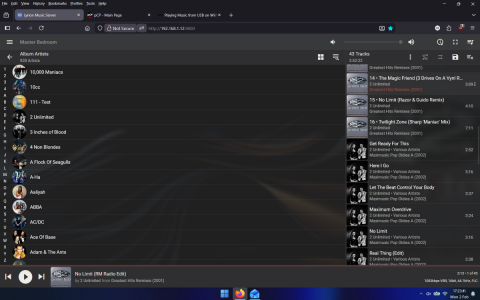
For example, I have my music on USB carefully archived into folders/artists/tracks etc. The App scans this fine (albeit through couple of iterations).When I am playing music from a particular folder, and I am in that folder, I can scroll through the tracks in that folder on the home screen itself. But I can browse and access tracks ONLY within that folder.
1. The home screen does not give me access to all the music on the USB, when it has already been scanned by WiiM.
I like using touch screen while I am working with my desktop set up. I do not want to use the App or even remote (which is very limited in its functionality for playing music).
2. When I turn off the unit at night and restart it in the morning, it does not remember the last played track and I have to re-select the folder etc and go through the same routine all over via the App.
Any thoughts regarding this will be greatly appreciated.
It is my understanding that this can be easily fixed by WiiM software development team. I love WiiM amp ultra for its compactness, 2xTPA 3255 chips, 6 op amps, and minimalist design. It is a new product and with a few tweaks, as suggested, this could be an all out WINNER!!
There is vast majority of users who have large collection of music in FLAC/MP3 form (like yours truly) who would like to use WiiM Amp Ultra as a dedicated music playback device. I know this for a fact due to my reading on various other similar forums for other streamers such as Eversolo, SMSL and so forth.
Once the USB has been properly scanned, it should be available on the home screen as one of the Source "inputs" to select from the home screen itself. It is unclear that WHY on the touch home screen, the USB does NOT appear (after been scanned) as one of the "USB-IN" options.
That way, one can access all the music on the USB from the home screen without having to open App at all.
Please advise.
Pax.

While the App is very good and user-friendly, I feel that certain things are quite counter-intuitive.
For example, I have my music on USB carefully archived into folders/artists/tracks etc. The App scans this fine (albeit through couple of iterations).When I am playing music from a particular folder, and I am in that folder, I can scroll through the tracks in that folder on the home screen itself. But I can browse and access tracks ONLY within that folder.
1. The home screen does not give me access to all the music on the USB, when it has already been scanned by WiiM.
I like using touch screen while I am working with my desktop set up. I do not want to use the App or even remote (which is very limited in its functionality for playing music).
2. When I turn off the unit at night and restart it in the morning, it does not remember the last played track and I have to re-select the folder etc and go through the same routine all over via the App.
Any thoughts regarding this will be greatly appreciated.
It is my understanding that this can be easily fixed by WiiM software development team. I love WiiM amp ultra for its compactness, 2xTPA 3255 chips, 6 op amps, and minimalist design. It is a new product and with a few tweaks, as suggested, this could be an all out WINNER!!
There is vast majority of users who have large collection of music in FLAC/MP3 form (like yours truly) who would like to use WiiM Amp Ultra as a dedicated music playback device. I know this for a fact due to my reading on various other similar forums for other streamers such as Eversolo, SMSL and so forth.
Once the USB has been properly scanned, it should be available on the home screen as one of the Source "inputs" to select from the home screen itself. It is unclear that WHY on the touch home screen, the USB does NOT appear (after been scanned) as one of the "USB-IN" options.
That way, one can access all the music on the USB from the home screen without having to open App at all.
Please advise.
Pax.
Last edited: