Hi Folks,
I love my Ultra its just about perfect for my use cases, however the limit on the current NAS playback / shuffle tracks is a huge drawback, especially for Presets.
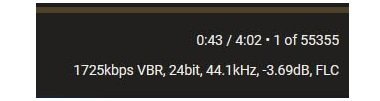
In my testing, direct playback of 'all tracks' from my NAS in the app seems to go beyond 500 tracks, but not consistently through my full library ( a few times I have seen a 7,997 track limit which i cant consistently replicate, but mostly the track cap sems to be 3,000 tracks). Even worse, Presets still appear to cap song lists at 500 tracks (*cry*).
My library is just under 10,000 tracks, which is on the small side compared to many folk. I use the Ultra at my desktop and would love to simply press a Preset to have the Ultra shuffle across my full NAS library and just let it play. No need to use the phone Wiim app at all.
The 500 track speed limit on Presets severely limits one of the Ultra's best “set and forget” use cases. Im sure lots of folk use the Ultra to connect to their NAS and have huge libraries.
It would be so great if WiiM could add support for true full library NAS shuffle, including via presets and ideally from the touchscreen. I dont want to depend on third party apps like mconnect player to simply shuffle play all my tracks via the Ultra. Please Wiim can we make this happen?
I love my Ultra its just about perfect for my use cases, however the limit on the current NAS playback / shuffle tracks is a huge drawback, especially for Presets.
In my testing, direct playback of 'all tracks' from my NAS in the app seems to go beyond 500 tracks, but not consistently through my full library ( a few times I have seen a 7,997 track limit which i cant consistently replicate, but mostly the track cap sems to be 3,000 tracks). Even worse, Presets still appear to cap song lists at 500 tracks (*cry*).
My library is just under 10,000 tracks, which is on the small side compared to many folk. I use the Ultra at my desktop and would love to simply press a Preset to have the Ultra shuffle across my full NAS library and just let it play. No need to use the phone Wiim app at all.
The 500 track speed limit on Presets severely limits one of the Ultra's best “set and forget” use cases. Im sure lots of folk use the Ultra to connect to their NAS and have huge libraries.
It would be so great if WiiM could add support for true full library NAS shuffle, including via presets and ideally from the touchscreen. I dont want to depend on third party apps like mconnect player to simply shuffle play all my tracks via the Ultra. Please Wiim can we make this happen?
Upvote
1