Song time progressbar in phone notification area gets out of sync for sqeueezelite

KimG

Member
Joined
Dec 23, 2025
Messages
11
Hi,

New Wiim Ultra owner here. Hopefully I'm posting this in the correct forum section. Really enjoy this device but have run into the following minor issue:

Song time progessbar in the phone notification area gets out of sync when playing more than one song using squeezelite.

The Wiim Ultra unit itself displays the song time progressbar correctly albeit a little slow to return to the beginning when the song changes.

When the Wiim Home app is opened the song time progressbar gets back in sync.

My only streaming service is TIDAL and it keeps the song time progressbar in sync in the phone notification area perfectly fine.

I did open a ticket through the Wiim Home app 23 days ago but it's stuck att "Pending Eng Review". Am I alone in experiencing this issue?
 
Hi,

New Wiim Ultra owner here. Hopefully I'm posting this in the correct forum section. Really enjoy this device but have run into the following minor issue:

Song time progessbar in the phone notification area gets out of sync when playing more than one song using squeezelite.

The Wiim Ultra unit itself displays the song time progressbar correctly albeit a little slow to return to the beginning when the song changes.

When the Wiim Home app is opened the song time progressbar gets back in sync.

My only streaming service is TIDAL and it keeps the song time progressbar in sync in the phone notification area perfectly fine.

I did open a ticket through the Wiim Home app 23 days ago but it's stuck att "Pending Eng Review". Am I alone in experiencing this issue?
First thought is why are you using the WiiM Home app when using Squeezelite?
 
Not sure if the problem is on the WiiM side!
I use „iPeng“ (Squeezelight) as control app on iphone and ipad to control my LMS environment.
I have this issue sometimes too - but, if I remember correctly, I had it at that time also without WiiM with my old Squeezebox Touch.
 
Not sure if the problem is on the WiiM side!
I use „iPeng“ (Squeezelight) as control app on iphone and ipad to control my LMS environment.
I have this issue sometimes too - but, if I remember correctly, I had it at that time also without WiiM with my old Squeezebox Touch.
What does this issue look like in an LMS control app? I am not sure I understood the first post.
 
@slartibartfast I'm controlling the LMS via the phone browser and have the Wiim Ultra as player. The song timeline is correctly displayed in the browser. Just happened to notice that the song time progressbar in the phone notification are got back in sync when I opened the Wiim Home app so I thought it should be mentioned.

@MCG555 I'm also unsure where the problem lies. For me the issue is constant, after one song has been played the song time progressbar gets out of sync on in phone notification area but is correct on both the Wiim Ultra and in the phone browser.

 
@slartibartfast I'm controlling the LMS via the phone browser and have the Wiim Ultra as player. The song timeline is correctly displayed in the browser. Just happened to notice that the song time progressbar in the phone notification are got back in sync when I opened the Wiim Home app so I thought it should be mentioned.

@MCG555 I'm also unsure where the problem lies. For me the issue is constant, after one song has been played the song time progressbar gets out of sync on in phone notification area but is correct on both the Wiim Ultra and in the phone browser.

How do you see a progress bar in the notification area? I don't see one on Android.
 
@slartibartfast I'm controlling the LMS via the phone browser and have the Wiim Ultra as player. The song timeline is correctly displayed in the browser. Just happened to notice that the song time progressbar in the phone notification are got back in sync when I opened the Wiim Home app so I thought it should be mentioned.

@MCG555 I'm also unsure where the problem lies. For me the issue is constant, after one song has been played the song time progressbar gets out of sync on in phone notification area but is correct on both the Wiim Ultra and in the phone browser.

Ok.
If I remember correctly (the last past month I did not hear lots from LMS) the issue appeared for me with long playlists… (?)
 
@slartibartfast The song time progressbar is from the the Wiim Home app. It's basic controls for the content that is being streamed to the Wiim Ultra. It should be displayed on the lock screen and phone notification area. So the Wiim Home app is required and needs to run in the background.
 
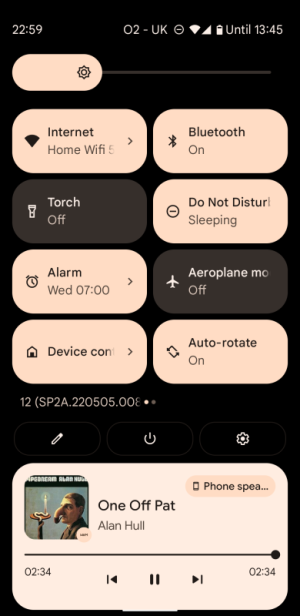
If this is the progress bar it appears to be completely useless. It displays 2.34 track time for every track.
View attachment 31419
Yes that looks like it, it also appears on the lock screen. Mine gets out of sync to random places. It's a minor issue.

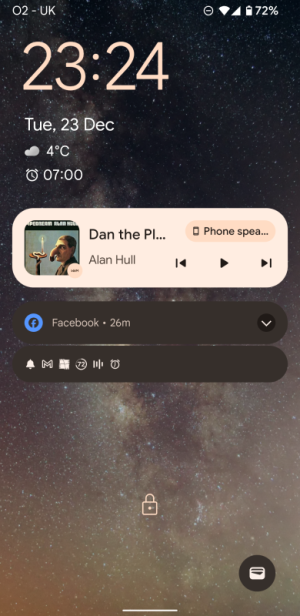
I sometimes use the basic controls like next/previous on the lock screen. It just looks a little wonky when the time progressbar is sent to random places.
 
@slartibartfast The song time progressbar is from the the Wiim Home app. It's basic controls for the content that is being streamed to the Wiim Ultra. It should be displayed on the lock screen and phone notification area. So the Wiim Home app is required and needs to run in the background.
I think I do see the same issue now I have somehow managed to get rid of the constant 2.34 track duration. It only synchronises when the WiiM Home app is in the foreground. Maybe this is to prevent battery drain when the app is in the background.
 
Yes that looks like it, it also appears on the lock screen. Mine gets out of sync to random places. It's a minor issue.

I sometimes use the basic controls like next/previous on the lock screen. It just looks a little wonky when the time progressbar is sent to random places.
Mine doesn't appear on the lock screen.
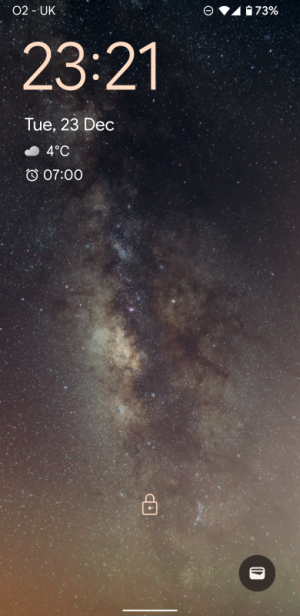
Screenshot_20251223-232140.png
 
I think I do see the same issue now I have somehow managed to get rid of the constant 2.34 track duration. It only synchronises when the WiiM Home app is in the foreground. Maybe this is to prevent battery drain when the app is in the background.
For me it synchronizes and keeps the synchronization until next track. Strange thing is that TIDAL works perfectly fine with keeping the sync.
 
I'm unsure but perhaps it gets minimized when there are enough other notifications and the progressbar disappears.
I am not sure either but the progress bar only shows in my notification area if I pull it fully down from the top of the screen. I think I will just go back to disabling the WiiM notification.
 
I am not sure either but the progress bar only shows in my notification area if I pull it fully down from the top of the screen. I think I will just go back to disabling the WiiM notification.
Ok, for me the basic controls are handy sometimes. The progressbar is more of a visual thing. Thanks for taking your time in investigating this little issue.
 
Back
Top