

You are using an out of date browser. It may not display this or other websites correctly.
You should upgrade or use an alternative browser.
You should upgrade or use an alternative browser.
Stereo pair wiim sound,roomfit options
- Thread starter dark1511
- Start date

You can run RoomFit individually for each WiiM Sound. Currently, it is not possible to calibrate two devices together as a stereo pair.Just ordered 2nd wiim sound to make stereo pair,can I do left speaker roomfit then right speaker or are they done together?
(If you already own a WiiM Streamer, it is possible, but this is not an official method.)
Thanks for reply,hopefully update in future will give this option to do both together, thanksYou can run RoomFit individually for each WiiM Sound. Currently, it is not possible to calibrate two devices together as a stereo pair.
(If you already own a WiiM Streamer, it is possible, but this is not an official method.)
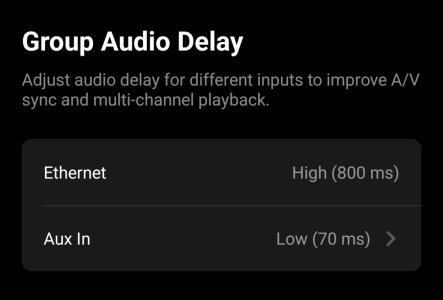
Tap the gear icon on the leader device of the stereo pair, then change the delay for the AUX input to 70ms (or 150ms) under Audio input > Group Audio Delay.Just setup stereo pair got delay and echo through aux input,any advice,gutted
Could you tell me more about the echo?
Does the sound from the left and right speakers seem out of sync?
After unlinking the group, please try rebooting. (reconnect the power cable.)
What device is connected to the AUX input of the WiiM Sound?It sounds normal for a few seconds then echo comes out of sync,then normal then back to echo round in circles,done delay both set to 70ms didn’t help sound dreadful.
Is the issue only occurring with the AUX?It sounds normal for a few seconds then echo comes out of sync,then normal then back to echo round in circles,done delay both set to 70ms didn’t help sound dreadful.
Just changed delay on both speakers to 800ms sounds good but way out lip sync about 2 seconds out unusable
I recommend submitting a ticket via the feedback section in the WiiM app.
(WiiM home > More > Feedback)
Your device logs will be sent, which will help resolve the issue.
When connecting to a TV, you must set the delay to either 70ms or 150ms. Does echo occur even at 150ms?
Actually, I've also experienced the same issue with both the AUX and Bluetooth input. However, when I connected my smartphone to the AUX input and played YouTube, the issue didn't occur. To pinpoint the cause, please check the following if possible:
1. Play TuneIn from the WiiM app's browse screen and see if the issue occurs.
2. Reinsert the AUX cable. Try a different cable.
3. If you have another device that can connect via AUX besides the TV, try connecting it.
4. Check if there is a problem with the Wi-Fi signal strength
(WiiM app > Network Status).
5. Try an Ethernet connection.
If possible, try using an Ethernet connection. Even at 70ms, playback may become stable. (It's hard to say without trying, though...)150ms is ok but half second out lip sync very annoying,lol
Hope this can be solved,ye raised ticket,signal is excellent on both speakers on network,never had problem with other speakers included Sonos era 100s stereo pair slight delay on sound but was ok,WiiM at 150ms lip sync is to bad
This is a video of the WiiM Sound group's latency test today. It shows 150ms of latency. Is yours about the same, or worse?WiiM at 150ms lip sync is to bad

@cmcc, @Burnside,
5.1 Group's stereo playback with WiiM Sound has an audio delay of approximately 150ms. Setting the group delay to 150ms for stable playback results in lip sync like this.
(The sound you hear is from the WiiM Sound in the next room.)
View attachment 2111.mp4
To my ears, the delay is barely noticeable, but it's obviously unsuitable for gaming.
(If you have a Fire TV Stick, you can adjust the lip sync.)
5.1 Group's stereo playback with WiiM Sound has an audio delay of approximately 150ms. Setting the group delay to 150ms for stable playback results in lip sync like this.
(The sound you hear is from the WiiM Sound in the next room.)
View attachment 2111.mp4
To my ears, the delay is barely noticeable, but it's obviously unsuitable for gaming.
(If you have a Fire TV Stick, you can adjust the lip sync.)

Hope they fix pre-gain,to low on zero,can be turned up for 1 speaker but not for stereo pair,without using pre gain got to listen on 80 on volume and still quit,if I use pre gain on stereo pair only the one speaker using aux turns up the other speaker is on zero and very quiet.
Hope they fix pre-gain,to low on zero,can be turned up for 1 speaker but not for stereo pair,without using pre gain got to listen on 80 on volume and still quit,if I use pre gain on stereo pair only the one speaker using aux turns up the other speaker is on zero and very quiet.
Currently, I don't think it's possible to adjust the group's pre-gain.
Please tell me your TV model name.
I connected my Hisense TV.
I switched the TV's speaker output setting from "Headphones" to "Audio Output".
I switched the audio output setting from "Fixed" to "Variable".
I turned the TV volume up to 100%.
I set the "Volume Limit" to 100% on the WiiM Sound speaker pair and set the group volume to 100%.
When playing a 1kHz signal video on YouTube, I get about 85dB at a distance of 1m. At 3.5m, I get 75dB. That's very loud in my room.
Please double-check your TV's audio settings.
I don't know what volume you're currently getting in your room, but I doubt you can get any louder than this. If you need even higher volume, you may need to connect a DAC to the TV's optical output and then connect the DAC's analog output to the WiiM Sound.
Group pre gain would do it,hope they give it,tried dac same volume,tv setting all good been into hifi and home cinema for 35 years and enjoy new tech,but as you said group pre-gain would do it,thanksCurrently, I don't think it's possible to adjust the group's pre-gain.
Please tell me your TV model name.
I connected my Hisense TV.
I switched the TV's speaker output setting from "Headphones" to "Audio Output".
I switched the audio output setting from "Fixed" to "Variable".
I turned the TV volume up to 100%.
I set the "Volume Limit" to 100% on the WiiM Sound speaker pair and set the group volume to 100%.
When playing a 1kHz signal video on YouTube, I get about 85dB at a distance of 1m. At 3.5m, I get 75dB. That's very loud in my room.
Please double-check your TV's audio settings.
I don't know what volume you're currently getting in your room, but I doubt you can get any louder than this. If you need even higher volume, you may need to connect a DAC to the TV's optical output and then connect the DAC's analog output to the WiiM Sound.
Similar threads
- Question
- Replies
- 19
- Views
- 1K


- Replies
- 5
- Views
- 432
- Suggestion
- Replies
- 0
- Views
- 209