Terramaster nas compatibility

servit00

New Member
Joined
Apr 4, 2024
Messages
28
Hello, is possible create link and use wiim amp ultra with terramaster nas in same. Wireless network? Where can i find instructions? Thanks
 
If all you're talking about is a simple file share, then WiiM supports smb shares


However, personally I'd see if you can load some upnp server software on the NAS or always on server as that provides much better access - for me, using smb is the option of last resort.
 
My Terramaster supports upto date versions of Plex, and Emby and has its own DLNA server application. The WHA integration with Plex isn't too bad.

@servit00 - you install Plex via "Applications"
Please i have emby server on terramaster installed but i am not able to configure in wiim amp ultra. Can help me with a link to a guide? Thanks
 
Please i have emby server on terramaster installed but i am not able to configure in wiim amp ultra. Can help me with a link to a guide? Thanks
In Emby you need to switch on DLNA support BUT Plex integration in WHA is MUCH better. DLNA not required. I'd install that instead.
 
Please i have emby server on terramaster installed but i am not able to configure in wiim amp ultra. Can help me with a link to a guide? Thanks
In Emby go to Settings > DLNA and enable:

Enable DLNA Play To: Cast to UPnP renderers e.g. WiiM Ultra
Enable DLNA Server: Browse library from third party control points e.g. WiiM Home app

To browse your library from the WiiM Home app go to Browse > Home Music Share > Media Server > [Emby Server], but DO NOT choose to build "an enhanced music library". Whilst "Advanced" mode does have a slightly more functional UI (a couple of sorting options) it's not worth the hassle.

For the best browsing experience use the Emby app to cast to your Ultra using UPnP (once Enable DLNA Play To has been enabled), or a third-party app like Symfonium.

The Plex browsing experience in the WiiM Home app is slightly better, but is limited by the Plex API, at least on the free tier e.g. Search only returns 4 results from each category (album, artist e.t.c.).


EDIT: Having said that, I've just tried it and the WHA can't see any Emby content, whereas it's fine in BubbleUPnP, Hi-Fi Cast etc

 
Last edited:
In Emby go to Settings > DLNA and enable:

Enable DLNA Play To: Cast to UPnP renderers e.g. WiiM Ultra
Enable DLNA Server: Browse library from third party control points e.g. WiiM Home app

To browse your library from the WiiM Home app go to Browse > Home Music Share > Media Server > [Emby Server], but DO NOT choose to build "an enhanced music library". Whilst "Advanced" mode does have a slightly more functional UI (a couple of sorting options) it's not worth the hassle.

For the best browsing experience use the Emby app to cast to your Ultra using UPnP (once Enable DLNA Play To has been enabled), or a third-party app like Symfonium.

The Plex browsing experience in the WiiM Home app is slightly better, but is limited by the Plex API, at least on the free tier e.g. Search only returns 4 results from each category (album, artist e.t.c.).


EDIT: Having said that, I've just tried it and the WHA can't see any Emby content, whereas it's fine in BubbleUPnP, Hi-Fi Cast etc
The Plex search isn’t very good but the jump list navigation is usable and once you find something you do get all the appropriate content.
 
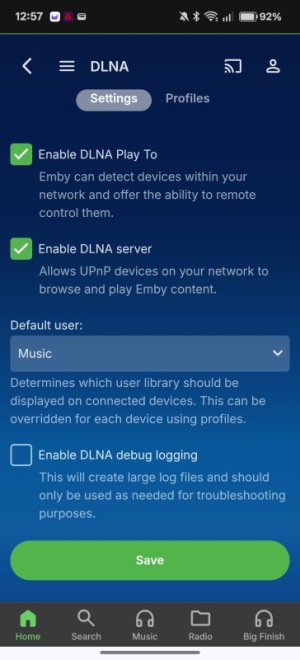
In any Emby app go Manage Emby Server > DLNA then do this

Screenshot_2026-03-31-12-57-01-68_40deb401b9ffe8e1df2f1cc5ba480b12.jpg

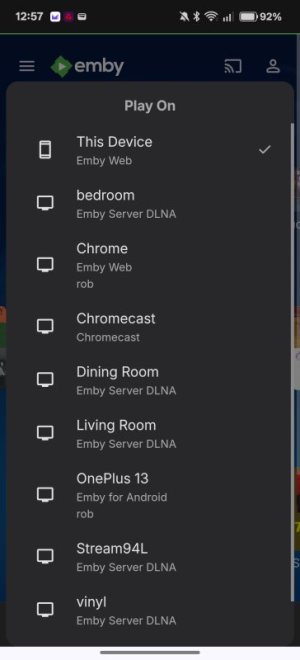
Then in the Emby app if you click the little cast button you will see all your Wiim device (and any others)


Screenshot_2026-03-31-12-57-36-29_40deb401b9ffe8e1df2f1cc5ba480b12.jpg

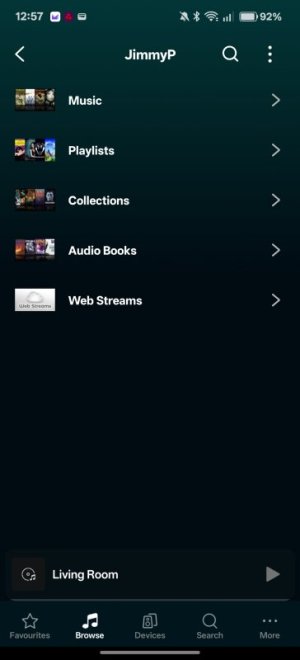
and in your Wiim app you will see your media in Browse > Home Music Share

Screenshot_2026-03-31-12-57-55-20_5592fe85c89b9c7526dd9939eef9599a.jpg

Personally, I create a user in Emby that only has access to the audio Libraries otherwise all the TV shows, Movies, Photos etc show up but don't worry about that at first.
The only thing you might need the Emby DLNA server for is to assign playlists to presets in your Wiim Home App. Otherwise, it's a much better experience using the Emby app (or symfonium if you have an android phone).
 
Back
Top