

You are using an out of date browser. It may not display this or other websites correctly.
You should upgrade or use an alternative browser.
You should upgrade or use an alternative browser.
Tidal Tidal Login failed
- Thread starter Higgins
- Start date

- Joined
- Oct 19, 2022
- Messages
- 1,083
The login issue with TIDAL on WiiM devices has been successfully resolved. You can now log in to TIDAL on your WiiM device and enjoy uninterrupted music streaming.Hello! I can't sign into the app to my Tidal account! this is the error message: {"message":"Missing Authentication Token"} What is the solution?
LeaderOfPlanets
New Member
- Joined
- Mar 12, 2024
- Messages
- 2
Unboxed my WIIM MINI yesterday to have this exact issue, and was amazed to see the response, ans corrective action time. Incredible!The login issue with TIDAL on WiiM devices has been successfully resolved. You can now log in to TIDAL on your WiiM device and enjoy uninterrupted music streaming.
Now my maybe related issue.
Couldn’t sign into Tidal in the WIIM app, but I was able to configure my WIIM, and successfully play the test audio for 24b 192Khz.
The WIIM MINI showed up in tidal as a Tidal connect option. When I chose it as an output, Tidal did all kinds of funky things. Track would not play, audio ‘resolution’/‘bit rate’ never appeared, and when trying to select a different track the album art is frozen on the first track attempted to play.
Also strange, “360RA connect” (I believe this is chrome cast) for my Sony str-az5000es no longer works. Has worked for 3 weeks without issue, and no longer works. No idea if this is related, a cross talk issue, bad luck, or a combination.
After the fast action of the support team on the Tidal login issue, I was able to connect to Tidal inside the WIIM app, and it functions flawlessly. But, I am still unable to use Tidal connect from inside the Tidal app, same issue.
IPhone 13 IOS 17.3.1
Tidal 2.105.1
WIIM MINI Updated, not home ATM.
Thanks! It's working now!The login issue with TIDAL on WiiM devices has been successfully resolved. You can now log in to TIDAL on your WiiM device and enjoy uninterrupted music streaming.


Might sound crazy, but have you tried uninstalling and reinstalling the Tidal app?Unboxed my WIIM MINI yesterday to have this exact issue, and was amazed to see the response, ans corrective action time. Incredible!
Now my maybe related issue.
Couldn’t sign into Tidal in the WIIM app, but I was able to configure my WIIM, and successfully play the test audio for 24b 192Khz.
The WIIM MINI showed up in tidal as a Tidal connect option. When I chose it as an output, Tidal did all kinds of funky things. Track would not play, audio ‘resolution’/‘bit rate’ never appeared, and when trying to select a different track the album art is frozen on the first track attempted to play.
Also strange, “360RA connect” (I believe this is chrome cast) for my Sony str-az5000es no longer works. Has worked for 3 weeks without issue, and no longer works. No idea if this is related, a cross talk issue, bad luck, or a combination.
After the fast action of the support team on the Tidal login issue, I was able to connect to Tidal inside the WIIM app, and it functions flawlessly. But, I am still unable to use Tidal connect from inside the Tidal app, same issue.
IPhone 13 IOS 17.3.1
Tidal 2.105.1
WIIM MINI Updated, not home ATM.
Last edited:
LeaderOfPlanets
New Member
- Joined
- Mar 12, 2024
- Messages
- 2
Hahaha yea crazy indeed. I tried the full list of ‘Tidal connect’ fixes found on another post.Might sound crazy, but have ypu tried uninstalling and reinstalling the Tidal app?
Off load, uninstall, reset network settings, reset router, reset modem, full shut down of my AV, full reset on WIIM, still never worked yesterday.
I come home today, and both ‘360RA’ and Tidal connect is working.
Probably just my bad luck!
But did you try restarting your phone/tablet?Hahaha yea crazy indeed. I tried the full list of ‘Tidal connect’ fixes found on another post.
Off load, uninstall, reset network settings, reset router, reset modem, full shut down of my AV, full reset on WIIM, still never worked yesterday.
I come home today, and both ‘360RA’ and Tidal connect is working.
Probably just my bad luck!
I've found that sometimes fixes my connectivity issues.
Anyway, glad it's working again.
Hello, I live in Iran and I recently bought a wiim pro plus device and my biggest problem is that I can't login to any application in wiim home!
Meanwhile, I have to use vpn to connect to Tidal, Spotify and Soundcloud…
I get this message every time I login
( Login failed, please try again ) Please help me find a way to connect to music apps on wiim home
thanks a lot
My device input: iPhone 10 ios 16.7.8
imac last version OS
Meanwhile, I have to use vpn to connect to Tidal, Spotify and Soundcloud…
I get this message every time I login
( Login failed, please try again )
Please help me find a way to connect to music apps on wiim home thanks a lot
My device input: iPhone 10 ios 16.7.8
imac last version OS

Brantome
Major Contributor
- Joined
- Oct 20, 2022
- Messages
- 6,842
Please submit a ticket to WiiM thru the settings/feedback section in the app so they can see if there are any clues in the device logsHello, I live in Iran and I recently bought a wiim pro plus device and my biggest problem is that I can't login to any application in wiim home!
Meanwhile, I have to use vpn to connect to Tidal, Spotify and Soundcloud…
I get this message every time I login
( Login failed, please try again )
thanks a lot
My device input: iPhone 10 ios 16.7.8
imac last version OS
Ok thanks a lotPlease submit a ticket to WiiM thru the settings/feedback section in the app so they can see if there are any clues in the device logs
It certainly has NOT been resolved. Tonight, 2 august 2025, the same old nightmare with WiiM ULtra and Tidal 'login failed' problem with the most up-todate Android app and the latest software with the WiiM Ultra.The login issue with TIDAL on WiiM devices has been successfully resolved. You can now log in to TIDAL on your WiiM device and enjoy uninterrupted music streaming.
Rebooting the Wiim Ultra (removing power cable and restarting), force stopping the WiiM app in Android, deleting and reinstalling the Wiim App. None of this works. Now I have a WiiM Ultra that is just a useless pice of crap sitting in an AV tower. Tidal works fine when using the dedicated Android Tidal app. This is happening on a regular basis now. What is going on here? If this continues it's goodbye to WiiM. My experience is that it's an unreliable piece of junk when trying to use the WiiM Ultra with Tidal.

What’s going on? I guess WiiM might have some insight if you submit a ticket to them via the more/feedback section in the WiiM app.
Have you tried using the Tidal app and casting to the Ultra using Tidal Connect?
Have you tried using the Tidal app and casting to the Ultra using Tidal Connect?

- Joined
- Mar 2, 2024
- Messages
- 4,005
It is working fine with iOS devices, perhaps you should send a ticket to WiiM via the WiiM Home App > More > Feedback.It certainly has NOT been resolved. Tonight, 2 august 2025, the same old nightmare with WiiM ULtra and Tidal 'login failed' problem with the most up-todate Android app and the latest software with the WiiM Ultra.
Rebooting the Wiim Ultra (removing power cable and restarting), force stopping the WiiM app in Android, deleting and reinstalling the Wiim App. None of this works. Now I have a WiiM Ultra that is just a useless pice of crap sitting in an AV tower. Tidal works fine when using the dedicated Android Tidal app. This is happening on a regular basis now. What is going on here? If this continues it's goodbye to WiiM. My experience is that it's an unreliable piece of junk when trying to use the WiiM Ultra with Tidal.
Yes, as mentioned the dedicated Android Tidal app works fine. I can cast using Chromecast andTidalCOnnect. WiiM, no go. As ever!What’s going on? I guess WiiM might have some insight if you submit a ticket to them via the more/feedback section in the WiiM app.
Have you tried using the Tidal app and casting to the Ultra using Tidal Connect?
I'm now thoroughly sick to the back teeth of the WiiM Ultra continually having connectivity problems with one of the better known music streaming services. If it's not working in a couple of days, it's land fill for the never connecting to Tidal piece of WiiM Ultra junk. The most disappointing and irritating pieces of AV equipment I've bought in my 60 years on this planet.
Last edited:

hgo58
Major Contributor
Never had a problem with Android either.It is working fine with iOS devices, perhaps you should send a ticket to WiiM via the WiiM Home App > More > Feedback.
The log in is done by the WiiM device anyway. So the issue may be with the stored password on the device itself or the connection from the WiiM to the Tidal service.
Or the Tidal third party interface/authentication…Never had a problem with Android either.
The log in is done by the WiiM device anyway. So the issue may be with the stored password on the device itself or the connection from the WiiM to the Tidal service.
slartibartfast
Major Contributor
- Joined
- Apr 18, 2024
- Messages
- 6,007
Send feedback through the app and tell WiiM what you really thinkYes, as mentioned the dedicated Android Tidal app works fine. I can cast using Chromecast andTidalCOnnect. WiiM, no go. As ever!
I'm now thoroughly sick to the back teeth of the WiiM Ultra continually having connectivity problems with one of the better known music streaming services. If it's not working in a couple of days, it's land fill for the never connecting to Tidal piece of WiiM Ultra junk. The most disappointing and irritating pieces of AV equipment I've bought in my 60 years on this planet.

None of the following work:
1. Full network reset, modem and router disconnected from power at wall socket and then rebooted.
2. Removing WiiM Ultra from power and reconnecting it to power by removing plug from wall socket.
3. Reset to factory default settings (WiiM Ultra).
4. Full power down and restart of Android Samsung S22+.
5. Complete deletion of Android WiiM Ultra app, power down of 'phone and restart, followed by re-installation of WiiM Ultra app after powering up 'phone.
5. Clearing cache and forced stop of WiiM Ultra app in Android.
Tidal works fine using the dedicated Android Tidal app when casting to my Denon AVC3700H receiver (Tidal Direct & Chromecast)
Tidal works fine using the LG C1 OLED TV app on my television in conjunction with my Denon AVC3700H via HDMI.
Tidal works fine using the Windows 11 desktop app, I can cast it to my Denon AVC37010H using Chromecast and Tidal Direct.
Tidal refuses to work at all using WiiM Ultra. Logging in to Tidal is impossible.
I have no other ideas as of how to resolve this now. I have submitted a support ticket.
1. Full network reset, modem and router disconnected from power at wall socket and then rebooted.
2. Removing WiiM Ultra from power and reconnecting it to power by removing plug from wall socket.
3. Reset to factory default settings (WiiM Ultra).
4. Full power down and restart of Android Samsung S22+.
5. Complete deletion of Android WiiM Ultra app, power down of 'phone and restart, followed by re-installation of WiiM Ultra app after powering up 'phone.
5. Clearing cache and forced stop of WiiM Ultra app in Android.
Tidal works fine using the dedicated Android Tidal app when casting to my Denon AVC3700H receiver (Tidal Direct & Chromecast)
Tidal works fine using the LG C1 OLED TV app on my television in conjunction with my Denon AVC3700H via HDMI.
Tidal works fine using the Windows 11 desktop app, I can cast it to my Denon AVC37010H using Chromecast and Tidal Direct.
Tidal refuses to work at all using WiiM Ultra. Logging in to Tidal is impossible.
I have no other ideas as of how to resolve this now. I have submitted a support ticket.
Last edited:
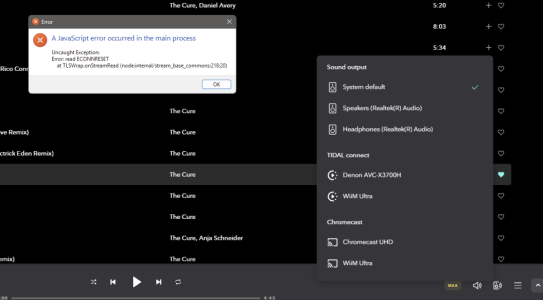
In the Windows 11 desktop app I'm getting the following Javascript error when trying to cast any tracks to the WiiM Ultra when trying to use Tidal Connect or Chromecast. Casting Tidal using Tidal Connect to Denon AVC-3700H works fine, as does casting to Chromecast UHD under Chromecast. WiiM Ultra casting works with neither.
Similar threads


- Replies
- 1
- Views
- 426


