

Posting here because I’m running 5.2.807549 (beta) firmware.
I bought an additional WiiM Pro streamer today in hopes of improving the reliability and synchronization of a 2-node speaker group of overlapping zones in a high ceiling room with a loft. It was previously ‘mastered’ by my ultra on the main floor with a mini in the loft.
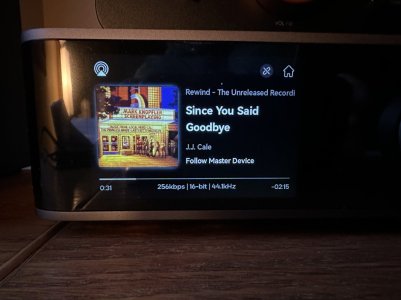
When I swapped the mini for a pro connected via Ethernet, I tried making the Pro the group master and sending it an AirPlay stream. Both devices played the stream in good sync, and I was pleased to see the album art on the Ultra’s screen, but then I noticed the art was from the first song that was playing when I connected the stream to the WiiM Pro. The song title and text data referred to the currently playing song, but the image was stuck on the first image received in the session.
I rebooted the Ultra and tried again. The image again remained stuck on the first track’s whereas the text updated.
Ultra screen with Mark Knopfler Album art and J.J. Cale song info:
Taken at the same time, here’s the WiiM Apple TV app with the same song info and the J.J. Cale album art (and lyrics! very cool trick):
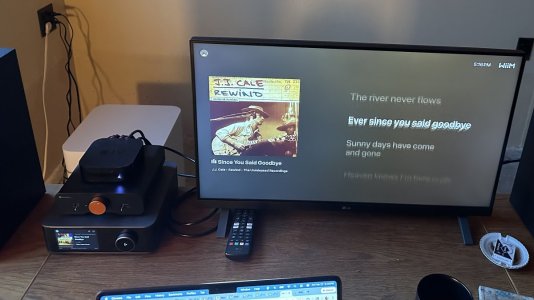
You can also see the stuck image on the ultra’s screen at the lower left.
I bought an additional WiiM Pro streamer today in hopes of improving the reliability and synchronization of a 2-node speaker group of overlapping zones in a high ceiling room with a loft. It was previously ‘mastered’ by my ultra on the main floor with a mini in the loft.
When I swapped the mini for a pro connected via Ethernet, I tried making the Pro the group master and sending it an AirPlay stream. Both devices played the stream in good sync, and I was pleased to see the album art on the Ultra’s screen, but then I noticed the art was from the first song that was playing when I connected the stream to the WiiM Pro. The song title and text data referred to the currently playing song, but the image was stuck on the first image received in the session.
I rebooted the Ultra and tried again. The image again remained stuck on the first track’s whereas the text updated.
Ultra screen with Mark Knopfler Album art and J.J. Cale song info:
Taken at the same time, here’s the WiiM Apple TV app with the same song info and the J.J. Cale album art (and lyrics! very cool trick):
You can also see the stuck image on the ultra’s screen at the lower left.


