Using RCA socket and Optical at same time

MJPMBJ

Member
Joined
Nov 21, 2025
Messages
14
Hi I have a Wiim Pro Plus which is connected to my analogue stereo integrated amplifier. I'm using the RCA sockets (analogue interconnect) for music. I use my iPhone to select music via the Spotify app.

I am thinking of buying a TV and installing it above my stereo.

Can I connect the TV to the WiiM through the Optical In?

How would I choose to play music through my phone via Spotify and choose to have the sound of the TV programme playing through my stereo?

Or will I have to buy a separate DAC for the TV?

Many thanks for any advice or help you can provide.
 
Do you and your family frequently adjust the TV volume? For instance, if you simply switch between loud and soft volume at 2~4 levels, you could also use the preset buttons on the WiiM Remote. In this case, it can be convenient as it allows you to change directly to the desired volume.🙂
Here in the UK, you can hardly hear what people are saying in some movies or TV programmes, then the advert comes on, or there's an explosion or something in the movie and it's almost deafening.
 
Here in the UK, you can hardly hear what people are saying in some movies or TV programmes, then the advert comes on, or there's an explosion or something in the movie and it's almost deafening.
That - TV Volume issues - is universal.
Difficulty with understanding dialog, at anything less than High Volume, can also be a combination of TV Hardware issues. 1) Most TV Speakers are side- or back-facing, leading to muffled reflected sound. This is why AVRs support a Center Channel (and why it faces forward directly above or under the TV). 2) Poor decoding and mixing of dialog track (Center Channel) into 2-channel Stereo from prevalent Dolby and DTS sources. 3) Poor Master Volume Control at TV Stations that are mostly automated machinery slotting Advertisements into "canned" Syndicated TV Content - very little can be done for this except in higher-end TVs and Sound Bars and AVRs with "Dynamic Volume Control" features (WiiM does not have an equivalent as WiiM devices aren't focused on TV Audio Reproduction.)
 
That - TV Volume issues - is universal.
Difficulty with understanding dialog, at anything less than High Volume, can also be a combination of TV Hardware issues. 1) Most TV Speakers are side- or back-facing, leading to muffled reflected sound. This is why AVRs support a Center Channel (and why it faces forward directly above or under the TV). 2) Poor decoding and mixing of dialog track (Center Channel) into 2-channel Stereo from prevalent Dolby and DTS sources. 3) Poor Master Volume Control at TV Stations that are mostly automated machinery slotting Advertisements into "canned" Syndicated TV Content - very little can be done for this except in higher-end TVs and Sound Bars and AVRs with "Dynamic Volume Control" features (WiiM does not have an equivalent as WiiM devices aren't focused on TV Audio Reproduction.)
The WiiM do have the "Spoken Word" EQ setting and that helps a lot with the TV sound.
 
Got a new TV today. A Hisense 43E7QTUK. It's only for a spare room so didn't want to spend much.

Anyway I bough an optical cable from Amazon, plugged it into the the back of the TV. In the Digital Audio Out socket.

I changed the output on the TV to PCM. Selected SPDIF.
On the WiiM app under Audio Input as Optical In.
On the Audio Output I've selected line Out.
I've set the WiiM app to Auto-sensing of Optical In, and Auto Sensing of Line-In.
Line Input Resolution set at 16 bit, 48 kHz.

I've messed about with Audio Settings - Optical Output Resolution

All to no avail. I can't get any sound through my speakers.

I'm currently using the headphone 3.5mm socket to two RCA phono inputs. (using a 3.5mm / 2 RCA cable). It works but it's annoying me that I can't use the optical output of the TV.

Am I missing something?

Thanks
 
Got a new TV today. A Hisense 43E7QTUK. It's only for a spare room so didn't want to spend much.

Anyway I bough an optical cable from Amazon, plugged it into the the back of the TV. In the Digital Audio Out socket.

I changed the output on the TV to PCM. Selected SPDIF.
On the WiiM app under Audio Input as Optical In.
On the Audio Output I've selected line Out.
I've set the WiiM app to Auto-sensing of Optical In, and Auto Sensing of Line-In.
Line Input Resolution set at 16 bit, 48 kHz.

I've messed about with Audio Settings - Optical Output Resolution

All to no avail. I can't get any sound through my speakers.

I'm currently using the headphone 3.5mm socket to two RCA phono inputs. (using a 3.5mm / 2 RCA cable). It works but it's annoying me that I can't use the optical output of the TV.

Am I missing something?

Thanks
Have you manually selected the optical input and the optical output of the WiiM?
 
Have you manually selected the optical input and the optical output of the WiiM?
I got the impression that it was always Line Out that was wanted, but that only line in was working.
Didn't understand why optical out settings was mentioned, unless it was tv settings. Didn't seem so though.
 
Got a new TV today. A Hisense 43E7QTUK. It's only for a spare room so didn't want to spend much.

Anyway I bough an optical cable from Amazon, plugged it into the the back of the TV. In the Digital Audio Out socket.

I changed the output on the TV to PCM. Selected SPDIF.
On the WiiM app under Audio Input as Optical In.
On the Audio Output I've selected line Out.
I've set the WiiM app to Auto-sensing of Optical In, and Auto Sensing of Line-In.
Line Input Resolution set at 16 bit, 48 kHz.

I've messed about with Audio Settings - Optical Output Resolution

All to no avail. I can't get any sound through my speakers.

I'm currently using the headphone 3.5mm socket to two RCA phono inputs. (using a 3.5mm / 2 RCA cable). It works but it's annoying me that I can't use the optical output of the TV.

Am I missing something?

Thanks

You'll probably need to change the "Power-On Priority Speaker" setting in your TV's HDMI settings to external speakers.
 
I think I may have at one point but corrected it. It's been a long day trying to solve it, to be honest.

Which model wiim? (Pro plus?) edit: i reread the first post ;)
Have you used this wiim with optical in before?
Have you tried it from a different tv?
Tried the optical cable that came with the wiim?

As Wiimer suggests, check the tv settings, it could simply be there's no optical signal!
 
Last edited:
You'll probably need to change the "Power-On Priority Speaker" setting in your TV's HDMI settings to external speakers.
Thanks again Wiimer. I think I did that but I'll check again in the morning. I've tried that many things I'm not sure what I have and haven't done now.
That would make a lot of sense though.
 
Which model wiim? (Pro plus?) edit: i reread the first post ;)
Have you used this wiim with optical in before?
Have you tried it from a different tv?
Tried the optical cable that came with the wiim?

As Wiimer suggests, check the tv settings, it could simply be there's no optical signal!
Thanks Mr Ee.

No I've tried the optical before.
I brought another TV in to try and had murder getting the stand off it. I think I gave up in the end.
I'll have to try to try to find it and give it a go.

Thanks a lot mate.

I was reading in the help section, to check if the red light in the optical port is on, on the WiiM, and if not to contact them.

I'm going to have another go tomorrow, with fresh eyes and brain (small but fresh).
 
Thanks again Wiimer. I think I did that but I'll check again in the morning. I've tried that many things I'm not sure what I have and haven't done now.
That would make a lot of sense though.
Yes, please check again.

TV Settings Menu ->
Other Settings ->
External Input/HDMI Link ->
Power-On Priority Speaker ->
Sound System

When connecting the TV and WiiM via Optical, if sound is coming from the TV speakers (unless the TV volume is set to 0), the TV settings are incorrect.

If no sound is heard from the TV speakers and also not from the WiiM, there is likely an issue with the connection between the TV and WiiM, or with the settings for the WiiM or subsequent devices.

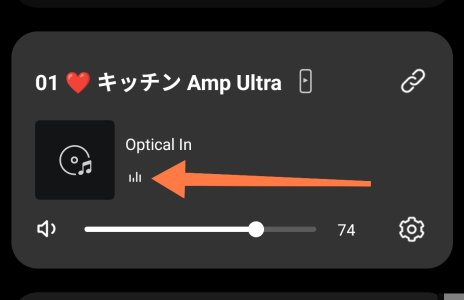
Next, open the WiiM app while playing something on your TV. Check that the device card displays "Optical in" and that the sound icon is moving.
1598.jpg
If it is moving, WiiM is receiving the TV audio correctly, so the issue is with the output.

Check that the connection between WiiM and the amplifier is correct, and verify there are no problems with the amplifier's input selection or volume settings.
 
Back
Top