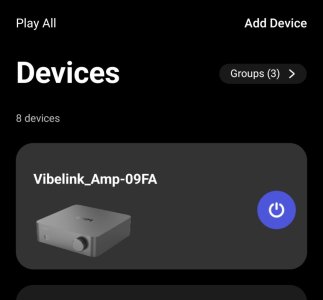
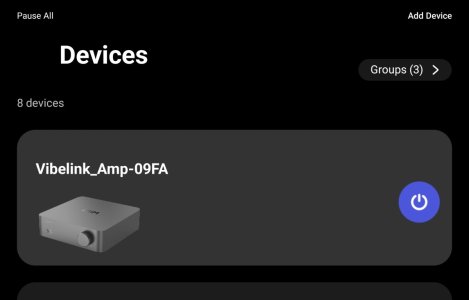
Vibelink Software Update?

Hi,
Pressing and holding the Vibelink power button for 5 seconds will reset it, but it will not enter Bluetooth mode. Normally, the WiiM app automatically detects the Vibe.

If there’s anything you haven’t tried yet, could you please try the following?

  1. Unplug the Vibelink power cord, wait a moment, and then plug it back in.
  2. Check that the two permissions in the WiiM app are enabled: "Location" and "Nearby Devices."
  3. Check that Location Services and Bluetooth are enabled on your iPhone and Mac.
  4. Reinstall the WiiM app and restart your Apple devices.

I usually hide Vibe in the WiiM app. A little while ago, I displayed Vibe on three Android devices for testing purposes. At least, there doesn’t seem to be any issue with my Vibe or its firmware. However, there might be some kind of bug lurking in the latest version of the WiiM app.

That’s because when I tried to connect the WiiM app to the Vibe, the Vibe initially refused the connection, and the attempt failed. After unplugging and replugging the Vibe’s power cord, the connection was successfully established.

View attachment 36190


@markstein,
Sorry for going off topic.

As I mentioned earlier, I’ve enabled Vibe Cards on my three devices, so I’ll keep an eye on things over the next few days. If any issues arise, I’ll report them via a support ticket and in this thread.
Thank you very much. That did the trick. I only even had to unplug the power cable and plug it in after 20 secs. I could connect with my iPhone and the V reappeared in the app. All's well for now. Thanks again.
 
Looks like we got way off track here everyone. A few posts in this thread have been removed that were clearly rule breaking, and while some others need editing, I haven't done so yet.

We have some very simple rules here on the forum, but everyone needs to follow them.

To summarize where things stand on the actual issue: I'm checking in with the team to investigate this and see if they have more details.

If you're experiencing this bug (or any bug), please also submit a report via the feedback option in the WiiM Home app as it generates logs and the tickets get checked out by the team all the time.

Let's keep further replies focused on the technical discussion. Thanks everyone.
 
Did WiiM admit there was an issue when you submitted a ticket for the "many times" you experienced this?
Yes, I submitted the bug a time ago, and it was admitted with the advice to reboot the device which works but is no solution.
 
Yes, I submitted the bug a time ago, and it was admitted with the advice to reboot the device which works but is no solution.
That question wasn't addressed to you in particular, but it's good to know that, despite the naysayers, you followed the standard advice to contact them by raising a ticket as there are often clues in your device logs that may not be apparent from what a user can see and describe. Hopefully with @RyanWithWiiM having commented, the engineering team will address this issue anew. Cheers
 
Last edited:
I have the same problem with the Vibe and Ultra.
It works flawlessly, with the trigger cable, and, after some time, days or weeks, the capability of the Ultra to switch off the Vibelink cease to work, and the Vibelink remains in standby mode.
I have to manually disconnect the Vibe from the power cable, and after this operation, everything start to go well again.
And so on...
 
@WiiM Team,

I’ve been monitoring this for the past 3 days, so I’d like to report on the progress so far. To cut to the chase, there’s no sign that the Vibe’s Bluetooth signal has disappeared.

However, there seems to be a slight issue with the WiiM app.

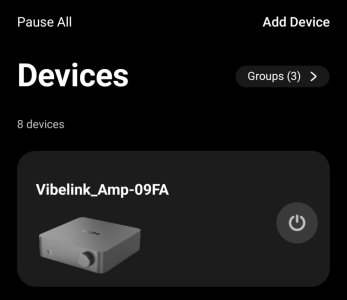
Even though the Vibe is in sleep mode, the status displayed in the WiiM app is inconsistent.

<Xiaomi 15>
WiiM app battery optimization: Off
App lock: On
3191.jpg

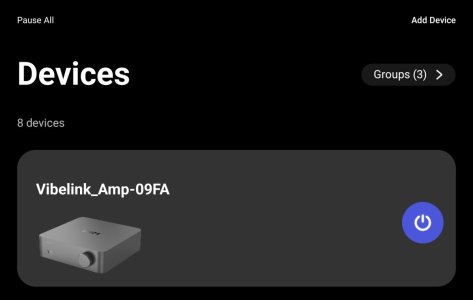
<Xiaomi pad Mini>
WiiM app battery optimization: On
App lock: On
709bf593-5c21-44a7-b4d1-8fcb58ee3da2-1_all_4468.jpg

<Galaxy Tub S8+>
WiiM app battery optimization: On
App lock: Off
3196.jpg

I have confirmed that restarting the app changes the status on all devices. After restarting, the power icon on the Vibe card turns on (even though the Vibe is in sleep mode, of course).

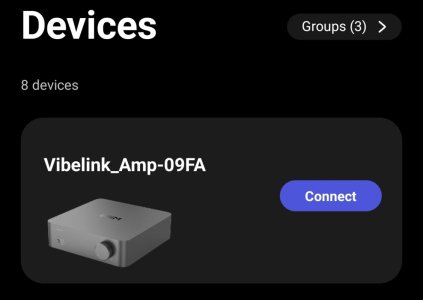
Additionally, on all devices, the Bluetooth connection between the app and the Vibe may occasionally disconnect, causing the "Connect" icon to appear.

Next, I tapped the Connect icon to check how Vibe was working.

View attachment 3201.mp4

When the app and Vibe reconnect, the power icon in the app turns on. The Vibe remains in sleep mode. Even if I tap the icon, the Vibe remains in sleep mode.


View attachment 3202.mp4

Next, with the power icon turned on and the Vibe in sleep mode, I pressed the Vibe’s power button to turn it on. Then, when I tapped the power icon in the app again, the Vibe went back to sleep.

Based on these results, I believe this indicates that it is not a display bug in the WiiM app, but rather that the app is unable to detect the Vibe’s power status.

If this is a display bug, the Vibe should turn on when you first tap the power icon.


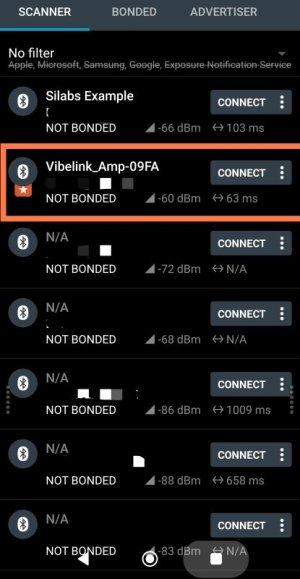
Btw, the Bluetooth signal strength of the Vibe seems to be fine. We were able to get a strong signal even from a distance of 5m.
3198.jpg


I will continue to monitor the situation.
 
Additionally, on all devices, the Bluetooth connection between the app and the Vibe may occasionally disconnect, causing the "Connect" icon to appear.
I find that this happens when you have the Vibelink paired with more than two devices, as it can only support two simultaneous Bluetooth connections at any time.

Selecting the “Connect” icon will connect that device, but another device will then lose its connection.
 
I find that this happens when you have the Vibelink paired with more than two devices, as it can only support two simultaneous Bluetooth connections at any time.

Selecting the “Connect” icon will connect that device, but another device will then lose its connection.
Thanks. I didn't know that.🙂
(I'm pretty sure you mentioned that before, but I'd completely forgotten...)
 
Thanks. I didn't know that.🙂
(I'm pretty sure you mentioned that before, but I'd completely forgotten...)
I think it only supported one Bluetooth connection when it was launched, and this was increased to two devices in a firmware update.

Because of this, I only used to have two devices paired with my Vibelink, until I saw your recent post where you mentioned having three devices paired, so I tried adding three additional devices.

This is when I first noticed the “Connect” icon, and with five different devices running the WiiM Home app, only two of them are connected, and the other three are showing the “Connect” icon.

Selecting a “Connect” icon will connect that particular device, but one of the other two connected devices will lose its connection.
 
I think it only supported one Bluetooth connection when it was launched, and this was increased to two devices in a firmware update.

Because of this, I only used to have two devices paired with my Vibelink, until I saw your recent post where you mentioned having three devices paired, so I tried adding three additional devices.

This is when I first noticed the “Connect” icon, and with five different devices running the WiiM Home app, only two of them are connected, and the other three are showing the “Connect” icon.

Selecting a “Connect” icon will connect that particular device, but one of the other two connected devices will lose its connection.
Does the power icon turn on after connecting, just like it does for me?
 
Does the power icon turn on after connecting, just like it does for me?
Yes, the power icon in the app is usually on whatever the power state of the Vibelink is at the time, this can be a bit misleading.
 
@WiiM Team,

I’ve been monitoring this for the past 3 days, so I’d like to report on the progress so far. To cut to the chase, there’s no sign that the Vibe’s Bluetooth signal has disappeared.

However, there seems to be a slight issue with the WiiM app.

Even though the Vibe is in sleep mode, the status displayed in the WiiM app is inconsistent.

<Xiaomi 15>
WiiM app battery optimization: Off
App lock: On
View attachment 36320

<Xiaomi pad Mini>
WiiM app battery optimization: On
App lock: On
View attachment 36321

<Galaxy Tub S8+>
WiiM app battery optimization: On
App lock: Off
View attachment 36322

I have confirmed that restarting the app changes the status on all devices. After restarting, the power icon on the Vibe card turns on (even though the Vibe is in sleep mode, of course).

Additionally, on all devices, the Bluetooth connection between the app and the Vibe may occasionally disconnect, causing the "Connect" icon to appear.

Next, I tapped the Connect icon to check how Vibe was working.

View attachment 36323

When the app and Vibe reconnect, the power icon in the app turns on. The Vibe remains in sleep mode. Even if I tap the icon, the Vibe remains in sleep mode.


View attachment 36325

Next, with the power icon turned on and the Vibe in sleep mode, I pressed the Vibe’s power button to turn it on. Then, when I tapped the power icon in the app again, the Vibe went back to sleep.

Based on these results, I believe this indicates that it is not a display bug in the WiiM app, but rather that the app is unable to detect the Vibe’s power status.

If this is a display bug, the Vibe should turn on when you first tap the power icon.


Btw, the Bluetooth signal strength of the Vibe seems to be fine. We were able to get a strong signal even from a distance of 5m.
View attachment 36324


I will continue to monitor the situation.

Good sleuthing ;)
 
Well, it’s been two weeks since I started monitoring. So far, there haven’t been any issues. The Vibe tab remains open at all times.

View attachment 36808
View attachment 36809
I guess it’s becoming increasingly likely that the issue is occurring only on certain phones.

Should I keep going?😅
I haven’t had this issue since getting my Vibelink about a year ago. 🤔
 
Back
Top