Vibelink Software Update?

markstein

New Member
Joined
Jun 1, 2025
Messages
20
Since it is been quite a long time that there was an update of the Vibelink software and the Bluetooth bug* is not fixed yet, when can we expect a new version?

* After some days the Bluetooth connection is switched off and the amp does not show up in the Wiim Home app anymore.
 
Since it is been quite a long time that there was an update of the Vibelink software and the Bluetooth bug* is not fixed yet, when can we expect a new version?

* After some days the Bluetooth connection is switched off and the amp does not show up in the Wiim Home app anymore.
I have never experienced this Bluetooth bug as you call it. Can you give some further information on it.
 
I have never experienced this Bluetooth bug as you call it. Can you give some further information on it.
It is very easy to describe: After reboot everything is ok, the Vibelink shows up in the Home app and can be switched on and off with the app. This works for some days and then the Bluetooth signal of the Vibelink is switched off. I have no clue why, maybe a timer in the Vibelink software.
 
i experienced the exact same issue with the Vibelink many times. but no one here is going to admit there's an issue.
though I think (for anyone using a trigger cable) the Vibelink appearing in the WHA is a waste of screen space, I can understand how some users who don't use the remote trigger cable, find it extremely useful to be able to turn it on through the app.
 
i experienced the exact same issue with the Vibelink many times. but no one here is going to admit there's an issue.
though I think (for anyone using a trigger cable) the Vibelink appearing in the WHA is a waste of screen space, I can understand how some users who don't use the remote trigger cable, find it extremely useful to be able to turn it on through the app.
Did WiiM admit there was an issue when you submitted a ticket for the "many times" you experienced this?
 
I don't have a Vibelink. But it is much more likely that the Pairing is aged out - possibly by some function of your Phone's Bluetooth Management software.
Is it possible that optimizing my smartphone's battery settings could cause the Bluetooth connection to be interrupted? The OP mentioned a few days later, so it does seem like a long time, though...

@markstein,
I'm not sure if this will solve the issue, but if you're using an Android phone, please try turning off battery optimization in the WiiM home app, and then locking the app.
 
How can someone who hasn’t experienced that issue acknowledge that there is a issue? Are you suggesting they should lie and make a fuss?

i question the objectivity of most of this forum main "contributors" , specially when it comes to faults and bugs in WiiM products.

Did WiiM admit there was an issue when you submitted a ticket for the "many times" you experienced this?
yes. for other issues - not going to state ticket numbers here. i didn't open a ticket for this bug as like I mentioned above - i find it useful when the Vibelink disappears from the list of devices in WHA

and also @Wiimer , i suggest that you avoid in the future replying to my comments. thanks in advance
 
Last edited:
i question the objectivity of most of this forum main "contributors" , specially when it comes to faults and bugs in WiiM products.


yes. for other issues - not going to state ticket numbers here. i didn't open a ticket for this bug as like I mentioned above - i find it useful when the Vibelink disappears from the list of devices in WHA

and also @Wiimer , i suggest that you avoid in the future replying to my comments. thanks in advance
Why ask questions in this forum if you don't want comments from people that actually knows what they are talking about?

If you read carefully you will see that many of the "contributors" are actually critical about the WiiM products and are contributing with suggestions for fixing issues.
 
Why ask questions in this forum if you don't want comments from people that actually knows what they are talking about?
where exactly in this thread i "asked a question" ? i merely advised @markstein this is a known issue with the Vibelink, that probably not going to be attended to
If you read carefully you will see that many of the "contributors" are actually critical about the WiiM products and are contributing with suggestions for fixing issues.
yea , so critical that every 3rd message is "you can open a ticket using feedback in the WHA"
 
i question the objectivity of most of this forum main "contributors" , specially when it comes to faults and bugs in WiiM products.

I think you'll find the main contributors are also the ones who try to replicate issues members report and suggest corrective actions. I'd wager they also submit more bug reports than the average user and hence help enhance WiiM products to the benefit of all users.

and also @Wiimer , i suggest that you avoid in the future replying to my comments. thanks in advance

Like all users , @Wiimer is free to answer who and what they choose in the forum.
 
i experienced the exact same issue with the Vibelink many times. but no one here is going to admit there's an issue.
though I think (for anyone using a trigger cable) the Vibelink appearing in the WHA is a waste of screen space, I can understand how some users who don't use the remote trigger cable, find it extremely useful to be able to turn it on through the app.
I confirm that I experience the same problem. I own the Ultra a few months (dec 2025), the Vibelink a few weeks. Connected them and it worked properly. The Vibelink started to download the latest software and i was on the way. The V was visable in the app, untill last saterday. It disappered from the app (iOS, and MacOs). Tried al the tips in this forum and no result, even reboots nor factory resets solved it. Holding the power button 5 secs to activate bluetooth on the V does'nt lead to pairing with my iPhone.......
 
i question the objectivity of most of this forum main "contributors" , specially when it comes to faults and bugs in WiiM products.

As usual, that's just your imagination.


and also @Wiimer , i suggest that you avoid in the future replying to my comments. thanks in advance
No thanks. If you don’t want to see my posts, please block me.
 
i understand you're having hard time with the mere fact that WiiM products are not "perfect" but that's your problem mate


fine, i'll "ignore" your forum replies
Also, it seems you’re misunderstanding something: what I’m trying to protect here isn’t WiiM, but the sincere members who are here. No matter who it is, if you insult anyone, I will continue to call you out.

If you don’t want me to reply to you, I suggest you stop replying to me first.😂
 
i question the objectivity of most of this forum main "contributors" , specially when it comes to faults and bugs in WiiM products.


yes. for other issues - not going to state ticket numbers here. i didn't open a ticket for this bug as like I mentioned above - i find it useful when the Vibelink disappears from the list of devices in WHA

and also @Wiimer , i suggest that you avoid in the future replying to my comments. thanks in advance
If you didn't open a ticket and nobody else does it definitely won't get fixed. Before you accuse me of defending WiiM I was the first to point out that the sub/speaker automatic sync was useless.
 
I confirm that I experience the same problem. I own the Ultra a few months (dec 2025), the Vibelink a few weeks. Connected them and it worked properly. The Vibelink started to download the latest software and i was on the way. The V was visable in the app, untill last saterday. It disappered from the app (iOS, and MacOs). Tried al the tips in this forum and no result, even reboots nor factory resets solved it. Holding the power button 5 secs to activate bluetooth on the V does'nt lead to pairing with my iPhone.......
Hi,
Pressing and holding the Vibelink power button for 5 seconds will reset it, but it will not enter Bluetooth mode. Normally, the WiiM app automatically detects the Vibe.

If there’s anything you haven’t tried yet, could you please try the following?

  1. Unplug the Vibelink power cord, wait a moment, and then plug it back in.
  2. Check that the two permissions in the WiiM app are enabled: "Location" and "Nearby Devices."
  3. Check that Location Services and Bluetooth are enabled on your iPhone and Mac.
  4. Reinstall the WiiM app and restart your Apple devices.

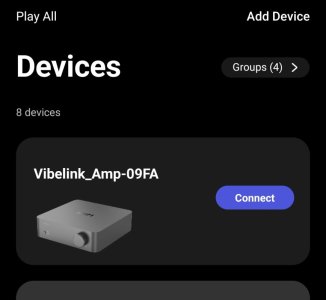
I usually hide Vibe in the WiiM app. A little while ago, I displayed Vibe on three Android devices for testing purposes. At least, there doesn’t seem to be any issue with my Vibe or its firmware. However, there might be some kind of bug lurking in the latest version of the WiiM app.

That’s because when I tried to connect the WiiM app to the Vibe, the Vibe initially refused the connection, and the attempt failed. After unplugging and replugging the Vibe’s power cord, the connection was successfully established.

3153.jpg


@markstein,
Sorry for going off topic.

As I mentioned earlier, I’ve enabled Vibe Cards on my three devices, so I’ll keep an eye on things over the next few days. If any issues arise, I’ll report them via a support ticket and in this thread.
 
If you didn't open a ticket and nobody else does it definitely won't get fixed.
reading comprehension - i can't help you with it. I wrote clearly :
i didn't open a ticket for this bug as like I mentioned above - i find it useful when the Vibelink disappears from the list of devices in WHA"
and if that wasn't clear enough, let me try again:
yes, I DID NOT open a ticket for this bug ON PURPOSE , because I DO NOT want it to get fixed, as I FIND IT A GOOD THING that the Vibelink doesn't appear in the list of devices on 6.1 inch smartphone display
Before you accuse me of defending WiiM I was the first to point out that the sub/speaker automatic sync was useless.
i have no idea who you are and don't recall "accusing" you of anything
 
Back
Top