WiiM amp ultra not showing 5.1 icon in now playing screen, in spite of showing dolby audio AC3 signal

shinshya

New Member
Joined
Mar 16, 2026
Messages
7
Hello FMs,

I was having WiiM Amp for my stereo setup connected to my bedroom projector, XGIMI Halo+. I have a subwoofer and have been enjoying the 2.1 sound for movies too. I wanted to make the setup 4.1 and decided to do it through another WiiM device, WiiM Amp Ultra and bought it along with additional speakers too. However, after setting up both the amps(making WiiM amp Ultra as Group Lead connected to projector through HDMI cable and WiiM Amp as Follower), and tried to play a DD 5.1 movie, but the now playing screen doesn't show 5.1 icon, though it shows the Dolby Audio AC3 as sound source. Hence, unable to setup surround speakers through the follower Amp. I read in other threads that many FMs are able to setup 4.1 successfully and enjoying the surround sound.
Is there anything that I missed during the setup? I followed the setup process provided by WiiM, yet unable to get surround sound.
Your quick help is greatly appreciated.
 
Hello FMs,

I was having WiiM Amp for my stereo setup connected to my bedroom projector, XGIMI Halo+. I have a subwoofer and have been enjoying the 2.1 sound for movies too. I wanted to make the setup 4.1 and decided to do it through another WiiM device, WiiM Amp Ultra and bought it along with additional speakers too. However, after setting up both the amps(making WiiM amp Ultra as Group Lead connected to projector through HDMI cable and WiiM Amp as Follower), and tried to play a DD 5.1 movie, but the now playing screen doesn't show 5.1 icon, though it shows the Dolby Audio AC3 as sound source. Hence, unable to setup surround speakers through the follower Amp. I read in other threads that many FMs are able to setup 4.1 successfully and enjoying the surround sound.
Is there anything that I missed during the setup? I followed the setup process provided by WiiM, yet unable to get surround sound.
Your quick help is greatly appreciated.
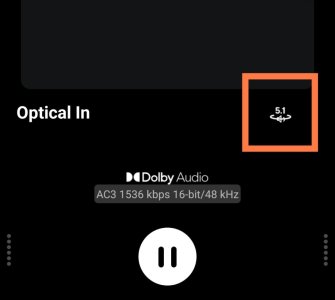
Hi
Is this icon not appearing on the WiiM app's playback screen?
2979.jpg
If so, please unplug the device's power cable, leave it for a while, and then restart it. This sometimes resolves temporary errors.

Also, what is your playback source? If possible, please try playing a 5.1 video on Amazon Prime Video.
 
@Wiimer,

Thanks for the quick response. Yest the 5.1 icon highlighted in the image posted by you is not visible. I will try to unplug and restart the WiiM Amp Ultra, and revert to you.
My chain of connection is below:
XGIMI Halo+ -> WiiM Amp Ultra(through HDMI ARC both ends) -> 2.1 speakers
XGIMI Halo+ -> WiiM Amp Ultra(through HDMI ARC both ends) -> WiiM Amp(wireless) -> 2 speakers(for surround sound)
Group Lead is set to WiiM Amp Ultra & WiiM Amp is set as follower
Tried to play 5.1 movie from Amazon prime app on XGIMI Halo+, however, it only shows Dobly Audio AC3(exactly as showing in your pic), but no 5.1 Icon.
Not sure if any one else faced the same issue and able to resolve it.
 
@Wiimer,

Thanks for the quick response. Yest the 5.1 icon highlighted in the image posted by you is not visible. I will try to unplug and restart the WiiM Amp Ultra, and revert to you.
My chain of connection is below:
XGIMI Halo+ -> WiiM Amp Ultra(through HDMI ARC both ends) -> 2.1 speakers
XGIMI Halo+ -> WiiM Amp Ultra(through HDMI ARC both ends) -> WiiM Amp(wireless) -> 2 speakers(for surround sound)
Group Lead is set to WiiM Amp Ultra & WiiM Amp is set as follower
Tried to play 5.1 movie from Amazon prime app on XGIMI Halo+, however, it only shows Dobly Audio AC3(exactly as showing in your pic), but no 5.1 Icon.
Not sure if any one else faced the same issue and able to resolve it.
This might be a silly question, but is the WiiM Amp set as the group leader? Could you please post screenshots of the device card screen and the playback screen?
 
Thank you @Wiimer. I have unplugged the WiiM amp ultra for some time, re-connected and re-configured it & it worked. Now, I am unable to get 5.1 sound from Prime Video app on my projector.
Another question...
After configuring, when I tried to play music from Spotify, it is not showing WiiM Amp through Air Play. Is there a way, I can still use the WiiM Amp for stereo using Spotify, while it plays the role of follower for surround sound in 5.1 setup?
 
Thank you @Wiimer. I have unplugged the WiiM amp ultra for some time, re-connected and re-configured it & it worked. Now, I am unable to get 5.1 sound from Prime Video app on my projector.

Based on this information, your projector may only support PCM output. Please contact the XGIMI support. If your projector’s HDMI settings allow you to switch between pass-through (bitstream) and PCM audio, try switching to an option other than PCM.


Another question...
After configuring, when I tried to play music from Spotify, it is not showing WiiM Amp through Air Play. Is there a way, I can still use the WiiM Amp for stereo using Spotify, while it plays the role of follower for surround sound in 5.1 setup?
I’m not sure about AirPlay, but as things stand, I believe the group will be unlinked if you play music on a follower device. I recommend connecting to a persistent group via Spotify Connect and muting the Amp Ultra.
 
@Wiimer ,

Sorry for the type in my earlier post. I am getting surround sound from rear speakers connected to WiiM Amp. Thanks for your timely support.
I still have the issue of Airplay unable to detect either of the amps(WiiM Amp Ultra & WiiM Amp) for playing stereo. I don't see these devices in Spotify app too. Let me know if you have any solution to this.
I would like to use this setup for both stereo as well as 5.1 HT.
 
@Wiimer ,

Sorry for the type in my earlier post. I am getting surround sound from rear speakers connected to WiiM Amp. Thanks for your timely support.
I still have the issue of Airplay unable to detect either of the amps(WiiM Amp Ultra & WiiM Amp) for playing stereo. I don't see these devices in Spotify app too. Let me know if you have any solution to this.
I would like to use this setup for both stereo as well as 5.1 HT.
Got it. I'm glad the 5.1 audio played back successfully.

The WiiM Amp Ultra doesn't support AirPlay, so you can't connect it, but the Amp should work. Unfortunately, I'm not sure how to do that, so you might want to start a new thread. (Please try restarting your smartphone.)

Do the persistent group or device names appear in the device connection list in the Spotify app?

Please try signing out of the Spotify app.
Also try unlinking the surround group for now.
 
It worked now. I am able to play music on Wiim Amp using AirPlay.
One last question...
How do I calibrate my 4.1 setup using Wiim Amp Ultra. Will it calibrate everything OR Do I need to calibrate 2.1 using WiiM Amp Ultra and then the Surround 2.0 using WiiM Amp?
 
It worked now. I am able to play music on Wiim Amp using AirPlay.
One last question...
How do I calibrate my 4.1 setup using Wiim Amp Ultra. Will it calibrate everything OR Do I need to calibrate 2.1 using WiiM Amp Ultra and then the Surround 2.0 using WiiM Amp?
If you’re referring to RoomFit, unfortunately, RoomFit and EQ can't currently be applied to wireless surround. These features are disabled during surround playback. Audio sync between Amp Ultra and Amp is likely handled automatically.

According to WiiM’s roadmap, the addition of SurroundFit for surround is planned, so we’ll just have to wait for that.
 
Thank you @Wiimer for your timely responses.
I have one more topic to discuss...
As I mentioned, I have been using the XGIMI Halo+ projector to watch movies. As it doesn't have native NetFlix app, the workaround was provided by XGIMI, however, that version doesn't deliver 5.1 DD, hence I ordered an audio extractor from Amazon and connected to the chain using the Amazon Fire TV stick that I already have. Below is the chain...
Amazon Fire TV stick(HDMI) -> HDMI Audio Extractor(HDMI IN) -> HDMI Audio Extractor(HDMI OUT) ->XGIMI HALO+(HDMI ARC)
For Audio, I connected HDMI Audio Extractor(SPDIF OUT) -> WiiM Amp Ultra(SPDIF IN)
This setup is giving me 5.1 DD experience, however, I experience small lag between video and audio. Tryied to tweak on WiiM amp ultra as well as Fire TV Stick but, I am not fully satisfied.
Do you have any advice on this?
 
Thank you @Wiimer for your timely responses.
I have one more topic to discuss...
As I mentioned, I have been using the XGIMI Halo+ projector to watch movies. As it doesn't have native NetFlix app, the workaround was provided by XGIMI, however, that version doesn't deliver 5.1 DD, hence I ordered an audio extractor from Amazon and connected to the chain using the Amazon Fire TV stick that I already have. Below is the chain...
Amazon Fire TV stick(HDMI) -> HDMI Audio Extractor(HDMI IN) -> HDMI Audio Extractor(HDMI OUT) ->XGIMI HALO+(HDMI ARC)
For Audio, I connected HDMI Audio Extractor(SPDIF OUT) -> WiiM Amp Ultra(SPDIF IN)
This setup is giving me 5.1 DD experience, however, I experience small lag between video and audio. Tryied to tweak on WiiM amp ultra as well as Fire TV Stick but, I am not fully satisfied.
Do you have any advice on this?
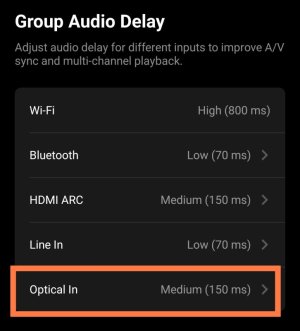
In the "Group Audio Delay" of the Audio Input section, set the delay for the optical input to 150 ms. (A delay of 70 ms may cause issues such as audio dropouts.)
3094.jpg
Then, adjust the lip sync on the Fire Stick. In my case, this fixed the audio sync.
 
@Wiimer ,
It didn't work for me. I tried to change to 70ms, 150ms and 800ms, none of the options helped in resolving the issue in 4.1 mode. However, when I switched to 2.1 mode there is no issue with lip sync.
 
@Wiimer ,
It didn't work for me. I tried to change to 70ms, 150ms and 800ms, none of the options helped in resolving the issue in 4.1 mode. However, when I switched to 2.1 mode there is no issue with lip sync.


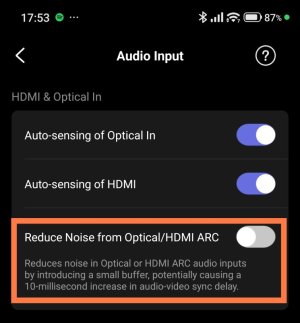
Is "Reduce Noise from Optical/HDMI ARC" disabled on the audio input screen? Enabling this feature increases latency, so if it's turned on, please try turning it off.
3103.jpg


Also, could you "repeat playback" this video and check the amount of latency?


On my Amp Ultra, the latency is around 100 ms in 2.1 mode and around 250 ms in 4.1 mode.

I think the Fire TV’s lip-sync feature should be able to compensate for this level of latency...

I hope this video is helpful.
 
Back
Top