Wiim mini jitter

Promso

Member
Joined
Dec 27, 2024
Messages
69
Hi Guys,
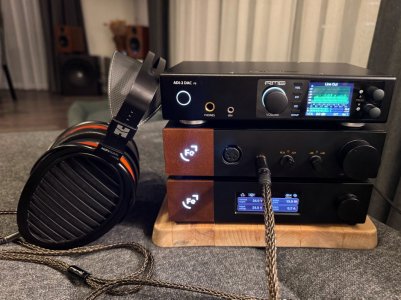
Im currently running my headphone setup connected to Wiim mini via with wiim delivered optical cable:
IMG_4363.jpeg

If I fix Wiim volume on max and and control volume on rme or oor, my rme showing some red dots on source which means jitter and i can actually hear it on intensive music where these red dots are more often. If only i reduce volume on wiim to 95% then it becomes normal. Should it be like that?

Edit: maybe it is not jitter, sorry for my english, this is how ai calls it:)
The issue is called intersample clipping, where reconstructed digital peaks exceed 0 dBFS during D/A conversion, causing audible distortion.
 
Last edited:
If that’s what it is and a volume limit of 95% cures it then I wouldn’t see it as something to worry about. Remember that the Mini is the least capable and by far the cheapest of all the WiiM streamers so perhaps one shouldn’t expect total perfection ;)
 
If that’s what it is and a volume limit of 95% cures it then I wouldn’t see it as something to worry about. Remember that the Mini is the least capable and by far the cheapest of all the WiiM streamers so perhaps one shouldn’t expect total perfection ;)
I just want to understand if i should try to change it to another one or it should be like that. But as I understand from your answer, we should expect some real max volume deviations from so cheap device?😂
 
I just want to understand if i should try to change it to another one or it should be like that. But as I understand from your answer, we should expect some real max volume deviations from so cheap device?😂
Isn't the WiiM just sending the digital signal to the DAC? If the digital signal is up to 0dB you will get intersample peaks over 0dB.
 
Isn't the WiiM just sending the digital signal to the DAC? If the digital signal is up to 0dB you will get intersample peaks over 0dB.
Rme has two types of lines at the bottom, wider which showing what it is sending out and narrow which shows what he is getting in, so these narrows getting some red marks at very top on max wiim volume. Not sure why and how, im not enough technical. I can make a video if you want. Maybe i should just switch to wiim pro plus to be able to fully control the the source by connecting rme via usb and skipping wiim dac.
 
Isn't the WiiM just sending the digital signal to the DAC? If the digital signal is up to 0dB you will get intersample peaks over 0dB.
Yes it is. And if the DAC can't produce intersample peaks over 0dB you get intersample clipping. This appears to be what is happening. A lengthy explanation is provided in the YT video but the image on the page shows the problem: https://benchmarkmedia.com/blogs/vi...-a-problem-with-most-digital-playback-systems.

The simple solution is, as stated by Burnside. Just turn down the Mini a bit so that the DAC will not clip when sent a maximum input signal from the WiiM.
 
That usb connection idea coming to my mind just because i think i was getting better quality when connecting iphone via usb. As i understand rme has some ability to control much more via USB connection.
 
Now Im a bit confused, ai says wiim pro plus has usb out to pass the dac, but some photos showing it has not. How it is?
 
Now Im a bit confused, ai says wiim pro plus has usb out to pass the dac, but some photos showing it has not. How it is?
The WiiM Pro Plus does have a USB C port, but this is for the DC power input only.
 
(The use of positive gain at the PEQ mode level if an headphone correction at wiim mini?)
(The DAC RME units seem to have a -2dB cutoff by default to protect themselves from ISPs... you should check on yours though)
 
Edit: maybe it is not jitter, sorry for my english, this is how ai calls it:)
The issue is called intersample clipping, where reconstructed digital peaks exceed 0 dBFS during D/A conversion, causing audible distortion.
Maybe i should just switch to wiim pro plus to be able to fully control the the source by connecting rme via usb and skipping wiim dac.
What you describe sounds like digital clipping to me, in which case replacing the WiiM Mini with a different digital source wouldn't help (assuming you otherwise run the same configuration).
A good solution is to set the Mini volume to e.g. 95% (or as low as needed to avoid clipping), which you said then completely solves the issue.
There's really no drawback to doing this at all, if you can still get sufficiently loud playback levels.
 
What would be really nice is having the option to lock it at a fixed level, say example 95%, instead of having to use the adjustable volume control, which you risk constantly changing accidentally. A fixed, "adjustable" level.:rolleyes:
 
You can use the volume limit feature.
it's not the same use
It continues to be a variable level...
not a fixed, defined level
No?
(Furthermore, if it could be associated with a gec peq preset, it could help to manually bypass the lack of autogain)
 
Last edited:
Excuse me, I just discovered that the fixed volume could be linked to this limit, even though I've had a Wiim for four years... hehe...

It's just that, since the result seemed to be "bit-perfect"... it didn't seem logical to me (and honestly, it still doesn't...).
So, there really isn't any locked and protected "bit-perfect" output solution (I'm an idiot because it was already obvious if you consider the range of output levels in num and not analog)
?


No automatic gain in the correction modes... fixed levels... limits... but also input level presets, etc.
It's incredibly confusing...
especially since there's no "fair" observation of the levels, with a DRC...
Furthermore, it requires great clarity regarding how each of these changes is managed in the process!
So many functions require infinite precautions...and the possibility of precise monitoring of actual levels...
Too much...or for ""expert""
😳
 
Last edited:
But thanks for pointing out the fixed-mode limit, it's just a shame it displays 100% when it's actually effectif at 95% in fixed...a little "idiot"
;-)

Thinking about very simplified " modes "for simple uses could be a really nice challenge now...
 
Last edited:
It's just that, since the result seemed to be "bit-perfect"... it didn't seem logical to me (and honestly, it still doesn't...).
So, there really isn't any locked and protected "bit-perfect" output solution (I'm an idiot because it was already obvious if you consider the range of output levels)
?
If I may share my opinion, the importance of "bit-perfect" is greatly exaggerated these days.
What I'll say next may be counter-intuitive to many people, but I'm fully convinced of it: attempting to go "bit-perfect" can actually degrade the quality of one's audio!

Let me try to explain my position:

With devices that offer high bit-depth volume controls (I believe WiiM use 32-bit, which is a a lot!) there's no degradation to the original signal and no increase in digital noise when decreasing volume digitally. It isn't "bit-perfect" anymore, but it is "perfect" in any meaningful sense.
On the other hand, analogue volume controls can introduce audible imperfections like volume mismatch or crackling (when potentiometers become scratchy). So in summary, with high SNR devices that have high bit-depth volume controls I truly see really no point in trying to override the digital volume control.

In addition, when you set your device for "bit-perfect" playback, with fixed volume (and volume limit to 100%) you actually increase the risk of running into inter-sample overloads and digital clipping in general - especially with loud mastered recordings. This effectively (and unnecessarily) decreases the sound quality. There's IMHO really no need to demand DACs to have huge inter-sample overload headroom when we can just decrease the digital volume by a few dB, without any loss in audio quality whatsoever.

Lastly, "bit-perfect" also implies that all DSP (EQ, RoomFit, Bass Management...) has to be disabled.
Given that optimally configured EQ, RoomFit and Bass Management can each significantly improve sound quality in most environments, that puts the last nail in the "bit-perfect" coffin, at least in my book.

To summarize - it seems to me that many users run themselves into a corner trying to chase "bit-perfect", and then they have to search for solutions to the various problems this can bring. But these problems can be avoided altogether by recognizing that "bit-perfect" is not really a necessity for "perfect" sound quality (anymore).
Digital volume controls are convenient and transparent, plus having the volume significantly below 100% avoids issues like inter-sample overload and digital clipping altogether.

No automatic gain in the correction modes... fixed levels... limits... but also input level presets, etc.
It's incredibly confusing...
especially since there's no "fair" observation of the levels, with a DRC...
Too much...or for ""expert""
😳
I fully agree with you that advanced WiiM device configuration is quite complex, and not really intuitive.
It seems to me this could probably be improved with a significant UI/UX redesign.

 
Last edited:
My point isn't to defend bit-perfect streaming (especially since I'm one of those people who highlight the problems with ISPs)... It's just that I know many friends who only want a streamer with a fixed level (like an RME Margin) to a digital output or a DAC... That's all... and they only stop to listen me when I talk about all the processing options etc etc we can do etc... and even less so when I try to warn them about precautions like not having auto-gain, DRC, etc...:cry:

"I just want an efficient basic streamer without any tinkering."
(And I'm practically certain that the people actively asking fonctions "audio ", etc., on such a forum are not representative ( ;-) ) of the majority of Wiim product buyers/users...
that's already a form of bias...

except for those waiting for the beautiful screen with a McIntosh-style VU meter or a dancing FFT :-) )


How long can you continue to "hold the hand" of people coming here to have so many technical things explained to them? Roomfit, levels...etc...😳😳😳😳😳
 
Last edited:
Back
Top