WiiM Ultra Firmware v5.2.736552 Update - Nov 24, 2025

Please review the WiiM Ultra update release notes below. If you encounter any issues, feel free to reach out to us. This firmware update is being rolled out in stages, with devices updating sequentially over the next few days.

5.2.736552 (In Progress)

Release date:
11 / 24 / 2025

What's New:
  1. Now Playing: Added Audio Spectrum visualization. Requires WiiM Home app v3.4.0+.
  2. Queue: Better track order retention in shuffle and faster queue operations across NAS/USB/Samba/Local, TIDAL, Qobuz, Radio Paradise, YouTube, Deezer, and SoundCloud.
  3. Multi room: Improved multicast logic for more reliable discovery/connectivity; reduced stutter when using Bluetooth input.
Bug Fixes:
  1. Google Cast: Device now retains its assigned room after reboot.
  2. Spotify Presets: Start on first press (no second trigger needed).
  3. Playback Stability: Fixes for TuneIn Radio and certain FLAC files.
  4. USB Library: Resolved missing albums when indexing large collections.
  5. USB Out: Playback now auto resumes.
  6. Screen/UI: Fixed overlay artifacts and occasional failures to load Now Playing or Standby screens.
  7. VU Meter: Restored operation with Dolby audio in multi room playback.
 
Last edited:
Hi Wiimer
Mhhhh :unsure: .Don’t know, but the dancing bars in the Ultra and what you hear does not match. More. Is it useful to have 25 Hz? My B&W are 48 - 28.000 Hz.
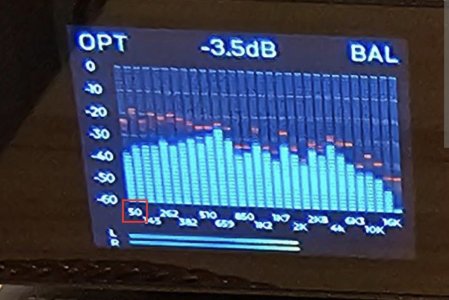
The lower limit for the Topping analyser is 50Hz.
1532.jpg


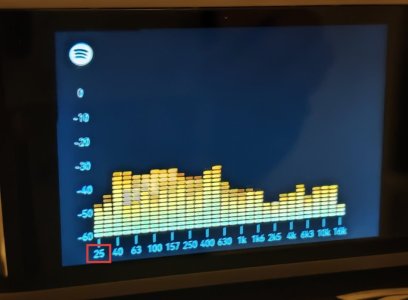
The lower limit for the Ultra is 25Hz.
1533.jpg

Ultra displays lower frequency bands than Topping, so the height of the leftmost bar is lower than that of Topping. 🙂

I did not mention the bar delay.
 
Could you implement a HDMI screen off option? The spectrum analyzer is great but not when watching movies in a dark room.
 
In addition to that we are awaiting WiiM to allow individual screen options for each input.
Been asking the same thing, but not sure if this is already in the works/brought to their attention?

Time to do some proper feature requests 👊👊
 
Hail!

Yesterday I got wiim Ultra

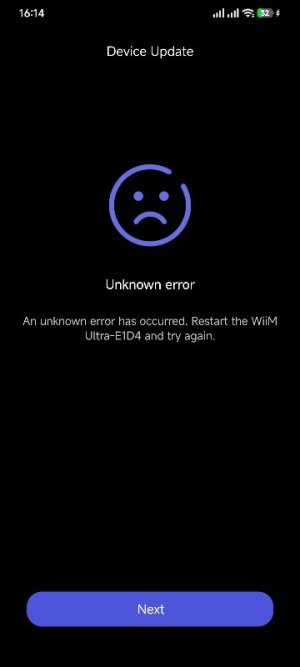
I can't install the full version
 

Attachments

  • Screenshot_2025-12-12-16-14-15-012_com.linkplay.wiimhome.jpg
    Screenshot_2025-12-12-16-14-15-012_com.linkplay.wiimhome.jpg
    15.4 KB · Views: 20
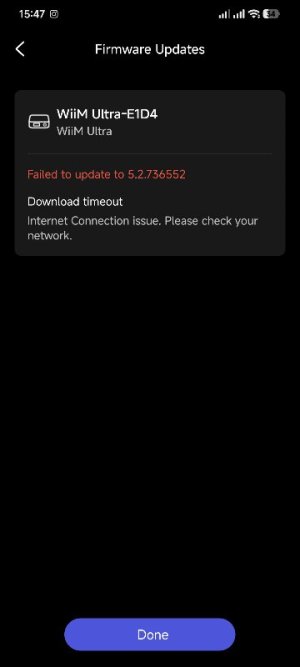
  • Screenshot_2025-12-12-15-47-34-058_com.linkplay.wiimhome.jpg
    Screenshot_2025-12-12-15-47-34-058_com.linkplay.wiimhome.jpg
    17.3 KB · Views: 19
Last edited by a moderator:
@Alfi Похоже, обновление закончилось неудачно.
Я бы посоветовал выключить и снова включить питание, подождать несколько минут, затем перезагрузить устройство и повторить попытку обновления... Если это по-прежнему не поможет, лучше всего отправить запрос на обратную связь через приложение WH.
Thank you

Rebooted

All firmware versions are gone

After 10 minutes, he reappeared on 24.11.25

And it gives an error again(((
 
Last edited by a moderator:
I'm asking you to install version 52736552, but a new version has already been released! What should I do?
 
Last edited by a moderator:
Я прошу вас установить версию 52736552, но уже вышла новая версия! Что мне делать?
"I ask you to install version 52736552, but a new version has already been released! What should I do?"

Firmwares are sequential.
You cannot update to the release 5.2.738432 until you complete the installation of the previos 52736552, so my humble opinion is that it is mandatory to ask @WiiM Team for a solution, filling the feedback form within the Wiim Home App.

This is the current safest way,
 
"I ask you to install version 52736552, but a new version has already been released! What should I do?"

Firmwares are sequential.
You cannot update to the release 5.2.738432 until you complete the installation of the previos 52736552, so my humble opinion is that it is mandatory to ask @WiiM Team for a solution, filling the feedback form within the Wiim Home App.

This is the current safest way,

@WiiM Support can direct to him an older FW version.
 
Back
Top