WiiM Ultra Firmware v5.2.807149 Update - Feb 9, 2026

Please review the WiiM Ultra update release notes below. If you encounter any issues, feel free to reach out to us. This firmware update is being rolled out in stages, with devices updating sequentially over the next few days.

5.2.807149 (In Progress)

Release date:

Feb 9, 2026

Display & UI:
  1. Per-Input Now Playing: Customize the Now Playing screen for each input source.
  2. New Cover Layouts: Added larger album-art views for a more immersive playback screen, with Home and Music Source icons hidden.
  3. Dolby Visuals: VU Meter and Audio Spectrum now work during Dolby playback.
Playback & Audio:
  1. Optical In: Fixed dropouts caused by input stream format changes.
  2. Short-Track Transitions: Improved near-end handling to prevent skipping or audio “leakage.”
  3. Track Skips: Resolved multiple cases of unexpected skipping / premature track changes across services.
Radio & Streaming Services:
  1. Live Metadata: Added ICY support for richer “now playing” info on TuneIn, iHeartRadio, and BBC Radio.
  2. Qobuz: Added Track Radio / Artist Radio / Album Radio.
  3. vTuner: Improved reliability with backup stream URL fallback.
  4. SoundCloud: Added third-party login support.
  5. TuneIn: Fixed alarms occasionally starting late or failing to start playback.
  6. iHeartRadio / Pandora: Fixed intermittent stops and unexpected skipping.
  7. Napster: Fixed My Music playback failures, incorrect station controls, and a disconnect-on-no-internet crash.
  8. Plex: Fixed alarm progress display, station history playback failures, and occasional early skips.
  9. Amazon Music: Fixed interruptions when playing short playlists.
USB & NAS:
  1. USB Notifications: Added connect/disconnect pop-ups.
  2. Faster Browsing: Reduced app timeouts when browsing USB drives.
  3. NAS Playback: Fixed playback and display issues for NAS sources.

 
I was pretty sure we would get HDMI ARC fix from beta, as its working fine for quite some time, but...
@WiiM Support is telling me there are still things to implement and test, although the beta test I did one year ago and the current beta both solved the issue without breaking the current default handling of the HDMI CEC.

So I wonder what is missing for it to be included in the main firmware?
 
Got it, so you want Automatic ARC takeover disabled.

-Ed
Yes and no. With the new HDMI options it is possible to change the HDMI ARC handling to be manual on the WiiM side.

The TV will still automatically change to output sound via ARC but only when the HDMI input is selected on the WiiM.

The WiiM will not react to the TV turning on, except if HDMI input is already selected and the WiiM is active.

As it is in the current implementation one has to remove the HDMI cable to allow the TV using its internal speakers.

This has all been fixed in the current HDMI Beta Testing firmware.
 
Yes and no. With the new HDMI options it is possible to change the HDMI ARC handling to be manual on the WiiM side.

The TV will still automatically change to output sound via ARC but only when the HDMI input is selected on the WiiM.

The WiiM will not react to the TV turning on, except if HDMI input is already selected and the WiiM is active.

As it is in the current implementation one has to remove the HDMI cable to allow the TV using its internal speakers.

This has all been fixed in the current HDMI Beta Testing firmware.
Will there be a setting to keep it exactly as it is now?

I want it to be that regardless of previous listening mode/source, when my sons or wife turn the power on for the Apple TV 4K, ARC should automatically activate the TV as well as the WiiM and automatically divert it to ARC input. My kids and wife should not have to know a thing about the rest of the WiiM’s functions.

This is how it is currently working for me, and I don’t want anything to change. As far as my kids and wife are concerned, this entire system should just be dummy speakers attached to the TV.

-Ed
 
Will there be a setting to keep it exactly as it is now?
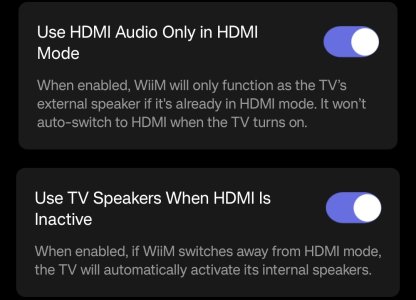
Yes. Just don't enabled the new options.

1000005647.jpg

The names and description is a bit hard to understand but it works ok.

"HDMI mode" means that HDMI ARC input is selected.

"HDMI Audio" is TV sound via HDMI ARC.
 
Last edited:
"Sync Main Speakers & Sub: Align main speakers and subwoofer for the listening position using the phone’s microphone (requires an upcoming beta firmware update)."

I tho we gonna have it this release 😅
 
"Sync Main Speakers & Sub: Align main speakers and subwoofer for the listening position using the phone’s microphone (requires an upcoming beta firmware update)."

I tho we gonna have it this release 😅
Well it does say beta firmware. Upcoming is a bit vague.🙂
 
Back
Top