

We're excited to announce a new update to the WiiM Home TV App for Android TV and Fire TV!
Here's what's new:
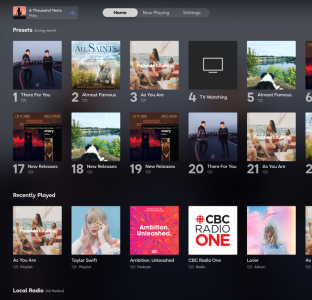
 New: Home Page The biggest addition in this update is the all-new Home page, giving you quick access to your favorite content right from the moment you open the app. From the Home page you can browse:
(Home page support for Apple TV is coming soon!)
 Improved Playback Screen
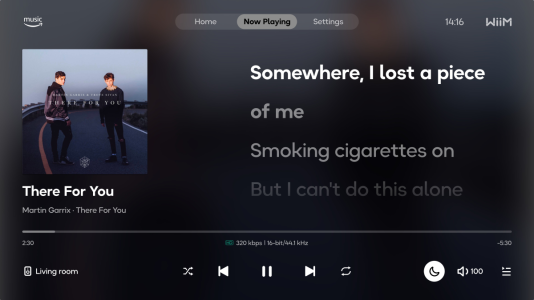
When lyrics aren't available for the currently playing track, the Now Playing screen now displays a large album cover for a cleaner, more immersive visual experience.
 Better Focus Handling
We've made improvements to focus management across the app to reduce instances of focus loss — making navigation with your TV remote smoother and more reliable.
 To learn more about everything the WiiM Home TV App has to offer, check out our full guide here.
Update your app today and bring your listening experience to the big screen!

Here's what's new:
New: Home Page The biggest addition in this update is the all-new Home page, giving you quick access to your favorite content right from the moment you open the app. From the Home page you can browse:- Presets – Your saved stations and playlists, ready for instant playback
- Recently Played – Jump back into what you were listening to
- Local Radio – Explore stations in your region
- Popular Music Stations – Browse what's trending
- BBC Radio – A curated selection of BBC broadcasts
(Home page support for Apple TV is coming soon!)
Improved Playback ScreenWhen lyrics aren't available for the currently playing track, the Now Playing screen now displays a large album cover for a cleaner, more immersive visual experience.
Better Focus HandlingWe've made improvements to focus management across the app to reduce instances of focus loss — making navigation with your TV remote smoother and more reliable.
To learn more about everything the WiiM Home TV App has to offer, check out our full guide here.Update your app today and bring your listening experience to the big screen!


