WiiM Home App v1.12 Update for Apple, Android, and Fire TV – Dec 1, 2025

Please review the Android & Fire TV app update release notes below. If you encounter any issues, feel free to reach out to us.

The Fire TV version is currently under review.

What's New:

1. Added a toggle for Lyrics Display and new Player Style options.
2. Added support for EQ, input, and output selection.
3. Introduced a new Vinyl-Style Cover view (selectable in Settings).
 
Did Night Mode used to completely remove the background image, or just make it darker?
 
All of these are working as you would expect on the Fire TV version.
I just chose the far right option (3 dots) and my cursor is back :)
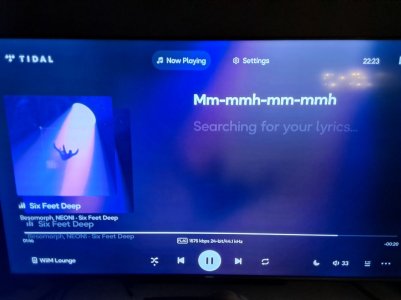
But I have the constant 'Searching for your lyrics' and night mode issue again. :(
Switching night mode on / off was making this text appear / disappear. But now it's always there!
And now night mode is blackening the background properly again, whereas a few mins ago it simply reduced the brightness of the background image.
It's a bit flaky!!
 
Last edited:
Here we go, Night Mode on, background image shown.
Searching for lyrics shown.
Two track titles shown.

Six Feet Deep seemed appropriate.
It's probably where this app should be :ROFLMAO:
(Harsh, but fair!)

Edit: it stayed like this for a couple of tracks, then I disabled night mode.
Searching for lyrics disappeared and the dual album art etc. is back to normal.
Turn night mode on again and both come back straight away.


1000000700.jpg
 
Last edited:
On v1.12 I find the "cursor" (can't think of a better word) disappears.
i.e. I can move left/right and up/down but the currently selected item doesn't get highlighted.
The active icon definitely changes with my button pushes. e.g. I just pushed the 'centre' button and night mode activated.
If I press left 3 times then the centre the music pauses. Press left 3 more then centre and the device list pops up.
So it works, but it's a bit of a lucky dip if you don't keep track of what was last pressed.
My Google TV works fine too.
 
Nice update.
What actually the "Now Playing" button does?
It seems to be inert.
On the Now Playing screen it does seem strange that pressing up takes you to Now Playing so you have to also press right to get to Settings.
Press down, takes you to the progress bar.
Press up - where would you prefer / expect to be, Now Playing or Settings?
Tough, it highlights Now Playing.
 
I tested this on AppleTV and everything works very well*. Always on "Detailed View" is an useful add-on, new "vinyl" player style I do not find visually appealing (but it is a matter of personal taste) and input / output management is great as makes the app much closer to perfect TV companion app.

Now it would be a good time to also add Presets selection - then one could routinely operate WiiM almost entirely from the TV level (safe for creating presets / searching music in streaming services). I think that @WiiM Team (quite a while ago) mentioned that they were working on this - I hope this could be added some time soon (does not seem to be very difficult - just adding third icon in top row, or - as minimum - additional section in "..." menu?).

Overall great job and I am very pleased that @WiiM Team does not stop to develop / improve this.

* and please DO NOT resign from "jumping bars" playback indication - it is actually very useful as quickly shows if something is actually playing (or not).
 
Back
Top