4.0 system

Lucakat

New member
Joined
Dec 9, 2025
Messages
3
Good morning, let me introduce myself: my name is Luca and I recently purchased a Wiim Amp and a Wiim Amp Pro. The Pro drives two 3-way speakers with a 10" subwoofer (Indiana Line Utah 5).
This choice was made to avoid having a separate subwoofer in my environment since I don’t have the space for it. I connected the two devices to create a TV surround system with two additional rear speakers using the secondary Wiim Amp.

My question is the following: can I route the subwoofer output of a 5.1 system to the front speakers? I see that in the app there is an option, but only if a subwoofer is connected.

Thank you,

Luca
 
Good morning, let me introduce myself: my name is Luca and I recently purchased a Wiim Amp and a Wiim Amp Pro. The Pro drives two 3-way speakers with a 10" subwoofer (Indiana Line Utah 5).
This choice was made to avoid having a separate subwoofer in my environment since I don’t have the space for it. I connected the two devices to create a TV surround system with two additional rear speakers using the secondary Wiim Amp.

My question is the following: can I route the subwoofer output of a 5.1 system to the front speakers? I see that in the app there is an option, but only if a subwoofer is connected.

Thank you,

Luca
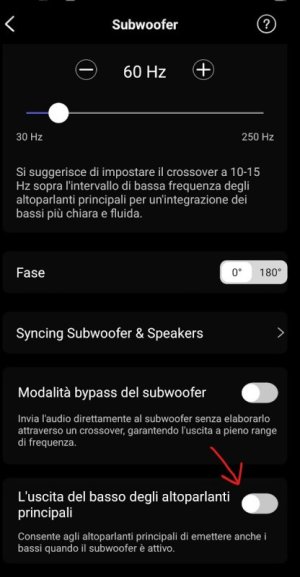
WiiMs do not do downmixing of LFE channel to the other channels.

-Ed
 
Thank you. So, this option should only be enabled if there is a woofer; otherwise, it shouldn’t.

Immagine 2025-12-10 165035.jpg

That’s a problem for me, I can’t use the product if it has this limitation.
 
Thank you. So, this option should only be enabled if there is a woofer; otherwise, it shouldn’t.

View attachment 30765

That’s a problem for me, I can’t use the product if it has this limitation.
This setting simply disables the high-pass filter of the main speakers when enabling subwoofer output, allowing the speakers to play full range.

-Ed
 
Thank you. So, this option should only be enabled if there is a woofer; otherwise, it shouldn’t.

View attachment 30765

That’s a problem for me, I can’t use the product if it has this limitation.
Have a look at this

And the setup instructions here:

So you will need the Subwoofer.
LFE is typically very low frequency effects, so a normal speaker will not be of any use anyway.
 
Last edited:
This setting simply disables the high-pass filter of the main speakers when enabling subwoofer output, allowing the speakers to play full range.
I haven't tried it myself (and I'm not interested) but couldn't this be exactly the solution @Lucakat is after?

  1. Enable the subwoofer to trick the WiiM Home App into thinking that you do have a subwoofer. This should enable the routing of the LFE to the subwoofer output. No downmixing required, since there appears to be a 4.1 system.
  2. Enable "Main Speakers Output Bass" (L'uscita del basso degli altoparlanti principali) to actually route all bass frequencies (hopefull including the LFE channel) to the main speakers.
There would finally be a good use case for this setting. ;)

@Lucakat, I'm not sure if this will or will not work. There are several reasons why it may not. But I think it's worth a try. If you decide to give it a go, set the crossover frequency to 250 Hz instead of 60 Hz. If it really works, the crossover frequency shouldn't make a difference anyway. If it doesn't work you will notice this straight away at 250 Hz, but maybe not at 60 Hz.

Surround sound test tracks which explicitly check the LFE are available from various sources.
 
Good morning, let me introduce myself: my name is Luca and I recently purchased a Wiim Amp and a Wiim Amp Pro. The Pro drives two 3-way speakers with a 10" subwoofer (Indiana Line Utah 5).
This choice was made to avoid having a separate subwoofer in my environment since I don’t have the space for it. I connected the two devices to create a TV surround system with two additional rear speakers using the secondary Wiim Amp.

My question is the following: can I route the subwoofer output of a 5.1 system to the front speakers? I see that in the app there is an option, but only if a subwoofer is connected.

Thank you,

Luca

Just buy a AVR
 
Instead of two boxes and the faff with that, and not working .1 lfe just use a AVRPlus have proper sound decoding, Pro-Logic and it's varients (now called DSU) DTS, Dolby Digital, Dolby HD, DTS HD Master, DTS X, Atmos

I have a Wiim product it's great, but for anything multi channel or bitstream codecs from movies/TV shows- get a AVR. I have a AVR & Home cinema system plus stereo systems

Using Wiim product or stereo product to bodge something together...lol
 
Instead of two boxes and the faff with that, and not working .1 lfe just use a AVRPlus have proper sound decoding, Pro-Logic and it's varients (now called DSU) DTS, Dolby Digital, Dolby HD, DTS HD Master, DTS X, Atmos

I have a Wiim product it's great, but for anything multi channel or bitstream codecs from movies/TV shows- get a AVR. I have a AVR & Home cinema system plus stereo systems

Using Wiim product or stereo product to bodge something together...lol
Please link to specific product; I am interested in learning more and searching just for the phrase avrplus is fruitless.

-Ed
 
Please link to specific product; I am interested in learning more and searching just for the phrase avrplus is fruitless.

-Ed


AVR's they're pretty standard.
 

AVR's they're pretty standard.
You confused me with the exact term, “avrplus,” making me think there’s an inexpensive surround sound decoder with line level multichannel outputs, a LFE downmix function, and zero amplifiers built in. The world needs this. Not everyone wants to spend several hundred to over a thousand dollars for a full AVR.

I went searching for AVRPlus thinking somebody had made and was selling such a thing.

-Ed
 
You confused me with the exact term, “avrplus,” making me think there’s an inexpensive surround sound decoder with line level multichannel outputs, a LFE downmix function, and zero amplifiers built in. The world needs this. Not everyone wants to spend several hundred to over a thousand dollars for a full AVR.

I went searching for AVRPlus thinking somebody had made and was selling such a thing.

-Ed

it missed the space after the avr.

surround decoders do exist, but they aren't cheap- in fact typically more expensive than AVR's. One of the more affordable ones are Tonewinner, I have a Tonewinner AT-300. They've just released a new version of it, AT-500. About £1200.

Basically it's a AVR with no amplification stages built in

If you only need optical/coaxial you could look at a older av pre amp, I've got a Lexicon MC-8 and for multi channel to stereo downmixing that will be great, and the Logic 7 music DSP is fantastic for music
 
it missed the space after the avr.

surround decoders do exist, but they aren't cheap- in fact typically more expensive than AVR's. One of the more affordable ones are Tonewinner, I have a Tonewinner AT-300. They've just released a new version of it, AT-500. About £1200.

Basically it's a AVR with no amplification stages built in

If you only need optical/coaxial you could look at a older av pre amp, I've got a Lexicon MC-8 and for multi channel to stereo downmixing that will be great, and the Logic 7 music DSP is fantastic for music
Do you have more tips for @Lucakat how to best sell the Wiim Amp and a Wiim Amp Pro or how the second hand market is for AVRs in Italy?
😇
 
Do you have more tips for @Lucakat how to best sell the Wiim Amp and a Wiim Amp Pro or how the second hand market is for AVRs in Italy?
😇

Use his two wiim products as stereo products, then get a AVR for a stereo/multi-channel -downmix Video sources to get the .1 lfe mix
 
Hi, unfortunately I tried this setup as well but without success. On top of that, I don’t consider the lip‑sync acceptable at 70 milliseconds, so I had to return the product. It just wasn’t suitable for my specific use case.
I haven't tried it myself (and I'm not interested) but couldn't this be exactly the solution @Lucakat is after?

  1. Enable the subwoofer to trick the WiiM Home App into thinking that you do have a subwoofer. This should enable the routing of the LFE to the subwoofer output. No downmixing required, since there appears to be a 4.1 system.
  2. Enable "Main Speakers Output Bass" (L'uscita del basso degli altoparlanti principali) to actually route all bass frequencies (hopefull including the LFE channel) to the main speakers.
There would finally be a good use case for this setting. ;)

@Lucakat, I'm not sure if this will or will not work. There are several reasons why it may not. But I think it's worth a try. If you decide to give it a go, set the crossover frequency to 250 Hz instead of 60 Hz. If it really works, the crossover frequency shouldn't make a difference anyway. If it doesn't work you will notice this straight away at 250 Hz, but maybe not at 60 Hz.

Surround sound test tracks which explicitly check the LFE are available from various sources.
 
Hi, unfortunately I tried this setup as well but without success. On top of that, I don’t consider the lip‑sync acceptable at 70 milliseconds, so I had to return the product. It just wasn’t suitable for my specific use case.

Modern AVR's have a lot better lip sync feature with HDMI it's part of the HDMI spec (and improved with HDMI 2.0)
 
Back
Top