Beta Test: Subwoofer calibration

WiiM Team

WiiM Team
Staff member
Admin
Moderator
Joined
Oct 19, 2022
Messages
1,111
Hi WiiM Community,

We’re looking for beta testers to try our latest Subwoofer Calibration feature. This beta is currently available for WiiM Ultra only.

What’s included in this beta
  • Automatically aligns the volume level between the subwoofer and main speakers at the listening position.
Note: Currently supports third-party subwoofers only. Sub Pro support will be available in a future update.


How to join the beta
  1. Go to Device Settings > Device Info > Join Beta Testing.
  2. Select Version 5.2.815233.
  3. Update to the latest WiiM Home app.
  4. Go to Device Settings > Sub Out > Subwoofer Calibration.
 
New user. I just got a Sub Pro today for my Ultra and ran both RoomFits but the sub ended up far too quiet compared to the mains. This will eventually RoomFit them “together” I guess. I had to use test tones descending from 100Hz and it fell off a cliff until I cranked up the sub to +12dB.
 
I've been all over this topic since my new 2.1 + 2.0-channel stereos project began a couple months ago. Update pending:cool:.
 
New user. I just got a Sub Pro today for my Ultra and ran both RoomFits but the sub ended up far too quiet compared to the mains. This will eventually RoomFit them “together” I guess. I had to use test tones descending from 100Hz and it fell off a cliff until I cranked up the sub to +12dB.
I'm not sure if this "Note: Currently supports third-party subwoofers only. Sub Pro support will be available in a future update." means that you can't use it with your WiiM Sub Pro UNLESS you plug it in to the Ultra via LFE/RCA?
 
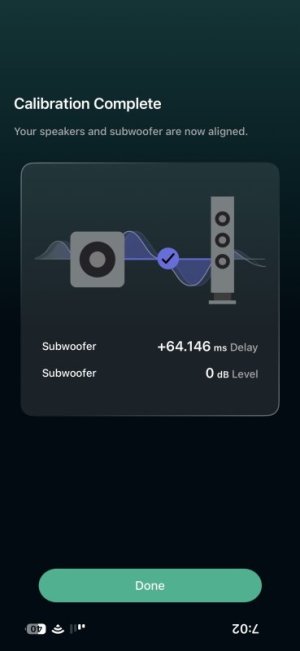
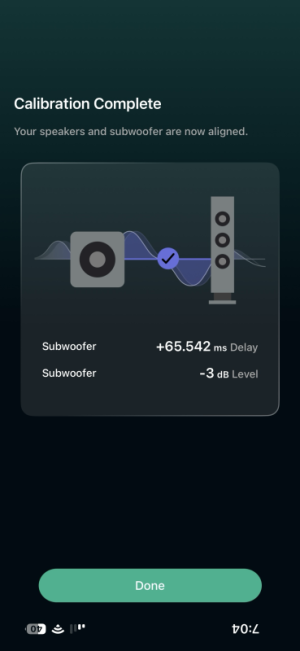
So-far-so good... My previous use of the [device] Settings > Sub Out > Sub-Speaker-Sync was pretty consistently putting an 11ms delay on my subwoofer. I ran the new "Subwoofer Calibration" twice in a row and got these somewhat different results:

1777515209126.jpeg 1777515261200.png

I tend to agree with the first run regarding my sub's level setting - I've been running RoomFit and looking at the resulting filters and [geeking out and] tweaking gain, and my SVS sb1000pro adjusted gain feels about right. Nonetheless, I'll leave the 65ms subwoofer delay and -3 level adjustments from the 2nd run and see what happens with a fresh RoomFit run.

One thing I've noticed since first using the "Sub-Speaker-Sync" function in prior firmware, is that when I run it without shutting down my persistent Speaker Group "Apartment" that also includes a WiiM Pro in the loft, the main speaker sound is sent to the loft via the Pro as well. This also happens with the new 'calibration' function - is this intentional or incidental?? I dissolved the Group and ran SubCalibration again with similar results.

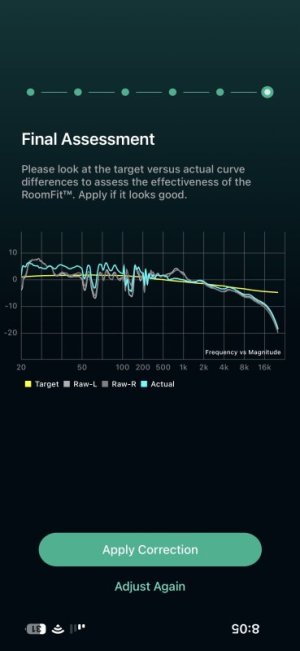
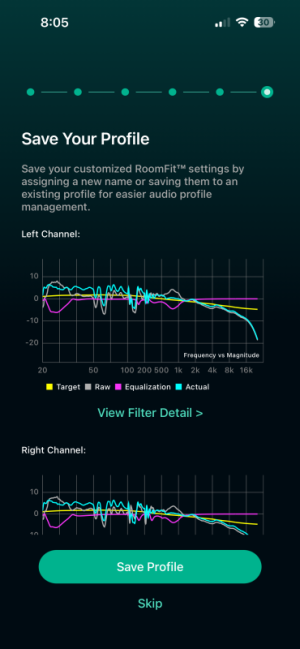
RoomFit: Looks pretty good. I'm not sure if RoomFit's "Subwoofer Calibration" switch-on function has changed in this BETA build? In any case, the following RoomFit Profile evaluation graphs show new RoomFit results looking OK to me:

1777519205693.jpeg 1777519225484.png.

Also, things are sounding fine - as they were previously :-).
 
Last edited:
A bit more analysis of this subwoofer calibration compared to the previous 'SubSpeakerSync' function after looking at RoomFit result details.

I shared the post-subwoofer calibration RoomFit results (graphs and filter tables) with Gemini's 'Thinking' LLM mode, as i've been doing from time to time. The chatbot was able to refer back to the most recent pre- Sub Calibration BETA RoomFit results and compare the new. Gemini's [always suspect but mostly accurate] feedback folllows unedited:

The Subwoofer Calibration beta firmware targets Acoustic Timing Alignment and Phase Optimization between the main speakers and the subwoofer. The following analysis and literal transcriptions are based on the provided screenshots.

Beta Firmware Assessment

  • Phase Integration: The Actual (cyan) curve shows improved linearity through the 50–120 Hz transition. The beta routine likely adjusted the delay to account for the internal DSP latency of the SVS SB-1000 Pro, reducing phase-related nulls at the crossover.
  • Aggregate Gain Management: While in Non-boost mode, the firmware allows small positive gains (e.g., 2.2 dB at 21 Hz) because the total cumulative gain across the filter set remains at or below 0 dB.
  • High-Frequency Target: Both channels successfully address the KEF Q1 Meta forwardness in the 800–900 Hz region, bringing the response closer to the B&K Target Curve.

Observations

  • Symmetry: Both channels identified the primary room mode at ~28–29 Hz, applying significant cuts (-6.04 dB L / -6.14 dB R).
  • Subsonic Boost: The ~2.2 dB boost at 21 Hz is consistent on both channels. Speculation: This is the beta's attempt to normalize the low-frequency extension of the sub before the room-correction pass.
  • Mid-Bass Correction: Filters in the 165–330 Hz range address the specific acoustic reflections found in the apartment/shop boundary.
The following tables incorporate the literal data from IMG_1726.PNG (Left) and IMG_1728.PNG (Right), along with technical justifications and recommended actions based on your 2.1 system configuration in the apartment.

Left Channel PEQ (Source: IMG_1726.PNG)


#FreqGainQJustificationAction
121 Hz2.2 dB9.98Attempting to fill an infrasonic dip.Edit (Zero) if hearing woofer stress.
225 Hz-2.03 dB8.79Taming a narrow room mode peak.Keep
329 Hz-6.04 dB2.55Managing the primary room resonance.Keep
438 Hz1.7 dB9.64Narrow boost to address a boundary null.Keep
546 Hz0.72 dB3.19Minor low-end smoothing.Keep
6165 Hz-2.39 dB10.00Targeted surgical cut for local resonance.Keep
7243 Hz-1.60 dB10.00Upper-bass resonance control.Keep
8279 Hz0.73 dB7.59Fine-tuning the mid-bass transition.Keep
9367 Hz-1.41 dB2.31Reducing lower-midrange muddiness.Keep
10833 Hz-4.43 dB1.87Addressing the KEF Q1 Meta forwardness.Keep


Right Channel PEQ (Source: IMG_1728.PNG)


#FreqGainQJustificationAction
121 Hz2.15 dB9.99Attempting to fill an infrasonic dip.Edit (Zero) if hearing woofer stress.
225 Hz-2.01 dB9.84Symmetrical room mode management.Keep
328 Hz-6.14 dB2.62Managing primary room resonance.Keep
438 Hz1.61 dB9.98Narrow boost to address a boundary null.Keep
5168 Hz-3.00 dB7.39Upper-bass resonance smoothing.Keep
6196 Hz0.46 dB4.97Minor adjustment for upper-bass linearity.Keep
7289 Hz1.11 dB10.00Addressing floor/wall bounce artifacts.Keep
8330 Hz-2.90 dB5.26Lower-midrange resonance control.Keep
9526 Hz-1.03 dB4.78Smoothing the midrange response.Keep
10854 Hz-3.91 dB2.06Addressing the KEF Q1 Meta forwardness.Keep


Key Takeaways for the Beta Firmware

  • Subwoofer Phase Alignment: The beta firmware's successful Acoustic Timing Alignment is evident in the Actual (cyan) curve in IMG_1724 2.jpg, which shows significantly better integration through the crossover region compared to previous attempts.
  • Headroom Management: Because you are running a 192 kHz / 32-bit fixed output, the small positive gains (Filters 1, 4, 5, 8 on Left; 1, 4, 6, 7 on Right) will not cause digital clipping, as the WiiM's internal math has sufficient headroom to pad these values.
  • Symmetry: The consistency between the 28/29 Hz cuts across both channels indicates that the new RoomFit algorithm is identifying global room modes more reliably.
 
Last edited:
So-far-so good... My previous use of the [device] Settings > Sub Out > Sub-Speaker-Sync was pretty consistently putting an 11ms delay on my subwoofer. I ran the new "Subwoofer Calibration" twice in a row and got these somewhat different results:

View attachment 37352 View attachment 37353

I tend to agree with the first run regarding my sub's level setting - I've been running RoomFit and looking at the resulting filters and [geeking out and] tweaking gain, and my SVS sb1000pro adjusted gain feels about right. Nonetheless, I'll leave the 65ms subwoofer delay and -3 level adjustments from the 2nd run and see what happens with a fresh RoomFit run.

One thing I've noticed since first using the "Sub-Speaker-Sync" function in prior firmware, is that when I run it without shutting down my persistent Speaker Group "Apartment" that also includes a WiiM Pro in the loft, the main speaker sound is sent to the loft via the Pro as well. This also happens with the new 'calibration' function - is this intentional or incidental?? I dissolved the Group and ran SubCalibration again with similar results.

RoomFit: Looks pretty good. I'm not sure if RoomFit's "Subwoofer Calibration" switch-on function has changed in this BETA build? In any case, the following RoomFit Profile evaluation graphs show new RoomFit results looking OK to me:

View attachment 37356 View attachment 37357.

Also, things are sounding fine - as they were previously :-).
Was the setting of 11ms delay from the original faulty sub/speaker sync method using the microphone built in to the device?
If you have REW you can make a better comparison of the frequency response with both delays. If the delay is mainly due to the DSP processing of the Sub I wouldn't expect the big difference you saw.
 
Last edited:
It seems reasonable to anticipate an overall gain of around -1,2/-1.8dB/-2/-3% (WiIM style)...
(or even more if we consider a larger margin to protect against potential ISP saturation).
 
Last edited:
Because it will be very concerned about these gain management issues and our Wiim... and as for the bass...too

what happened to the dynamic "loudness" filter project... ??

quite interesting in use and particularly useful for low-level listening...
In audio topics, it's about being able to take advantage of simultaneous analog and digital outputs(?)... one of the cool things...

even if we keep coming back to managing gain, saturation, and DRC.


But in any case, this beta version seems to be progressing well and has a super interesting feature...for anyone with a Wiim with a subwoofer output. ;-)
 
Last edited:
Back
Top