Connecting Wiim Ultra to Ruark MRX speakers

Benzo

New Member
Joined
Mar 10, 2026
Messages
12
I am having difficulty connecting my new WIIM Ultra to 2x Ruark MRX speakers - I am using 2 RCA to 3.5mm jacks (each from rear of Ultra to rear of speaker), switching Ultra to line out - but doesn’t work at all.

Speakers work OK with Bluetooth but I want to connect by cable.

To be honest, the Ruark speakers have always been a pain so it doesn’t surprise me they are not working now - I had hoped that wiring them to a WIIM Iltra would make them more obedient!

Any thoughts?

Thanks
 
I am having difficulty connecting my new WIIM Ultra to 2x Ruark MRX speakers - I am using 2 RCA to 3.5mm jacks (each from rear of Ultra to rear of speaker), switching Ultra to line out - but doesn’t work at all.

Speakers work OK with Bluetooth but I want to connect by cable.

To be honest, the Ruark speakers have always been a pain so it doesn’t surprise me they are not working now - I had hoped that wiring them to a WIIM Iltra would make them more obedient!

Any thoughts?

Thanks
Hi
Will sound play when connecting the Ultra to a single Ruark MRX? Is the Ruark MRX input set to AUX?

The Ruark MRX's AUX-IN appears to be a combined optical and analog jack. If sound still doesn't play with the above connection, you might try using the included optical adapter with the Ruark MRX and testing the Ultra's optical output. However, connecting two Ruark MRX units requires a splitter, and stereo playback is not possible.
 
I am having difficulty connecting my new WIIM Ultra to 2x Ruark MRX speakers - I am using 2 RCA to 3.5mm jacks (each from rear of Ultra to rear of speaker), switching Ultra to line out - but doesn’t work at all.
@Wiimer and @Valentino have already mentioned the mandatory AUX IN source switch (solid amber) on the MRX. Also try setting one speaker to "left" and the other to "right". This might or might not make a difference when using the aux input, the manual doesn't mention this.

Can you post a picture of your RCA to 3.5 mm jacks? There could be a hidden catch.
 
Thanks all - great ideas but no luck yet.

On the Ruark MRX - have set both speakers on Aux in. It says “Aux in / Optical” at the back and that is where the 3.5mm jack has gone.

Ruark also has its own app called “undok” which is pretty useless - I have set up both the speakers on this and set the source to “Aux in”.

I have plugged the other end of the RCA to 3.5mm cable into the Wiim Ultra - one for the left speaker, one for the right speaker - and have set the source on the Wiim to Spotify going to “Line out”.

I have tried it with one speaker connected this way too, but nothing works.

If I switch to Bluetooth, I can connect one speaker at a time and it does work.

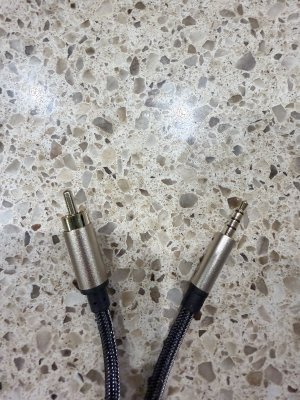
Have attached a photo of the cable in case I have the wrong one.

Ah yes, speakers are set to left and right at the back - have also tried mono and stereo but no signal seems to be going through the cable.

Any thoughts gratefully received!

Thanks
 

Attachments

  • IMG_2558.jpeg
    IMG_2558.jpeg
    257 KB · Views: 13
Thanks all - great ideas but no luck yet.

On the Ruark MRX - have set both speakers on Aux in. It says “Aux in / Optical” at the back and that is where the 3.5mm jack has gone.

Ruark also has its own app called “undok” which is pretty useless - I have set up both the speakers on this and set the source to “Aux in”.

I have plugged the other end of the RCA to 3.5mm cable into the Wiim Ultra - one for the left speaker, one for the right speaker - and have set the source on the Wiim to Spotify going to “Line out”.

I have tried it with one speaker connected this way too, but nothing works.

If I switch to Bluetooth, I can connect one speaker at a time and it does work.

Have attached a photo of the cable in case I have the wrong one.

Ah yes, speakers are set to left and right at the back - have also tried mono and stereo but no signal seems to be going through the cable.

Any thoughts gratefully received!

Thanks
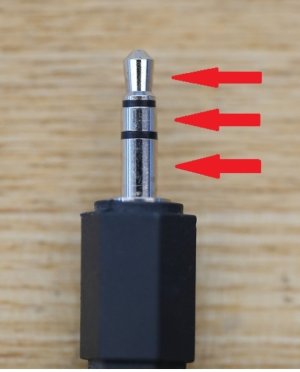
That cable might be a 4-pole type, which is why you're not getting any sound. You'll need either a mono cable with a single black wire at the tip of the 3.5mm plug, or a 3-pole cable with two wires. If I'm wrong, @harkpabst will correct me. Look for a 4-pole to 3-pole (or 2-pole) adapter plug on Amazon.
 
@Wiimer and @Valentino have already mentioned the mandatory AUX IN source switch (solid amber) on the MRX. Also try setting one speaker to "left" and the other to "right". This might or might not make a difference when using the aux input, the manual doesn't mention this.

Can you post a picture of your RCA to 3.5 mm jacks? There could be a hidden catch.
Hi Harkpabst

I think your suggestion of a closer look at the cable may be significant.

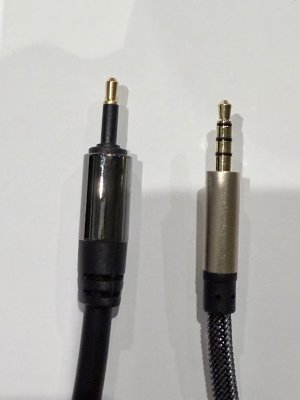
I tried an optical lead to connect to the same aux in/optical slot on the back of the Ruark MRX and it worked - but only one optical slot on the back of the Ultra so wouldn’t be an option for both speakers.

What I noticed however was that the plug on the optical cable is different to the 3.5mm plug I was using - another photo attached. So maybe this is the problem? Optical plug on the left, 3.5mm plug on the right.
 

Attachments

  • IMG_2559.jpeg
    IMG_2559.jpeg
    94.8 KB · Views: 12
I have plugged the other end of the RCA to 3.5mm cable into the Wiim Ultra - one for the left speaker, one for the right speaker - and have set the source on the Wiim to Spotify going to “Line out”.

I have tried it with one speaker connected this way too, but nothing works.
This is not how it works. You need a single-3.5mm to double-RCA cable and only connect that to one speaker. The connection between the speakers in order to make them a stereo pair will have to be established via your wifi network.

But you‘d be better off uding a figital optical cable anyway. Anything that comes into the Ruaks will be digitized anyway.
In any case, connect your WiiM to ONE speaker only.
 
From my memory and results from AI
A 4-pole (TRRS) 3.5mm jack is primarily used to transmit stereo audio and microphone signals simultaneously, commonly found on headsets, gaming controllers, and smartphones. It enables hands-free calling, voice chat, and, in some cases, composite video, utilizing Tip-Ring-Ring-Sleeve (TRRS) wiring for four distinct connections.
 
This is not how it works. You need a single-3.5mm to double-RCA cable and only connect that to one speaker. The connection between the speakers in order to make them a stereo pair will have to be established via your wifi network.

But you‘d be better off uding a figital optical cable anyway. Anything that comes into the Ruaks will be digitized anyway.
In any case, connect your WiiM to ONE speaker only.
Thanks Aquaman
I have connected the optical cable and that works perfectly fo the one speaker. The trouble I ja e had over the years with the Ruark speakers is that pairing them through the network has been consistently unreliable - one speaker fading in and out or cutting out completely. So I’m really hoping I can wire in both speakers. Hopefully a different cable will do the trick….
 
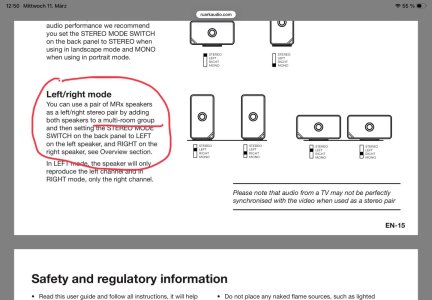
From the speakers‘ manual.

View attachment 35096
Thanks for that - but the multiroom group is hopeless for left and right speakers - Undok is the app which is pretty bad, but the stability of the setup is useless. Have been in touch with Ruark over the years with Jo joy and have tried multiple factory resets and other approaches to no avail. I was really hoping the Ultra would solve that with 2 wired channels
 
Thanks Aquaman
I have connected the optical cable and that works perfectly fo the one speaker. The trouble I ja e had over the years with the Ruark speakers is that pairing them through the network has been consistently unreliable - one speaker fading in and out or cutting out completely. So I’m really hoping I can wire in both speakers. Hopefully a different cable will do the trick….
I see. Good luck then. Please let us know if you get it working that way.
 
I see. Good luck then. Please let us know if you get it working that way.
Certainly will and thanks for your help!

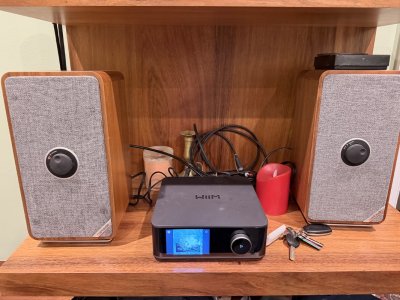
Attached photo shows the issue - one speaker on Aux in and the other speaker connected through network. Should work but is pretty useless. Has really put me off wireless speakers though maybe it is just a Ruark thing.
 

Attachments

  • IMG_2560.jpeg
    IMG_2560.jpeg
    328.7 KB · Views: 11
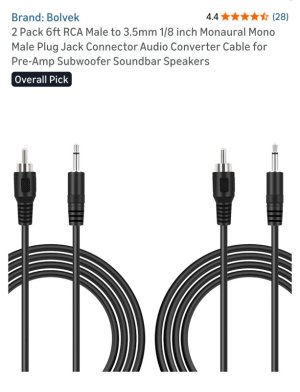
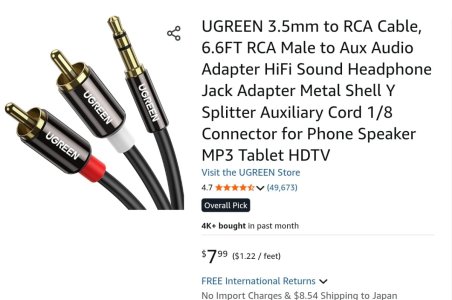
Do you have two cables like this?
1723.jpg
If so, connect only one end of the RCA plug to the Ultra's Line-out, and you can play audio through two speakers.
(Insulate the other RCA plug.)
 
Back
Top