
First attempt to use RoomFit followed by REW measurement

PaintItBlack

Member
Joined
Nov 26, 2025
Messages
40
This afternoon I decided to try REW for the first time, after using RoomFit with a fixed position and separate channels, using a UMIK-1 as the microphone. The frequency range for RoomFit was 41–8000 Hz. Unfortunately, I forgot to capture screenshots of the results from the RoomFit evaluation on the phone, but it didn’t show anything remarkable, and I assume REW can perform a similar evaluation as well.

My setup consists of the WAU and Dynaudio Focus 140 bookshelf speakers. To generate the test signal in REW, I used a Schiit Magni DAC connected to the laptop via USB, and then from the DAC’s RCA outputs to the Line Input of the WAU (24/192 selected). In REW, however, the sample rate was set to 16-bit/48 kHz with a 512K sweep. I suppose a better solution would be to use a TOSLINK connection between the laptop and the WAU, but I don’t have that option available.

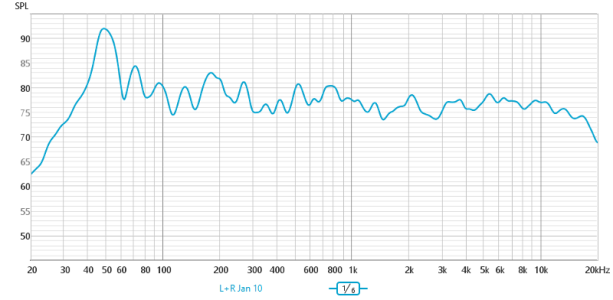
The uncorrected frequency measurement (smoothed to 1/6 octave) is shown below:
beforeRoomFit.png
I guess the boomy bass is due to the proximity to the wall (35 cm), but I think that, as a starting point, the result is not that bad. What do you think?
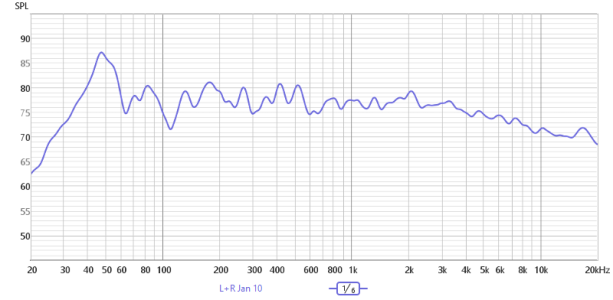
After performing RoomFit (target was Harman), a listening test reveals only subtle differences. Measuring again in REW confirms that the result is different, but more or less the same shape.
AfterRoomFit.png

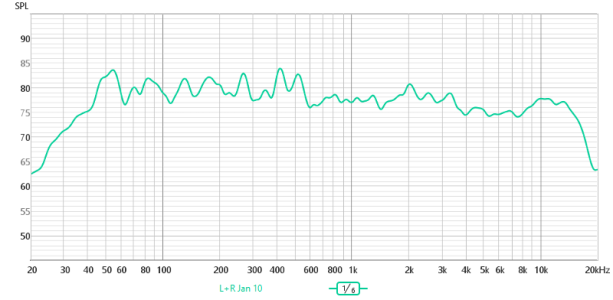
Finally I used the PEQ of WAU to try to correct a bit some of the biggest peaks and valleys (like that around 40 and 100 Hz) to get a flatter response but with a certain fall for high frequencies like in the Harman curve.
AfterRoomFitandTweaking.png

There is a big fall beyond 13 Khz that was not there before tweaking, but I guess that at 50+ I'm completely deaf for those frequencies. What do you think of these results ? Is there room for noticeable improvements ?
 
This afternoon I decided to try REW for the first time, after using RoomFit with a fixed position and separate channels, using a UMIK-1 as the microphone. The frequency range for RoomFit was 41–8000 Hz. Unfortunately, I forgot to capture screenshots of the results from the RoomFit evaluation on the phone, but it didn’t show anything remarkable, and I assume REW can perform a similar evaluation as well.

My setup consists of the WAU and Dynaudio Focus 140 bookshelf speakers. To generate the test signal in REW, I used a Schiit Magni DAC connected to the laptop via USB, and then from the DAC’s RCA outputs to the Line Input of the WAU (24/192 selected). In REW, however, the sample rate was set to 16-bit/48 kHz with a 512K sweep. I suppose a better solution would be to use a TOSLINK connection between the laptop and the WAU, but I don’t have that option available.

The uncorrected frequency measurement (smoothed to 1/6 octave) is shown below:

View attachment 32268
I guess the boomy bass is due to the proximity to the wall (35 cm), but I think that, as a starting point, the result is not that bad. What do you think?
After performing RoomFit (target was Harman), a listening test reveals only subtle differences. Measuring again in REW confirms that the result is different, but more or less the same shape.

View attachment 32269

Finally I used the PEQ of WAU to try to correct a bit some of the biggest peaks and valleys (like that around 40 and 100 Hz) to get a flatter response but with a certain fall for high frequencies like in the Harman curve.

View attachment 32270

There is a big fall beyond 13 Khz that was not there before tweaking, but I guess that at 50+ I'm completely deaf for those frequencies. What do you think of these results ? Is there room for noticeable improvements ?
If you don't like the Harman target you can try B&K. It doesn't have as much bass boost.
 
Actually, the Harman target is fine for me. What I don’t know is whether my results after correction are good enough, or if they can be improved using different settings of RoomFit
With the B&K target you probably wouldn't need to adjust the PEQ afterwards. Maybe limit the correction to 300-400Hz as well. Getting the best results from room correction involves a lot of trial and error.
 
In my opinion the REW graph showing the RoomFit result is not the best possible result.

You should correct for a smaller frequency range (like 20 Hz to 500 Hz max). Did you import the appropriate UMIK-1 calibration file (0 deg or 90 deg) in the WiiM Home App and in REW?.Did you make sure the calibration file has been used for all measurements?

Did you perform a stereo correction (both channels driven at the same time)? This could explain differences between measurements in the highest octave if the microphone position varies slightly. I would go for independent left and right correction.

OTOH even the uncorrected measurements is pretty good already for an in-room response. You might want to apply 1/12 octave smoothing instead of 1/6 octave to see a more detailed representation.
 
In my opinion the REW graph showing the RoomFit result is not the best possible result.

You should correct for a smaller frequency range (like 20 Hz to 500 Hz max). Did you import the appropriate UMIK-1 calibration file (0 deg or 90 deg) in the WiiM Home App and in REW?.Did you make sure the calibration file has been used for all measurements?

Did you perform a stereo correction (both channels driven at the same time)? This could explain differences between measurements in the highest octave if the microphone position varies slightly. I would go for independent left and right correction.

OTOH even the uncorrected measurements is pretty good already for an in-room response. You might want to apply 1/12 octave smoothing instead of 1/6 octave to see a more detailed representation.
Yes, the calibration file downloaded from MiniDSP was used, and RoomFit was performed with separate sweeps for the L and R channels. If I use 1/12-octave smoothing, would that change the results of RoomFit? In other words, does this smoothing affect the filter calculations or just the visualization?

Tomorrow I will try using RoomFit only for 20–500 Hz and post the results. And yes, I didn’t expect these pretty good results. My room is 6 × 3.2 meters, but the speakers and listening point are along the shortest dimension, giving a listening distance of 2.4 meters, with a wall right behind the listening point and other only 35 cm from the rear port of the speakers. It has hard floors and no carpets, but it is cluttered with furniture, which I guess helps. I was expecting much, much worse results.
 
After reading, over time, all the advice provided in the posts on this topic on the forum, this is essentially what I did (leaving out some minor details):
  1. Initially disable all types of equalization on the WiiM.
  2. Run RoomFit in MMM mode for the two channels separately, from 30 Hz to 500 Hz.
  3. Measure the frequency response of the two channels separately using REW.
  4. Use REW to calculate equalization with 10 PEQ filters between 500 Hz and 16,000 Hz for the two channels separately.
  5. Manually apply in the WiiM the equalization proposed by REW for the two channels separately.
It is perfectly clear to me that, instead of applying at step 5 the equalization calculated by REW at step 4, it would have been much more correct to apply an equalization calculated on the basis of the loudspeakers’ response measured in an anechoic chamber; unfortunately, however, this data is not available to me.

Personally, I find the final result very good.

(Of course, I will continue to carry out further experiments, following the advice of posts that will be published in the future on the forum and making use of any new features introduced by WiiM.)

Just my two cents.
 
It is perfectly clear to me that, instead of applying at step 5 the equalization calculated by REW at step 4, it would have been much more correct to apply an equalization calculated on the basis of the loudspeakers’ response measured in an anechoic chamber; unfortunately, however, this data is not available to me.
You already have and know how to use REW. REW should be all you need to perform quasi-anechoic measurements right in your home.

It's basically just a matter of time and effort to bring the speakers into a position where the distance of reflections from the walls, the ceiling and the floor is maximised and performing measurements at different angles. :)

Did I say "just"? 😅
 
Last edited:
You already have a d know how to use REW. REW should be all you need to perform quasi-anechoic measurements right in your home.

It's basically just a matter of time and effort to bring the speakers into a position where the distance of reflections from the walls, the ceiling and the floor is maximised and performing measurements at different angles. :)

Did I say "just"? 😅
Thank you very much for your advice.
Unfortunately, my speakers are too heavy to move them easily in a suitable position, also because they are positioned on spikes.
:cry:
 
Back
Top