How to set up roomfit correctly? help

dankandi

Member
Joined
Dec 10, 2025
Messages
24
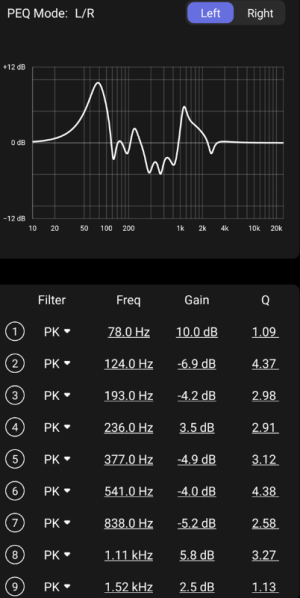
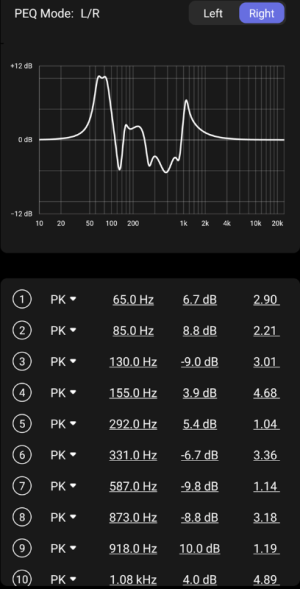
I got these results after playing around with using my phone. I already have the sub sync. I use the default roomfit B&K but i am seeing we should use a smaller range of frequency? Like 50hz - 500hz only?

I am confused if these graphs make sense.

The dayton usb-c mic is coming soon, do i just need to download the right calibration file to my file and run roomfit again? Any steps to note?
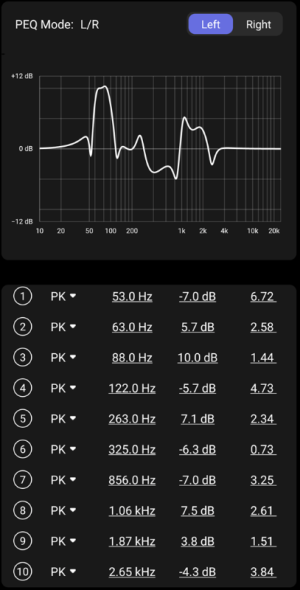
 

Attachments

  • L.png
    L.png
    98 KB · Views: 32
  • R.png
    R.png
    97.2 KB · Views: 35
I got these results after playing around with using my phone. I already have the sub sync. I use the default roomfit B&K but i am seeing we should use a smaller range of frequency? Like 50hz - 500hz only?

I am confused if these graphs make sense.

The dayton usb-c mic is coming soon, do i just need to download the right calibration file to my file and run roomfit again? Any steps to note?
On both channels RoomFit added a very strong boosts at 70Hz, which makes me think the position of your speakers compared to walls is not optimal, or that you have a cancellation around the subwoofer crossover - so I'd suggest to sort that out first, because that way RoomFit will work better as well.

Have a look at this post for some advice how to do all this, and how to configure RoomFit as well.
 
Yap i re-run few times on different nights, roomfit always gave me that 70hz boost. I did set the svs sub to LFE, and set crossover in wiim to 70hz.

Do you think i should manually set the sub delays?

I do find WAU sub integration really better than AS701. I get more punchy mid-bass, bass lol
 
Yap i re-run few times on different nights, roomfit always gave me that 70hz boost. I did set the svs sub to LFE, and set crossover in wiim to 70hz.

Do you think i should manually set the sub delays?

I do find WAU sub integration really better than AS701. I get more punchy mid-bass, bass lol
I suppose it is possible the LS50 has no appreciable output at around 70Hz. Have you tried a higher crossover frequency?
 
Yap i re-run few times on different nights, roomfit always gave me that 70hz boost. I did set the svs sub to LFE, and set crossover in wiim to 70hz.
How far is the front face of your speaker to the wall behind them and to their sides?

How far is your listening position from the walls?

Does the 70Hz dip improve if you set sub phase to 180°?

Does the 70Hz dip move if you set the crossover to e.g. 100Hz?

Do you think i should manually set the sub delays?
Did you put the WAU at your listening position when running the speaker/sub sync function?

Again, I'd suggest to go through all of the advice from this post first, it might solve the problem.
 
I suppose it is possible the LS50 has no appreciable output at around 70Hz. Have you tried a higher crossover frequency?

Any youtube tracks to test crossover freq?
I chose 70hz because of +15hz recc and 70hz seems to blend best for seat.

How far is the front face of your speaker to the wall behind them and to their sides?

How far is your listening position from the walls?

Does the 70Hz dip improve if you set sub phase to 180°?

Does the 70Hz dip move if you set the crossover to e.g. 100Hz?


Did you put the WAU at your listening position when running the speaker/sub sync function?

Again, I'd suggest to go through all of the advice from this post first, it might solve the problem.

yap i am looking through the guide, i think it should be stickied, there must have been countless requests on the best use roomfit calibration here, i believe many users are just plug and play coming here.

My setup is on on small 25 SQM listening room, the WAU is placed not in the center of my KEFs, it is actually to the right of the RS and in between my sub.

The speakers are like 30cm to the wall, 1.2m apart, with the LS besides the room door, while the RS is corner loaded with my rack that seats the WAU and my HTPC and stuff, and at 90° to the rack, is my SVS on teh floor

0° phase is clearly louder to me at my seat.
 
Any youtube tracks to test crossover freq?
I chose 70hz because of +15hz recc and 70hz seems to blend best for seat.


yap i am looking through the guide, i think it should be stickied, there must have been countless requests on the best use roomfit calibration here, i believe many users are just plug and play coming here.

My setup is on on small 25 SQM listening room, the WAU is placed not in the center of my KEFs, it is actually to the right of the RS and in between my sub.

The speakers are like 30cm to the wall, 1.2m apart, with the LS besides the room door, while the RS is corner loaded with my rack that seats the WAU and my HTPC and stuff, and at 90° to the rack, is my SVS on teh floor

0° phase is clearly louder to me at my seat.
Try running RoomFit with the sub output disabled. Then we will see the response of your main speakers.
 
How far is the front face of your speaker to the wall behind them and to their sides?

How far is your listening position from the walls?

Does the 70Hz dip improve if you set sub phase to 180°?

Does the 70Hz dip move if you set the crossover to e.g. 100Hz?


Did you put the WAU at your listening position when running the speaker/sub sync function?
My 2 Cent

Set a mono bass at a crossover frequency of 100 Hz

On the famous Oscar Peterson Trio album We Get Requests, Ray Brown plays the bass on the far right, first bowed, then plucked. When switched to mono, he plays in the middle.
For live classical recordings, one subwoofer is a complete disaster.

The main signal is often virtually mono in the bass, but more important are the stereo reverb components etc. contained in the recording, which create the envelopment and are often easily 10dB, or rather 20dB below the main signal and therefore do not contribute much to the measured level distribution, but they are still important.
 
I got these results after playing around with using my phone. I already have the sub sync. I use the default roomfit B&K but i am seeing we should use a smaller range of frequency? Like 50hz - 500hz only?

I am confused if these graphs make sense.

The dayton usb-c mic is coming soon, do i just need to download the right calibration file to my file and run roomfit again? Any steps to note?

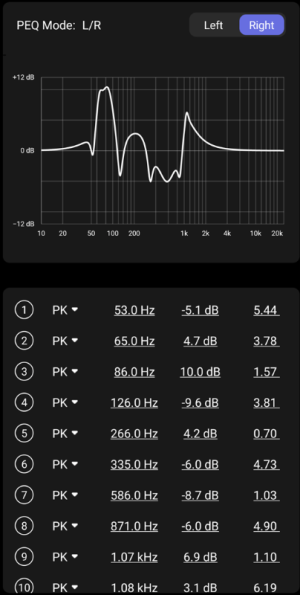
I'd disable any positive corrections, or use the option that only applies cuts. You really don't want to be boosting frequencies
 
My 2 Cent

Set a mono bass at a crossover frequency of 100 Hz

On the famous Oscar Peterson Trio album We Get Requests, Ray Brown plays the bass on the far right, first bowed, then plucked. When switched to mono, he plays in the middle.
For live classical recordings, one subwoofer is a complete disaster.

The main signal is often virtually mono in the bass, but more important are the stereo reverb components etc. contained in the recording, which create the envelopment and are often easily 10dB, or rather 20dB below the main signal and therefore do not contribute much to the measured level distribution, but they are still important.
Just to be clear - my recommendation was not to keep the crossover at 100Hz - it is just a troubleshooting step to figure out whether the 70Hz dip is related to SBIR, or if it is a cancellation due to out-of-phase contributions at the subwoofer crossover.

yap i am looking through the guide, i think it should be stickied, there must have been countless requests on the best use roomfit calibration here, i believe many users are just plug and play coming here.
You are right that the WiiM documentation is a bit lacking at the moment on these topics. Hopefully we can help guide you here.

My setup is on on small 25 SQM listening room, the WAU is placed not in the center of my KEFs, it is actually to the right of the RS and in between my sub.
This might be giving you incorrect values for the speaker/sub sync. Do you have cables long enough to place your WAU at your listening position temporarily, just to measure the delay values?

The speakers are like 30cm to the wall, 1.2m apart, with the LS besides the room door, while the RS is corner loaded with my rack that seats the WAU and my HTPC and stuff, and at 90° to the rack, is my SVS on teh floor

0° phase is clearly louder to me at my seat.
Am I understanding this right that both your speakers are practically in your room corners?
Are the speakers 30cm from the side walls, or from the wall behind them?
How wide is the room?
The subwoofer is in the corner, right?

Interesting thought, here is without sub output off, sub off at mains
Can you paste screenshots of the "Results Overview" page when you run RoomFit?
That one shows speaker responses so it is more informative for troubleshooting; the screenshots you are posting show only the filter responses.
 
I'm 63. I think of myself as above average on tech issues for someone my age. I brought this up before, and pretty much got slapped down for it. I just want simplicity. Push a button for room correction and be done with it. No hunting through outdated guides or advice. If its complicated people are not going to do it.
 
I'm 63. I think of myself as above average on tech issues for someone my age. I brought this up before, and pretty much got slapped down for it. I just want simplicity. Push a button for room correction and be done with it. No hunting through outdated guides or advice. If its complicated people are not going to do it.

It's pretty easy, compared to Dirac lol. Don't look into REW that needs a inch thick manual, or Minidsp even more with multiple sub setup, with MSO utilty and getting them synced etc etc

And it's automated. Just set no boost mode, set the cut off point, target curve type.
 
Oh dear, how do i get back the "Results Overview" measured response screen? I can only see this filtered response page.

One thing for Wiim, when people run roomfit and get this page, they would have expected/thought their room has been "corrected"
 
Back
Top