
how volume works

Antonio79

New member
Joined
Dec 2, 2025
Messages
2
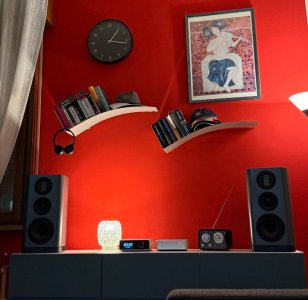
Hello everyone, I'm new to this forum and a novice in the audiophile world. As shown in the photo, my setup is Ultra + Vibelink + Wharfedale Evo 5.2. I use Amazon Munic Unlimited as input. Ultra and Vibelink are connected via optical cable.
I was taught (or perhaps I just understood) that the optical cable only carries the pure digital signal and not volume information. In fact, if, for example, I connect the soundbar to the TV with optical cable, I have to use the soundbar remote; if I use RCA cable, I can control the volume with the TV remote. Same thing for connection between my old CD player and my old Marantz amplifier.
Here's my question:
By connecting the Ultra to Vibelink via optical, I bypass the Ultra-DAC and use the Vibelink-DAC.
But how is it possible that I can use the volume control of Ultra? I set Vibelink volume to max and i I adjust the listening volume by Ultra remote or App.
I'm almost certain this discussion has already been addressed, and I apologize, but I'm Italian. I'm not very good at English. I tried searching the forum and found answers on how to connect, but not "why it works."
thanks in advance for explanation!
 

Attachments

  • photo_2025-12-03_11-33-03.jpg
    photo_2025-12-03_11-33-03.jpg
    89.2 KB · Views: 18
Hello everyone, I'm new to this forum and a novice in the audiophile world. As shown in the photo, my setup is Ultra + Vibelink + Wharfedale Evo 5.2. I use Amazon Munic Unlimited as input. Ultra and Vibelink are connected via optical cable.
I was taught (or perhaps I just understood) that the optical cable only carries the pure digital signal and not volume information. In fact, if, for example, I connect the soundbar to the TV with optical cable, I have to use the soundbar remote; if I use RCA cable, I can control the volume with the TV remote. Same thing for connection between my old CD player and my old Marantz amplifier.
Here's my question:
By connecting the Ultra to Vibelink via optical, I bypass the Ultra-DAC and use the Vibelink-DAC.
But how is it possible that I can use the volume control of Ultra? I set Vibelink volume to max and i I adjust the listening volume by Ultra remote or App.
I'm almost certain this discussion has already been addressed, and I apologize, but I'm Italian. I'm not very good at English. I tried searching the forum and found answers on how to connect, but not "why it works."
thanks in advance for explanation!
Hi

There's no need to overthink it.

Connect the Ultra and Vibelink Amp with an optical cable, and you can adjust the volume using the Ultra's remote.

I recommend this method for setting the volume on both the Ultra and Vibe.


Many TVs can't adjust the output level when using an optical connection.
(The output level is fixed.)

However, this is not a limitation of the optical connection itself, but rather an issue with the TV.

What a lovely room.😊
 
Hello everyone, I'm new to this forum and a novice in the audiophile world. As shown in the photo, my setup is Ultra + Vibelink + Wharfedale Evo 5.2. I use Amazon Munic Unlimited as input. Ultra and Vibelink are connected via optical cable.
I was taught (or perhaps I just understood) that the optical cable only carries the pure digital signal and not volume information. In fact, if, for example, I connect the soundbar to the TV with optical cable, I have to use the soundbar remote; if I use RCA cable, I can control the volume with the TV remote. Same thing for connection between my old CD player and my old Marantz amplifier.
Here's my question:
By connecting the Ultra to Vibelink via optical, I bypass the Ultra-DAC and use the Vibelink-DAC.
But how is it possible that I can use the volume control of Ultra? I set Vibelink volume to max and i I adjust the listening volume by Ultra remote or App.
I'm almost certain this discussion has already been addressed, and I apologize, but I'm Italian. I'm not very good at English. I tried searching the forum and found answers on how to connect, but not "why it works."
thanks in advance for explanation!
The SPDIF (optical and coax) contains the bit stream after DSP (Equalizer and volume control).

There is no additional volume information in the output to SPDIF, it's just the modified audio samples. So you can change volume on the Ultra and/or on the Vibelink. The result will be a combination of both.
 
The SPDIF (optical and coax) contains the bit stream after DSP (Equalizer and volume control).

There is no additional volume information in the output to SPDIF, it's just the modified audio samples. So you can change volume on the Ultra and/or on the Vibelink. The result will be a combination of both.
" The SPDIF (optical and coax) contains the bit stream after DSP (Equalizer and volume control)."

This is what I didn't know: I was convinced that in the digital signal there were only the bits relating to the music file and not also bit related to equalizer and volume, thanks
 
" The SPDIF (optical and coax) contains the bit stream after DSP (Equalizer and volume control)."

This is what I didn't know: I was convinced that in the digital signal there were only the bits relating to the music file and not also bit related to equalizer and volume, thanks
There is only audio sampling data in the SPDIF signal. The output audio data is the modified input data (music file) after the EQ and volume control has been applied. This is pure digital data manipulation of the stream of audio samples. If no EQ is applied and volume is 100%, then output data equals input data (bit perfect).
 
I set Vibelink volume to max and i I adjust the listening volume by Ultra remote or App.
In the first place you found out yourself that what had been said (or how you understood it) cannot be true, because it simply works. :)

As already mentioned above by @Wiimer you can adjust the volume either on the WiiM Ultra (digital volume control) or on the WiiM Vibelink Amp (analogue volume control) or as a combination of both. In theory, digital volume control simply means the reduction of meaningful bits, equivalent to a reduction of available dynamic range. For this reason some people will insist on analogue volume control (ignoring the fact that this has its own downsides). In practice, it mostly depends on how many bits you have for the digital processing compared to the digital audio signal and there's no problem with the Ultra's volume control.

The main reason for using a combination of Vibelink Amp volume control and Ultra volume control is to maximise operational safety. The digital volume control is finally controlled by software. A software bug could make the digital volume control switch to full blast unexpectedly, torturing your speakers and your hearing. So, the idea is to physically limit the volume potentiometer on the Vibelink Amp to the highest level you'll ever want with the Ultra's volume control set to 100. Music can't get any louder than this ...

... at least unless somebody turns the volume knob on your Vibelink Amp fully clockwise again while you don't pay attention. ;)
 
Last edited:
Back
Top