
Intermittent No Audio via HDMI ARC on AMP Ultra (Requires Reboot)

chiunyi.ko

New member
Joined
Jan 15, 2026
Messages
2
I received my AMP Ultra a couple of days ago, and overall the experience has been quite good so far.
However, I’d like to ask if anyone else has encountered the following issue:


After turning on the TV, the AMP Ultra is able to detect HDMI ARC normally,
but there is no audio output (the issue happens intermittently).
Whenever this occurs, I have to fully reboot the AMP Ultra for the sound to come back.


At the moment, I haven’t been able to identify the exact cause.
I’d really appreciate it if anyone who has experienced a similar issue could share possible solutions or settings to check.


TV model: Panasonic TN-55W80AGT
 
I received my AMP Ultra a couple of days ago, and overall the experience has been quite good so far.
However, I’d like to ask if anyone else has encountered the following issue:


After turning on the TV, the AMP Ultra is able to detect HDMI ARC normally,
but there is no audio output (the issue happens intermittently).
Whenever this occurs, I have to fully reboot the AMP Ultra for the sound to come back.


At the moment, I haven’t been able to identify the exact cause.
I’d really appreciate it if anyone who has experienced a similar issue could share possible solutions or settings to check.


TV model: Panasonic TN-55W80AGT
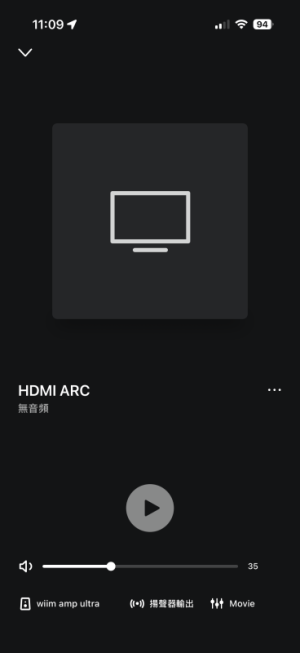
When the TV audio stops working, what does the status look like when you open the WiiM app's playback screen? Is the spectrum icon moving, indicating playback is active?

Also, if not, does pressing the play icon come back the audio?
 
I received my AMP Ultra a couple of days ago, and overall the experience has been quite good so far.
However, I’d like to ask if anyone else has encountered the following issue:


After turning on the TV, the AMP Ultra is able to detect HDMI ARC normally,
but there is no audio output (the issue happens intermittently).
Whenever this occurs, I have to fully reboot the AMP Ultra for the sound to come back.


At the moment, I haven’t been able to identify the exact cause.
I’d really appreciate it if anyone who has experienced a similar issue could share possible solutions or settings to check.


TV model: Panasonic TN-55W80AGT
I too am having the same problem. After being off all night, when turning on the TV the Wiim Ultra responds, but no sound. The status in the Wiim amp is designated as Offline. I have to reboot to get audio. I have 2 TV's with the same Wiim Ultra and it is symptomatic of both. I turned in a ticket.
 
When the TV audio stops working, what does the status look like when you open the WiiM app's playback screen? Is the spectrum icon moving, indicating playback is active?

Also, if not, does pressing the play icon come back the audio?
IMG_6815.png
Tonight, I tried enabling eARC in the TV settings and switched to the original HDMI cable.


At first, everything worked fine and audio output was normal.


However, when I turned on the TV again today, there was no sound once more.


Having to reboot the AMP Ultra every day to restore audio is becoming quite frustrating.


Does anyone have suggestions on what else I could try, or any recommended settings to resolve this issue?
 
View attachment 32614
Tonight, I tried enabling eARC in the TV settings and switched to the original HDMI cable.
Turn off eARC. WiiM does not support eARC.


At first, everything worked fine and audio output was normal.


However, when I turned on the TV again today, there was no sound once more.


Having to reboot the AMP Ultra every day to restore audio is becoming quite frustrating.

Does anyone have suggestions on what else I could try, or any recommended settings to resolve this issue?

It seems the HDMI connection remains disconnected and can't be reconnected.

I experience a similar issue with my TV. I turn off the TV using a smart plug when not in use, but when I turn the TV back on, the audio stops working. Reconnecting the HDMI cable restores the audio.

Have you submitted a ticket through the WiiM app's feedback section? Submitting a ticket after reproducing the issue sends device logs, which helps troubleshoot the problem.
 
Back
Top