Link not working

James!

New Member
Joined
Jan 22, 2026
Messages
11
I've got an amp and and amp pro they are both pretty sketchy when I try to link them in the wiim amp. Particularly when I'm playing from Spotify. More often than not it does the loading thing then just keeps playing on the current amp.

I can press the physical button on the start of either amp to start and stop playback same with in app but still only plays on the one that was the master that I started on in Spotify. In the Spotify app it shows whichever amp +1 so it knows it's meant to send to 2 amps.

Doesn't really happen of I play off Amazon music but that's started through the wiim app, I'm wondering if the Spotify playback is started outside the wiim app that's the problem?

Anyone got a solution cos this is doing my head in. I've cancelled my prime unlimited recently so only have prime basic music sub a d honestly prefer Spotify so would rather not have to go back
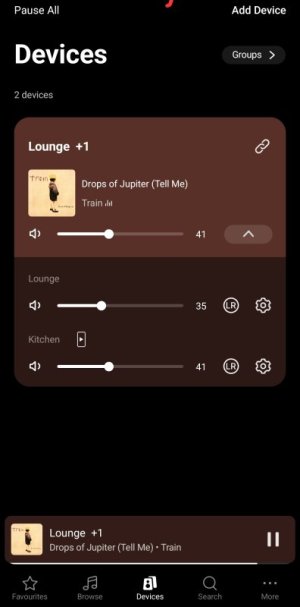
 
1000157267.jpg

This is just playing in the lounge even though the app, and it seems both amps think it's in both.

Lounge is the wiim amp, kitchen is amp pro though it doesn't seem to matter which I pick first for the link both do this
 
View attachment 35509

This is just playing in the lounge even though the app, and it seems both amps think it's in both.

Lounge is the wiim amp, kitchen is amp pro though it doesn't seem to matter which I pick first for the link both do this
Please try tapping "Groups" in the upper-right corner of that screen to create a persistent group. The name of the persistent group will then appear on the device connection screen in the Spotify app. Connect to that group using Spotify Connect and try playing some music.
 
I've tried creating then as a group but didn't help. I had the group set up before but was causing issues with Alexa as it played in the wrong place when I asked in the kitchen it played in the lounge, tried setting it up tonight and changed to that and it does the same just plays where it started
 
The best way I've found for multiple rooms using Spotify is to use the persistent groups so you can select which combination to use in the Spotify app. If you play music to one of your rooms and then go to the WiiM app and link that room with others, you should also be able to hear the audio from there. But it would require a little juggling.
 
The best way I've found for multiple rooms using Spotify is to use the persistent groups so you can select which combination to use in the Spotify app. If you play music to one of your rooms and then go to the WiiM app and link that room with others, you should also be able to hear the audio from there. But it would require a little juggling.
That's the but that's not working when I try and add a room in the wiim app
 
So using Spotify I have to do it all through the Spotify app and the wiim app does work right?
Yes, and if you add Spotify to the presets on your main device, you can start a group playback on Spotify simply by pressing the preset button on the WiiM app (or remote).

Could you please check the following again?

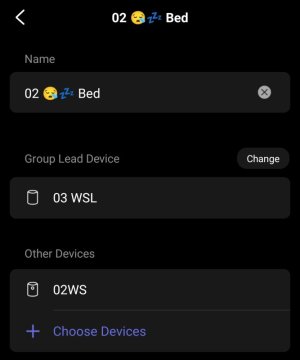
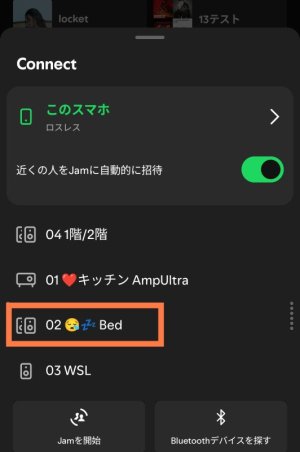
I created a permanent group named "Bed."
2997.jpg

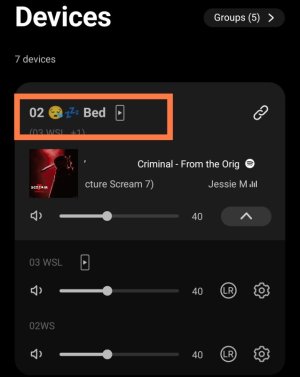
Tap the link icon in the upper-right corner of the device card, select a persistent group, and tap Done.
3003.jpg


The device card displays the persistent group name instead of "Device Name + 1".
2995.jpg


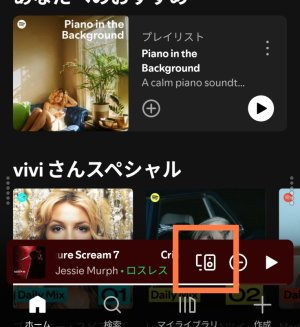
Open the Spotify app and tap the connection icon.
2999.jpg


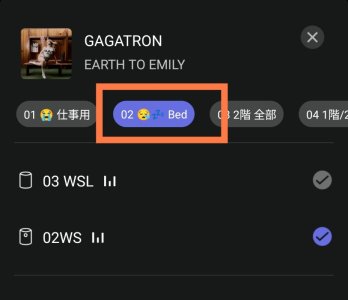
The device connection screen displays the persistent group name.
3001.jpg

Tap the "Persistent Group" to play music in the Persistent Group.

Please check to see if you can do the same. If it doesn't work, please post a screenshot here.
 
Back
Top