

You are using an out of date browser. It may not display this or other websites correctly.
You should upgrade or use an alternative browser.
You should upgrade or use an alternative browser.
Solution

One final thing from OP. Here is my solution to play my music library ALACs 16/44 rips on macOS (in other room) to a WiiM Pro Plus: Airplay. I’m using Rouge Amoeba Airfoil to bypass the Apple audio processor. Then ethernet direct to the WiiM which plays the ALAC lossless. It sounds great. Disc art comes along too. I control volume from my amp app.
You don’t need to use Airfoil and could just choose the WiiM in macOS control center but Airfoil removes most of the audio processor for sure.
Note: if you do choose the WiiM or any Airplay 2 device while in macOS Apple Music, you will not get lossless. Must be from control center.
Airplay (1) devices will always play lossless 16/44. But the DAC is great in the Pro Plus. This get’s me...
You don’t need to use Airfoil and could just choose the WiiM in macOS control center but Airfoil removes most of the audio processor for sure.
Note: if you do choose the WiiM or any Airplay 2 device while in macOS Apple Music, you will not get lossless. Must be from control center.
Airplay (1) devices will always play lossless 16/44. But the DAC is great in the Pro Plus. This get’s me...

I don’t have a Mac but would doubt it as your WiiM isn’t “signed into an Apple account”. If you want to play media you have on your Mac, try even the beta desktop WiiM home app to access the media and play to your WiiM. Also, if your Mac supports iOS apps, install the mobile version of the WiiM home app and use that (under My Music) to access your library.

- Joined
- Mar 2, 2024
- Messages
- 4,133
I'm using the free version of MinimServer so that I can access the music from my MacStudio on my WiiM devices.

Dude
Active Member
- Joined
- Dec 10, 2025
- Messages
- 84
Yep, you do not have a Mac and do not understand the OS and sharing media files at all.I don’t have a Mac but would doubt it as your WiiM isn’t “signed into an Apple account”. If you want to play media you have on your Mac, try even the beta desktop WiiM home app to access the media and play to your WiiM. Also, if your Mac supports iOS apps, install the mobile version of the WiiM home app and use that (under My Music) to access your library.
Dude
Active Member
- Joined
- Dec 10, 2025
- Messages
- 84
I am not a fan of that app at all! The home page is an anachronistic mess in UI and UX. The install is so awful, anything other than that. Not in a million years.I'm using the free version of MinimServer so that I can access the music from my MacStudio on my WiiM devices.
- Joined
- Mar 2, 2024
- Messages
- 4,133
You seem to have a very strange outlook on things. MinimServer is very easy to setup, then you don't need to access the interface.I am not a fan of that app at all! The home page is an anachronistic mess in UI and UX. The install is so awful, anything other than that. Not in a million years.
Oh really? Whatever…Yep, you do not have a Mac and do not understand the OS and sharing media files at all.
Dude
Active Member
- Joined
- Dec 10, 2025
- Messages
- 84
The page for this server is a total turn off. If the developer cannot stay current with decent UI and UX home page design and install simplicity and methods, forget it.You seem to have a very strange outlook on things. MinimServer is very easy to setup, then you don't need to access the interface.

Fletcher Munson
Active Member
- Joined
- Nov 7, 2025
- Messages
- 89
You can run Plex server in the background on the mac, its pretty lightweight. then use the plex client on the Wiim
Free
Free
Dude
Active Member
- Joined
- Dec 10, 2025
- Messages
- 84
Well, I could have said: Yer bums oot the windae.Oh really? Whatever…
Dude
Active Member
- Joined
- Dec 10, 2025
- Messages
- 84
I had nothing but crashes with Plex and slowed the Mac to a crawl.You can run Plex server in the background on the mac, its pretty lightweight. then use the plex client on the Wiim
Free
The media server already on the macOS is what I would like to use with WiiM.
Fletcher Munson
Active Member
- Joined
- Nov 7, 2025
- Messages
- 89
You can't.I had nothing but crashes with Plex and slowed the Mac to a crawl.
The media server already on the macOS is what I would like to use with WiiM.
slartibartfast
Major Contributor
- Joined
- Apr 18, 2024
- Messages
- 6,112
By one to find out then. You can always send it backYep, you do not have a Mac and do not understand the OS and sharing media files at all.

I had nothing but crashes with Plex and slowed the Mac to a crawl.
The media server already on the macOS is what I would like to use with WiiM.
I don't have a Mac, but I wouldn't be suprised they limited what multi platform support it works on, just to lock you into Mac.
Typically you need some kind of music server, which scans your music and builds a database. This is then accessible from any UPNP audio /video streamer, you should be able to see this service from your audio streamers. If not, then it's not supported. Google search
- Universal Media Server (Free): A popular, free DLNA-compliant UPnP server that supports a wide range of media formats and can transcode content on the fly for compatibility.
- MinimServer (Free/Paid): Considered one of the best for large music libraries, offering high flexibility and performance.
- FireStream (Commercial): A dedicated Mac app by Cyaneous, Inc. designed for macOS, featuring native media organization and advanced transcoding.
- A!Media Server (App Store): Available directly from the Apple App Store, this tool allows for easy casting of local files to TVs.
- ArkMS (Arkuda Digital): A full-featured server for streaming to UPnP/DLNA-compatible devices.
- Serviio & Twonky: Other available options with support for macOS, often used for media streaming.
Fletcher Munson
Active Member
- Joined
- Nov 7, 2025
- Messages
- 89
like i said ive been running plex on my mac mini for the last few weeks and works really well with very little system resources used. just sits in the menu bar quietly
like i said ive been running plex on my mac mini for the last few weeks and works really well with very little system resources used. just sits in the menu bar quietly
Used it on my PC/NAS, found it a bit over complex.. lots of button pressing to get to what I wanted
I think there is a music only version of the server/app which makes it simpler and less clicky-to-do things?
My go to is LMS
Lyrion Music Server Downloads
Download Lyrion Music Server to feed music to your Squeezebox, Squeezelite based players or SqueezePlay and compatible software packages. Free the Music!
 lyrion.org
Dude
Active Member
- Joined
- Dec 10, 2025
- Messages
- 84
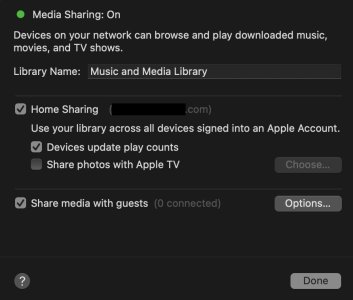
Actually, you can. If choosing Airplay to WiiM on macOS Control Panel (not apps), this ensures it is sending ALAC 16/44. Then you can open an app like Remote or even Wiim to control it. But it is not 100% remote convenience. Ideally, DLNA (what my screen shot shows) offers that and instructions all seem to say, this should show up on WiiM app in Browse, Home Music Share. Indeed, my Sonos system does show there. Indicating that it is working on the WiiM end. So this is some setting in macOS that I need to adjust but, I have been through privacy, sharing, and many other settings that might impact it but, all on, all off, the right ones on, etc. have no impact. Since it is macOS via Ethernet, that eliminates any wi-fi issues. So, this is why I posted this. Would love to get Media Sharing from macOS to show up on WiiM. Still looking for an answer.You can't.
Would love to get Media Sharing from macOS to show up on WiiM. Still looking for an answer.
Use Home Sharing to share media from a computer to other devices - Apple Support
Stream content from your computer's iTunes library to other computers, iOS devices, and Apple TVs.
As others have said, MinimServer is the answer.

MotleyG
New Member
- Joined
- Mar 30, 2025
- Messages
- 32
I know you are using a Mac, but this is the same settings window they use on iTunes for Windows for "Home" sharing. It is specifically used to enable most other Apple devices on a network to use the same library. This can be other Mac computers or AppleTV devices, only if they are logged into the same Apple account.
Perhaps the Media Sharing is more for Mac devices to expose some kind of UPnP or DLNA support. But as others have already confirmed this is not (yet?) supported by WiiM hardware.
Dude
Active Member
- Joined
- Dec 10, 2025
- Messages
- 84
This Apple link is not applicable to this.Use Home Sharing to share media from a computer to other devices - Apple Support
Stream content from your computer's iTunes library to other computers, iOS devices, and Apple TVs.support.apple.com
Similar threads
- Replies
- 6
- Views
- 1K

- Replies
- 33
- Views
- 2K
- Replies
- 5
- Views
- 622

- Replies
- 12
- Views
- 950
- Replies
- 6
- Views
- 3K
