

You are using an out of date browser. It may not display this or other websites correctly.
You should upgrade or use an alternative browser.
You should upgrade or use an alternative browser.
Solution

One final thing from OP. Here is my solution to play my music library ALACs 16/44 rips on macOS (in other room) to a WiiM Pro Plus: Airplay. I’m using Rouge Amoeba Airfoil to bypass the Apple audio processor. Then ethernet direct to the WiiM which plays the ALAC lossless. It sounds great. Disc art comes along too. I control volume from my amp app.
You don’t need to use Airfoil and could just choose the WiiM in macOS control center but Airfoil removes most of the audio processor for sure.
Note: if you do choose the WiiM or any Airplay 2 device while in macOS Apple Music, you will not get lossless. Must be from control center.
Airplay (1) devices will always play lossless 16/44. But the DAC is great in the Pro Plus. This get’s me...
You don’t need to use Airfoil and could just choose the WiiM in macOS control center but Airfoil removes most of the audio processor for sure.
Note: if you do choose the WiiM or any Airplay 2 device while in macOS Apple Music, you will not get lossless. Must be from control center.
Airplay (1) devices will always play lossless 16/44. But the DAC is great in the Pro Plus. This get’s me...

Dude
Active Member
- Joined
- Dec 10, 2025
- Messages
- 84
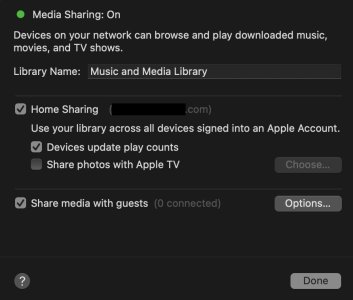
WiiM indicates it works.I know you are using a Mac, but this is the same settings window they use on iTunes for Windows for "Home" sharing. It is specifically used to enable most other Apple devices on a network to use the same library. This can be other Mac computers or AppleTV devices, only if they are logged into the same Apple account.
Perhaps the Media Sharing is more for Mac devices to expose some kind of UPnP or DLNA support. But as others have already confirmed this is not (yet?) supported by WiiM hardware.
It clearly shows that it's an authenticated protocol for use within the apple ecosystem; it's not DLNA.This Apple link is not applicable to this.
Where do they state that?WiiM indicates it works.
You could use SMB, but only folder browsing is supported.

HansD-NL
Valued Contributor
I don't understand why you guys are helping someone with a bad attitude towards people and things...Just let them be.
FreakyKiwi
Active Member
- Joined
- Nov 1, 2023
- Messages
- 130
The Wiim supports accessing music from an SMB file share which macos supports.WiiM indicates it works.
Enable sharing in System Settings > General > Sharing by turning on "File Sharing" and configuring options via SMB.
The sharing option in your screenshot is for sharing with other Apple devices only which is all Apple expect you to have.
The alternatives are to play music from the Mac to the Wiim over Airplay, play from another app which supports the Wiim as a DLNA renderer, install a supported server which the Wiim can access (various UPNP, Plex) using the Wiim app, or install a server with its own interface to play to the Wiim (Lyrion, Roon, Music Assistant).
Last edited:

Fletcher Munson
Active Member
- Joined
- Nov 7, 2025
- Messages
- 89
I've never got that to work on Wiim pro plus. it connects and shows the folders of music but doesn't play the flacs. Clunky as heck but might work for othersThe Wiim supports accessing music from an SMB file share which macos supports.
Enable sharing in System Settings > General > Sharing by turning on "File Sharing" and configuring options via SMB.
The sharing option in your screenshot is for sharing with other Apple devices only which is all Apple expect you to have.
The alternatives are to play music from the Mac to the Wiim over Airplay, play from another app which supports the Wiim as a DLNA renderer, install a supported server which the Wiim can access (various UPNP, Plex) using the Wiim app, or install a server with its own interface to play to the Wiim (Lyrion, Roon, Music Assistant).

I've never got that to work on Wiim pro plus. it connects and shows the folders of music but doesn't play the flacs. Clunky as heck but might work for others
Browse by folder works in a pinch but yeah it's slow and clunky.
I can browse by folder in LMS as well, I keep that option if I add a album and want to play it immediately without doing a rescan
FreakyKiwi
Active Member
- Joined
- Nov 1, 2023
- Messages
- 130
It does work on my pro, connecting to shares on one of my QNAP NASes, but I never use it as it lacks the additional track/album/artist info and better interface and features with Lyrion.I've never got that to work on Wiim pro plus. it connects and shows the folders of music but doesn't play the flacs. Clunky as heck but might work for others
Fletcher Munson
Active Member
- Joined
- Nov 7, 2025
- Messages
- 89
thats it, all this talk of lyrion, i'm off to install itIt does work on my pro, connecting to shares on one of my QNAP NASes, but I never use it as it lacks the additional track/album/artist info and better interface with Lyrion.

Yeah, for media sharing I see SMB, like Bluetooth, to be the protocol of last resort especially when merely installing even the macOS beta desktop WiiM home app and pointing it at your library provides a basic DLNA server that will deliver hi res lossless playback to your WiiM devices.It does work on my pro, connecting to shares on one of my QNAP NASes, but I never use it as it lacks the additional track/album/artist info and better interface and features with Lyrion.
FreakyKiwi
Active Member
- Joined
- Nov 1, 2023
- Messages
- 130
Oh, good point.Yeah, for media sharing I see SMB, like Bluetooth, to be the protocol of last resort especially when merely installing even the macOS beta desktop WiiM home app and pointing it at your library provides a basic DLNA server that will deliver hi res lossless playback to your WiiM devices.
For OP, if they are still here, the Wiim beta PC (and mac) app is another option.
I haven't checked out the latest versions which I see now include a DLNA server.'

WiiM Home PC App (Beta) Release Notes
WiiM Home is now available for Windows and macOS. Download the latest version from https://www.wiimhome.com/app. 0.2.2 Release date: 9/19/2025 What’s New: New Features Added Qobuz support. Added system tray support to run as ...
The OP seemingly found that suggestion in the first response to be risible, but hey, my bahookie is enjoying the fresh airOh, good point.
For OP, if they are still here, the Wiim beta PC (and mac) app is another option.
I haven't checked out the latest versions which I see now include a DLNA server.'
WiiM Home PC App (Beta) Release Notes
WiiM Home is now available for Windows and macOS. Download the latest version from https://www.wiimhome.com/app. 0.2.2 Release date: 9/19/2025 What’s New: New Features Added Qobuz support. Added system tray support to run as ...faq.wiimhome.com

FreakyKiwi
Active Member
- Joined
- Nov 1, 2023
- Messages
- 130
Make sure squeezelite is enabled on your Wiim (models above mini) which IMO is the best protocol to use.thats it, all this talk of lyrion, i'm off to install it
Plugins are also available to support DLNA, AirPlay and Chromecast renderers.
Also enable the material skin for a more modern look and have a look at the many other plugins available.
You can control Lyrion using a web browser or various apps available on mobile and PC.
I use Squeezer on Android, and Squeeze-LX on Windows
Make sure squeezelite is enabled on your Wiim (models above mini) which IMO is the best protocol to use.
Plugins are also available to support DLNA, AirPlay and Chromecast renderers.
Also enable the material skin for a more modern look and have a look at the many other plugins available.
You can control Lyrion using a web browser or various apps available on mobile and PC.
I use Squeezer on Android, and Squeeze-LX on Windows
I wouldn't have bought a wiim if it didn't have squeezelite
Ideally, DLNA (what my screen shot shows) offers that and instructions all seem to say, this should show up on WiiM app in Browse, Home Music Share.
I don't know a mac from a marshmallow, but if this sharing option in your screenshot is truly DLNA then open a ticket with wiim from the feedback section in the app.
I had some issues with a different DLNA server showing up and they sorted it for me.
I don't know a mac from a marshmallow, but if this sharing option in your screenshot is truly DLNA then open a ticket with wiim from the feedback section in the app.
A marshmallow is edible, but a mac isn’t unless it’s of the Big variety

It’s not truly DLNA viz.
“macOS does not natively support DLNA out of the boX.
While macOS has a "Media Sharing" feature, it is designed specifically for Apple ecosystem sharing (Home Sharing to Apple TV, iPad, etc.) or standard file sharing.
Therefore, to make your Mac appear as a DLNA server to non-Apple devices like smart TVs, receivers, or streamers (e.g., Sonos, WiiM), you will need to use third-party software.
Alternatives to Built-in Sharing
To enable DLNA on a Mac, you can use several third-party applications:
- MinimServer: An excellent, specialized option for audio streaming.
- Plex Media Server: A popular, robust choice that serves content to most smart TVs and devices.
- Serviio: A free, full-featured DLNA server.
- Elmedia Player: A Mac app that can act as a DLNA server/player.
- Macast: A lightweight, free, and open-source UPnP/DLNA renderer.
- Lack of Native DLNA: Apple focuses on AirPlay and Home Sharing, not the universal DLNA/UPnP standard.
- Format Compatibility: Third-party servers often handle transcoding, allowing your Mac to stream file formats that your TV might not otherwise support natively.
- Library Management: Tools like MinimServer or Plex provide better organization for large libraries compared to basic file sharing.
A marshmallow is edible, but a mac isn’t unless it’s of the Big variety
It’s not truly DLNA viz.
“macOS does not natively support DLNA out of the boX.
While macOS has a "Media Sharing" feature, it is designed specifically for Apple ecosystem sharing (Home Sharing to Apple TV, iPad, etc.) or standard file sharing.
Therefore, to make your Mac appear as a DLNA server to non-Apple devices like smart TVs, receivers, or streamers (e.g., Sonos, WiiM), you will need to use third-party software.
Alternatives to Built-in Sharing
To enable DLNA on a Mac, you can use several third-party applications:
Why You Need Third-Party Software
- MinimServer: An excellent, specialized option for audio streaming.
- Plex Media Server: A popular, robust choice that serves content to most smart TVs and devices.
- Serviio: A free, full-featured DLNA server.
- Elmedia Player: A Mac app that can act as a DLNA server/player.
- Macast: A lightweight, free, and open-source UPnP/DLNA renderer.
If your goal is to simply share files and you are only using Apple devices, the built-in Media Sharing works. If you are sharing to a TV or network streamer that requires a DLNA server, you will need a third-party application.“
- Lack of Native DLNA: Apple focuses on AirPlay and Home Sharing, not the universal DLNA/UPnP standard.
- Format Compatibility: Third-party servers often handle transcoding, allowing your Mac to stream file formats that your TV might not otherwise support natively.
- Library Management: Tools like MinimServer or Plex provide better organization for large libraries compared to basic file sharing.
What a surprise, they keep it in house. lol
Guess he has to return the wiim and buy a apple TV

I started with digital music files in about 2007/8 after I saw an ipod. I was amazed. 80gb, fits in your hand and you can take 1000s of tunes around with you. I bought loads of gear to hook it up to various systems, wires and docks and such like. Most of it 3rd party (not Apple). I also paid quite a lot of money to someone to wire it into my car stereo.and you are only using Apple devices
When the 160gb (or whatever it was) came out I was so excited, I queued up for it. Took it home, loaded it up and none of that stuff I'd bought worked.
The guy in the shop said that this new ipod wouldn't work with any of this stuff I'd got and I needed to buy a whole load of new gear to connect it up to everything.
I told him to shove it up his waste disposal pipe, asked for my money back and have never entertained another apple product since.
I started with digital music files in about 2007/8 after I saw an ipod. I was amazed. 80gb, fits in your hand and you can take 1000s of tunes around with you. I bought loads of gear to hook it up to various systems, wires and docks and such like. Most of it 3rd party (not Apple). I also paid quite a lot of money to someone to wire it into my car stereo.
When the 160gb (or whatever it was) came out I was so excited, I queued up for it. Took it home, loaded it up and none of that stuff I'd bought worked.
The guy in the shop said that this new ipod wouldn't work with any of this stuff I'd got and I needed to buy a whole load of new gear to connect it up to everything.
I told him to shove it up his waste disposal pipe, asked for my money back and have never entertained another apple product since.
yup needing to use itunes to sync music.
All my personal audio players use rockbox, you just transfer files like a USB drive, it can browse by folder or build a databse but you don't need any software like itunes to manage the music.
I still can use those players on a PC Windows or Linux.
Fletcher Munson
Active Member
- Joined
- Nov 7, 2025
- Messages
- 89
i think we are all very lucky to have so many options now. easy to take it for granted 
Similar threads
- Replies
- 6
- Views
- 1K

- Replies
- 33
- Views
- 2K
- Replies
- 5
- Views
- 622

- Replies
- 12
- Views
- 950
- Replies
- 6
- Views
- 3K
