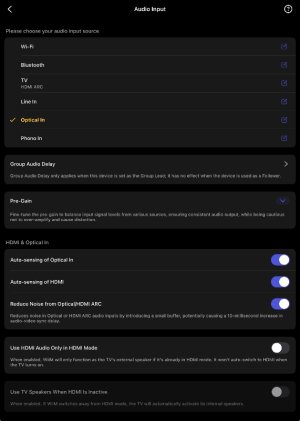
Optical In Not Autosensing

F1 Fan

Valued Contributor
Joined
Mar 17, 2024
Messages
294
Location
Suffolk, United Kingdom
Hi all,

I’ve noticed that my ‘Optical In’ isn’t auto sensing when in use. I have to manually select it when a signal is being sent to it..

Any idea why?
 

Attachments

  • IMG_0133.jpeg
    IMG_0133.jpeg
    76.9 KB · Views: 0
Hi all,

I’ve noticed that my ‘Optical In’ isn’t auto sensing when in use. I have to manually select it when a signal is being sent to it..

Any idea why?
What is the state of the WiiM when you start playing to the optical input?


Auto-sensing works only when your WiiM device isn't playing audio from the current input source. For example, if your WiiM device is playing music over Wi-Fi and you start audio on Line In, Optical In, or HDMI ARC, it won't automatically switch to that input.

HDMI ARC auto-sensing has higher priority than Optical auto-sensing when both are enabled.
 
What is the state of the WiiM when you start playing to the optical input?


Auto-sensing works only when your WiiM device isn't playing audio from the current input source. For example, if your WiiM device is playing music over Wi-Fi and you start audio on Line In, Optical In, or HDMI ARC, it won't automatically switch to that input.

HDMI ARC auto-sensing has higher priority than Optical auto-sensing when both are enabled.
Usually, it is set to HDMI but the source for the HDMI isn’t on..
 
@F1 Fan,

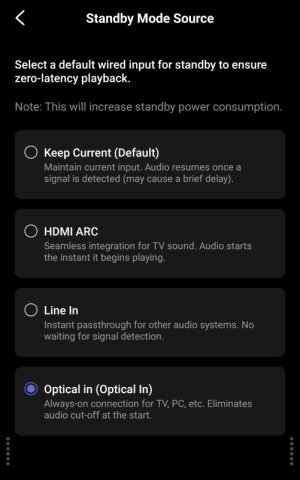
If you set the "Standby Mode Source" to "Optical," the input will automatically switch to "Optical" when the Ultra enters standby mode.
3423.jpg

However, there is a bug where this does not work when the Ultra enters standby mode via the TV's CEC. 😑

It might be helpful to keep in mind that if you pause the TV, the Ultra will switch to "Optical" after 3 minutes. (Although it might not actually be very useful)
 
Back
Top