
Roomfit Analysis

athflying

Member
Joined
Nov 25, 2025
Messages
5
Did lots of reading, partially understand so wanted some input on results. I am using a Umik-1 just taking a single measurement on each channel. Speakers are Wharfedale 12.2's which can get down to 50's per specs (roll off sooner per the graphs). I started with 20-500 and ended up narrowing down to 45-350. The only 2 variables between the 2 graphs....max gain set to 0.5 and non boost mode on, then a second run max gain set to 3 and non boost mode off.

Allowing to add gain on the bottom end seems to slightly improve the graph, but I could barely hear the difference....could have been the tracks I selected weren't going deep enough but my understanding is that those low frequencies adding gain eats up a lot of headroom for minimal improvement. Secondly, I am adding a sub and that will help fill in the bottom end. Will have to do this whole exercise again.
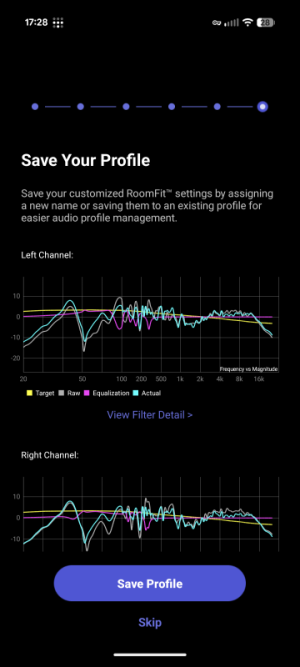
Screenshot_20251129-172804.pngScreenshot_20251129-172442.png
 
Try with a higher max gain like 10db and turn off non boost mode. you will get more of an idea of what room fit is trying to do. its hard to tell with such a low gain setting. this will enable you to identify the frequencies your room is having trouble with. and then work from there with more data ))
 
Did lots of reading, partially understand so wanted some input on results. I am using a Umik-1 just taking a single measurement on each channel. Speakers are Wharfedale 12.2's which can get down to 50's per specs (roll off sooner per the graphs). I started with 20-500 and ended up narrowing down to 45-350. The only 2 variables between the 2 graphs....max gain set to 0.5 and non boost mode on, then a second run max gain set to 3 and non boost mode off.

Allowing to add gain on the bottom end seems to slightly improve the graph, but I could barely hear the difference....could have been the tracks I selected weren't going deep enough but my understanding is that those low frequencies adding gain eats up a lot of headroom for minimal improvement. Secondly, I am adding a sub and that will help fill in the bottom end. Will have to do this whole exercise again.
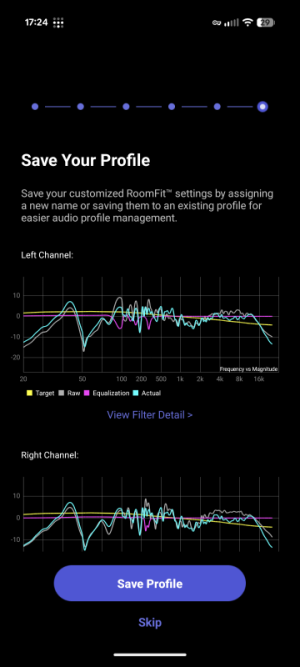
View attachment 30253View attachment 30254
Do you have a sub already, or are these results with just your speakers (i.e. without the sub)?
How far are your speakers and your listening position from each of the 4 walls (referenced to the woofer)?
 
This is without a sub. Sub is en route. My room is about 12x13, BUT behind the speakers is a large bay window. So the distance changes. The outer speaker edge is about 2' from rear wall and the inner edge is roughly 2.5'. so woofer about 2.25'. 2.5' from each side wall to speaker, 82" inches between speakers. I sit roughly 80-85" from speaker measures from me to each speaker.
 
If you've got a sub coming I'd honestly just wait until it arrives, because I'd imagine the roomfit response will change considerably once the sub is integrated (and don't forget to sync the sub with the mains to get latency set before running roomfit).
 
This is without a sub. Sub is en route. My room is about 12x13, BUT behind the speakers is a large bay window. So the distance changes. The outer speaker edge is about 2' from rear wall and the inner edge is roughly 2.5'. so woofer about 2.25'. 2.5' from each side wall to speaker, 82" inches between speakers. I sit roughly 80-85" from speaker measures from me to each speaker.
You may be able to improve that dip in the bass by moving the speakers closer to the wall (in this case a window) behind the speakers, as close as you can. Over 2 feet tends to lead to cancellations as shown in your graph.
 
Thanks all, I knew would have to redo with the sub but wanted to learn the ins and outs of RoomFit so once it was here I truly understood it and how best to use.
 
Back
Top