

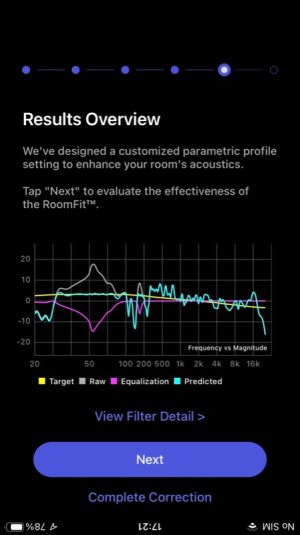
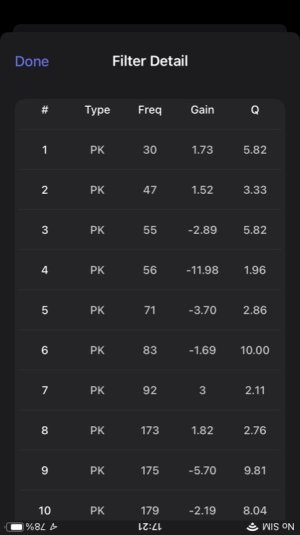
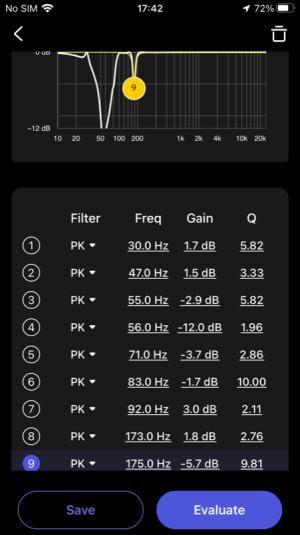
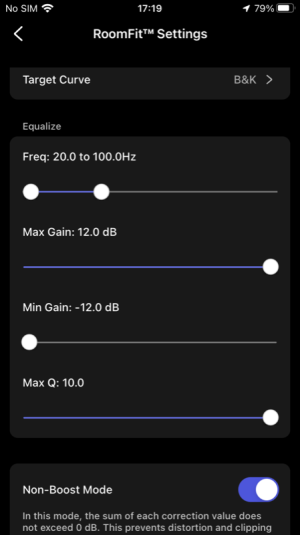
RoomFit’s behavior is a bit surprising. From the screenshot you can see that PK 9 and PK 10 fixes are above 20-100hz, which I set as the limit to eqalize. Why does it waste points?  (The screenshots are from one and the same measurement).
(The screenshots are from one and the same measurement).Attachments
-
 C80118BB-88C9-4C4A-AA54-DC1F29342635.jpeg65.6 KB · Views: 0
 -
 D8CAFD4B-6DC8-4F10-8B6C-01F989ADE02E.jpeg43.7 KB · Views: 0
 -
 5B4C2126-9AC9-434A-ABE2-79BAFFD2702B.png99 KB · Views: 0
 -
 D565D599-1AAC-41BD-8FCF-6DF3C9D490AB.jpeg54.4 KB · Views: 0
 -
 BB79D561-1885-4A39-AECF-C771B69DD810.png62.2 KB · Views: 0

 So I will then use as my minimi that 20-300mhz.


