RoomFit calibration with Ultra: first attempt

pat1975

New Member
Joined
Jan 1, 2024
Messages
25
hi all,

I'm using a Wiim Ultra with Spotify lossless and also Roon direct out in coax to AsciLab C8C active speakers.

This is my first ever attempt at proper room calibration and I'd like your opinions please :)

I read for quite a while before "acting", asked questions, and because RoomFit has made quite a lot of progress I decided to go with it vs tinkering with REW which is more complicated and I don't intend to spend endless hours on this (thanks @dominikz for the help).

So I bought a UMIK-1, loaded the 90° cal file into RoomFit and the following settings
Range: 20 or 25 Hz to 300 Hz, Target: B&K, Non-Boost Mode: On, Channels: Individual channel RoomFit, Smoothing: Variable.
I used MMM measurements.
Volume on Wiim was at 57.

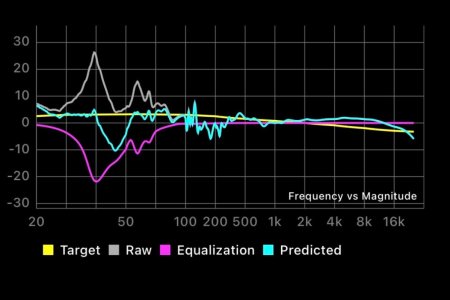
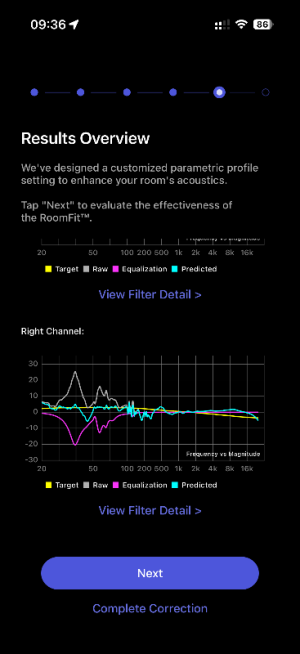
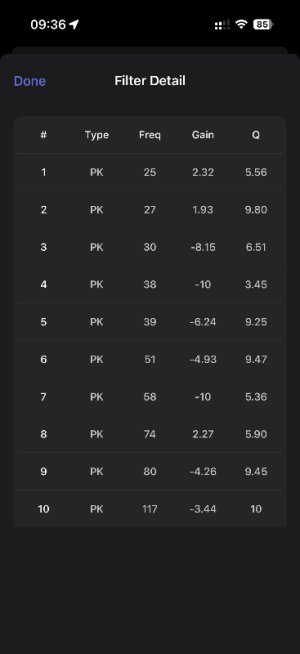
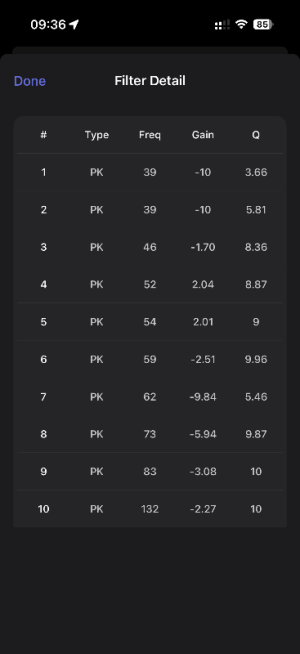
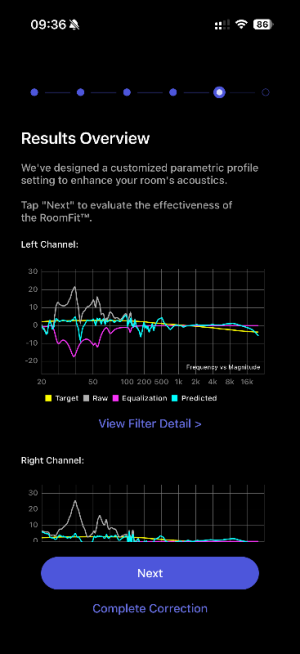
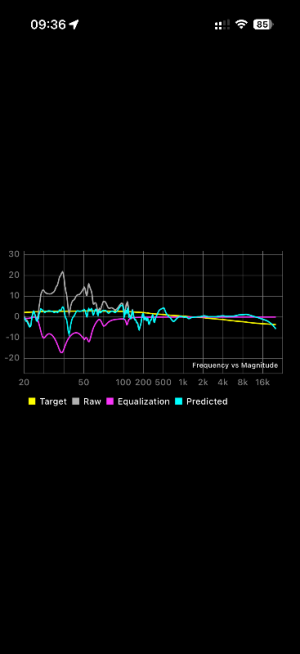
This is what I got. I'd like to get some feedback on what you see because honestly it's not telling me much.
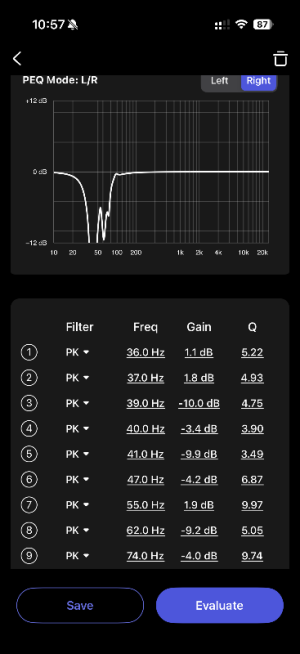
I blindly applied the filters proposed and now I'm listening with and without RoomFit and feel that it really removed a lot of bass, a bit too much to my taste. Essentially I felt that before, there was too much bass, and now not enough if that makes sense.

Any support would be helpful :)
Many thanks!
 

Attachments

  • IMG_1738.jpg
    IMG_1738.jpg
    127.4 KB · Views: 20
  • IMG_1739.jpg
    IMG_1739.jpg
    95.8 KB · Views: 19
  • IMG_1742.PNG
    IMG_1742.PNG
    48.9 KB · Views: 18
  • IMG_1743.PNG
    IMG_1743.PNG
    48.7 KB · Views: 20
Try Harman Curve. After making correction, use EQ / PEQ according to your preferences or adjust gain on sub / Wiim ap for subwoofer. If you choose to increase the gain on the subwoofer or in the app, keep in mind that minor peaks may occur again.

I like bass too, and I can't imagine watching movies without significantly boosting the bass level after auto correction


btw. what phone are you using?

Unfortunately POCO X7 Pro / Xiaomi Mi Note 15 (and probably many more form POCO / Xiaomi) still have problems with Wiim app auto-correction and don't pick up low frequencies, even when using an external microphone. It seems that this problem is not solvable?
 
Last edited:
Thanks but I’m not using any subwoofer (the bass extension from AsciLab comes in 1 month) and I’m using a Umik-1 mic with its 90 degree cal file.

I’ll try Harman curve
 
hi all,

I'm using a Wiim Ultra with Spotify lossless and also Roon direct out in coax to AsciLab C8C active speakers.

This is my first ever attempt at proper room calibration and I'd like your opinions please :)

I read for quite a while before "acting", asked questions, and because RoomFit has made quite a lot of progress I decided to go with it vs tinkering with REW which is more complicated and I don't intend to spend endless hours on this (thanks @dominikz for the help).

So I bought a UMIK-1, loaded the 90° cal file into RoomFit and the following settings
Range: 20 or 25 Hz to 300 Hz, Target: B&K, Non-Boost Mode: On, Channels: Individual channel RoomFit, Smoothing: Variable.
I used MMM measurements.
Volume on Wiim was at 57.

This is what I got. I'd like to get some feedback on what you see because honestly it's not telling me much.
I blindly applied the filters proposed and now I'm listening with and without RoomFit and feel that it really removed a lot of bass, a bit too much to my taste. Essentially I felt that before, there was too much bass, and now not enough if that makes sense.

Any support would be helpful :)
Many thanks!
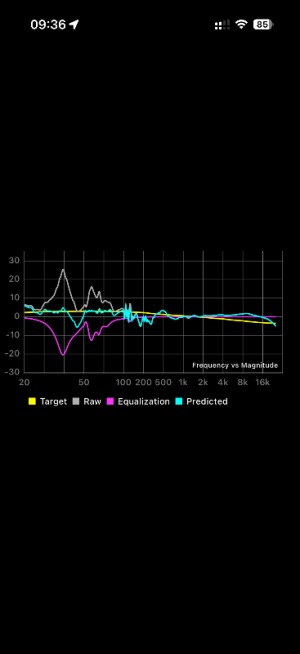
I'd say the main issue is that you have a very strong +25dB peak at 40Hz and after RoomFit applies filters to reduce it, you instead end up with a severe dip just below 50Hz. That will definitely cause bass suckout. :/

How are the speakers placed - how far from the wall behind them and sidewalls?
 
I'd say the main issue is that you have a very strong +25dB peak at 40Hz and after RoomFit applies filters to reduce it, you instead end up with a severe dip just below 50Hz. That will definitely cause bass suckout. :/

How are the speakers placed - how far from the wall behind them and sidewalls?
thank you very much Dominik.

I was using the C8C pointing directly at the listener. Distance front baffle to front wall = 67cm (within the 80 cm recommended by AsciLab). No side walls. Behind the speakers I have thick curtains (they are touching the walls).

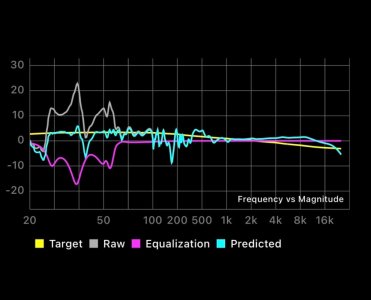
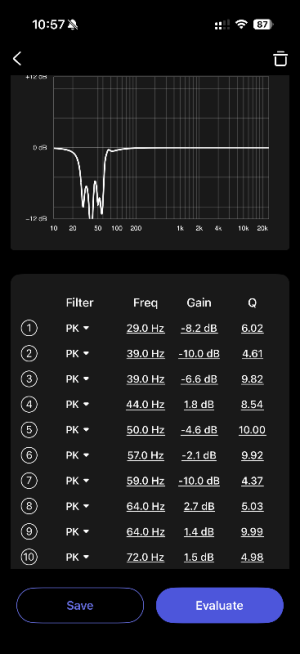
Now I've pointed them perpendicular to the front walls as I've seen a couple of knowledgeable people on ASR doing that successfully. The results are attached. I'm not sure they changed that much though.

My question is: how can I have such a huge peak at 40 hz? is it something wrong with the speakers or with my room?
 

Attachments

  • IMG_1753.PNG
    IMG_1753.PNG
    51.7 KB · Views: 5
  • IMG_1754.PNG
    IMG_1754.PNG
    33 KB · Views: 5
  • IMG_1755.PNG
    IMG_1755.PNG
    33 KB · Views: 2
  • IMG_1752.PNG
    IMG_1752.PNG
    52.9 KB · Views: 3
  • IMG_1756.PNG
    IMG_1756.PNG
    32 KB · Views: 2
  • IMG_1757.PNG
    IMG_1757.PNG
    31.6 KB · Views: 4
thank you very much Dominik.

I was using the C8C pointing directly at the listener. Distance front baffle to front wall = 67cm (within the 80 cm recommended by AsciLab). No side walls. Behind the speakers I have thick curtains (they are touching the walls).

Now I've pointed them perpendicular to the front walls as I've seen a couple of knowledgeable people on ASR doing that successfully. The results are attached. I'm not sure they changed that much though.

My question is: how can I have such a huge peak at 40 hz? is it something wrong with the speakers or with my room?
Huge peaks in the bass are pretty normal, they are mostly related to speaker distance from walls or to room modes. Peaks are normally handled well by RoomFit, but really severe ones can sometimes cause these kinds of issues.

My suggestion would be to try a few distances from the wall and re-run RoomFit at each position. Then keep the distance which doesn't have the 40-50Hz dip after correction.

If nothing else works, with REW you should be able to build a more precise custom correction that fixes the peak without introducing a dip.
 
Huge peaks in the bass are pretty normal, they are mostly related to speaker distance from walls or to room modes. Peaks are normally handled well by RoomFit, but really severe ones can sometimes cause these kinds of issues.

My suggestion would be to try a few distances from the wall and re-run RoomFit at each position. Then keep the distance which doesn't have the 40-50Hz dip after correction.

If nothing else works, with REW you should be able to build a more precise custom correction that fixes the peak without introducing a dip.
thanks, I'll bring them closer to the wall and report back! :)
 
Back
Top