


- Joined
- Mar 9, 2026
- Messages
- 34
Welcome back to another edition of Tech Tuesday!
One of the biggest strengths of the WiiM ecosystem is how flexible multi-zone audio can be. You are not locked into a single type of setup or listening style. A WiiM system can be as simple as a couple of grouped rooms playing synchronized music, or as elaborate as a whole-home setup mixing streamers, amps, active speakers, outdoor zones, TV audio, and local media libraries.Many YouTube videos have captured this idea well by showing how multi-zone systems can seamlessly move between independent listening zones and synchronized whole-home playback.
Today’s post is less about raw networking theory and more about the practical side of building a WiiM multi-zone setup that feels good to actually live with.
For the networking side of things, including synchronization stability and wireless best practices, check out last week’s Tech Tuesday.
Think in Listening Zones
One thing WiiM does particularly well is flexibility in how you organize playback groups.Instead of thinking strictly in terms of rooms or individual devices, it often works better to think in listening experiences.
A WiiM group lets you link multiple WiiM devices together for synchronized playback inside the WiiM ecosystem. Persistent groups are saved groups that can be reused more easily, which is especially useful for common situations like “Downstairs,” “Party,” or “Outdoor.”
This is different from platform-level grouping systems such as Alexa MRM or Google Cast speaker groups. Those systems may appear in different apps, behave differently depending on the source, and may not have the same capabilities or limitations as WiiM groups.
So before troubleshooting or planning a setup, it helps to ask: “Am I using a WiiM group, a persistent WiiM group, a Spotify Connect target, an Alexa group, a Google Cast group, or something else?
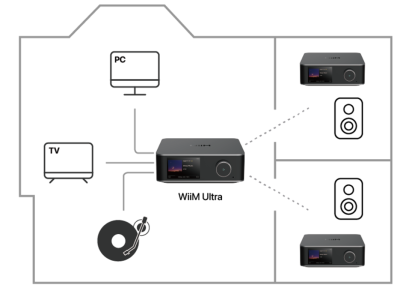
Because WiiM grouping is dynamic, you can change these combinations quickly without rebuilding your setup every time your listening habits change.
The WiiM Home App Is the Heart of the Experience
The controller experience matters.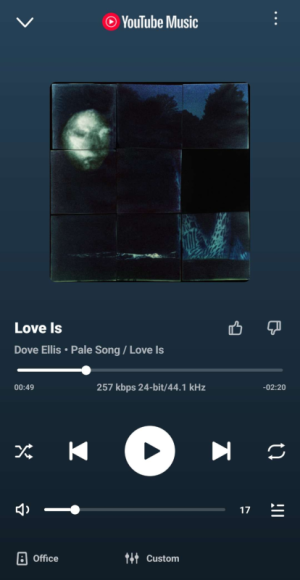
The WiiM Home app becomes the operational center for the entire system. Grouping zones, moving playback between rooms, adjusting volume across multiple devices, switching inputs, or redistributing audio from one source to several zones all happens from one place.
A good multi-zone system should feel effortless to control. If grouping rooms feels cumbersome, people tend to stop using those features entirely.
WiiM's Flexibility Changes How You Can Build a System
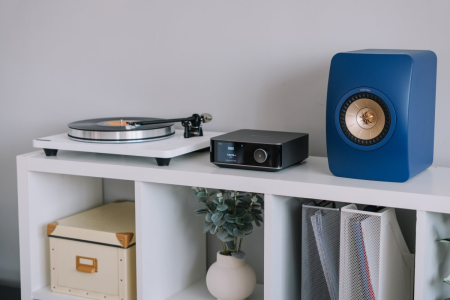
One of the more unique aspects of WiiM compared to some ecosystems is how open the platform can feel.Some users build systems around WiiM streamers connected to existing stereo gear. Others use WiiM Amps to power passive speakers directly. Some mix older traditional audio systems with newer networked zones. Others combine indoor listening rooms with outdoor audio areas.
Because WiiM supports multiple streaming protocols and input options, many users end up building hybrid systems that evolve over time rather than replacing everything at once.
That flexibility is a major advantage if you already own audio equipment you love.
Different Sources Behave Differently
Not every source behaves the same way in a WiiM multi-zone setup.Streaming services, local libraries, HDMI ARC, line-in, Bluetooth, AirPlay, DLNA, Spotify Connect, Roon, Lyrion, Alexa Cast, and Google Cast can each have different expectations around grouping, buffering, and redistribution.
As a practical rule, music-only sources can usually tolerate more buffering because there is no picture to keep in sync. For turntables or line-in music, increasing group delay may improve stability if visual sync is not important.
TV audio is different. With HDMI ARC or optical input from a TV, delay becomes much more noticeable because the sound has to stay aligned with the picture. In that case, the best setting may involve a tradeoff between multi-room stability and lip sync.
It is also worth noting that WiiM Linkplay group playback is currently limited to 16-bit / 48 kHz.
For many whole-home and casual listening setups, that is completely usable. But if your goal is high-resolution playback in every room, this limitation is important to understand before designing your system around grouped playback.
If you plan to distribute live audio across multiple WiiM zones, network consistency matters a lot more than many people initially expect.
Good Networking Quietly Powers Everything
This is where many multi-zone issues actually begin.As a general best practice, choose a stable and central device as the group leader when possible. If one device is wired by Ethernet and regularly participates in larger groups, that device may be a better starting point than a device on the edge of Wi-Fi coverage.
Also think about the source. If you are distributing line-in, HDMI ARC, Bluetooth, or another physical input, the device receiving that input naturally becomes more important to the group. If you usually start playback from Spotify, Qobuz, TIDAL, a NAS library, or another service, test which device or group target gives you the most predictable behavior.
The best group leader is not always the most obvious room. It is the device that gives you the best mix of stability, source access, and everyday usability.
A synchronized WiiM setup does not just need bandwidth. It needs stable timing and reliable connectivity between devices.
Weak mesh handoffs, inconsistent Wi-Fi coverage, roaming instability, or overloaded wireless environments can all become more noticeable once several devices are trying to stay synchronized together.
That does not mean every WiiM device needs Ethernet, but stable networking becomes increasingly important as systems grow larger and more complex.
Again, if you want to go deeper into this side of things, last week’s Tech Tuesday covers the networking considerations behind stable synchronized playback in much more detail:
Final Thoughts
One of the best things about a well-built WiiM multi-zone setup is that it eventually fades into the background. Music simply exists where you want it.You stop thinking about individual devices and start thinking about the experience itself. Music follows you through the house. Different spaces can take on different moods. A gathering can expand from one room into the entire home with a few taps.
That flexibility is part of what makes the WiiM ecosystem so compelling for multi-zone audio.
How have you structured your WiiM setup?
Do you keep fixed groups? Dynamically regroup rooms throughout the day? Mix older stereo equipment into your WiiM ecosystem?


