Tidal Connect - Problem with MAX Albums

d3vil0

New Member
Joined
Feb 4, 2024
Messages
8
Hi,
From some time, I have problem with playing Tidal MAX Albums (those with FLAC 4350 kbps 24-bit/192 kHz.
At Random times, music stop playing for 1-2 sec - like 20-40 times per song.

Wiim soft is up to date.
This is not a internet issue problem - tested and rebooted everything. Connecting only through IPv4 with google DNS's on 5GHz Wifi and 300Mbit fiber. On other devices TIDAL works just fine.
# Tested different SPDIF cables (using stock Wiim cable, cleaned up - not twisted),
# Lowering SPDIF output resolution in Wiim to test.
# Tested Diffrent DAC SPDIF inputs

Nothing is working.

Problem occurs on Tidal album: The Alan Parsons Project - I Robot.
Looks like software/hardware problem to me.

We will be grateful for your help.
 
Answer form WiiM:

We are very sorry for the inconvenience.

We recommend turning off the "Preferred DNS Server" function by going to WiiM Home App > Device Settings > Network Status. After disabling this, please restart both your device and router to see if there is any improvement.

Thank you for your patience and understanding.
 
Answer form WiiM:

We are very sorry for the inconvenience.

We recommend turning off the "Preferred DNS Server" function by going to WiiM Home App > Device Settings > Network Status. After disabling this, please restart both your device and router to see if there is any improvement.

Thank you for your patience and understanding.
Do you know if disabling this should prevent wiim devices from using several DNS servers and pinging to determine which has the lowest RTT? I've disabled, but wiim is still using a few additional DNS servers.

While it started working before changing anything, I usually have NAT rules to rewrite source and destination addresses of DNS queries and replies to avoid devices ignoring my DNS config like this, so sending six queries to the same two DNS servers isn't very useful. I disabled these a week ago when I first noticed the issue, but no improvement. Today, I went to reeable these rules on my firewall and noticed Wiim appears to behave the same regardless of the setting you mentioned being off or on. i guess I could just block icmp too, but I don't want to piss off the Wiim!
 
Having the same issue with tidal max. Have 1Gbit fiber and the router is next to the wiim.
Only happens with Max files. I am leaning to think the wiim mini is no powerful enough for these large 4Mbit/s files. I am trying qobuz and so far so good.
If the wiim ultra also have this don't know if is a CPU issue then.
 
And just because your own Internet connection is good doesn't mean that the entire path from Tidal's rented CDN servers to the WiiM is good.

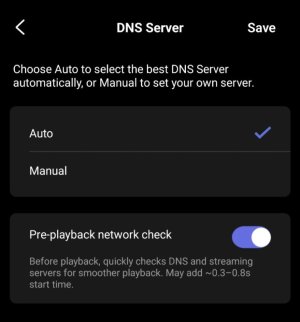
The old setting "Preferred DNS Server" is long gone now. It didn't do anything smart, but just forced the use of Google DNS servers, which often (but not always) have better performance than the ISP's own DNS servers.

Since the introduction of Auto DNS and Pre-playback network check I never had to worry about touching theses settings again. Admittedly, the Mini is not amongst my collection of WiiM devices.

IMG_20260320_095302_copy_768x822.jpg
 
For anyone it might help, I no longer have a Wiim device, but I’ve experienced this issue with an Eversolo DMP-A8, the Wiim Ultra, and now with the Matrix TT-1. From what I’ve seen—and read on some forums, including the official Matrix Audio forum via support—it seems to depend on Tidal’s servers, which in some regions can cause this error.


The solution they suggest, and which worked for me, is to change the DNS settings on your main router. In my case, I use Cloudflare’s DNS (1.1.1.1 and 1.0.0.1), though Google’s DNS might work as well.


Hope this helps.
 
Back
Top