
Two Strange Vibelink Bugs

markstein

Member
Joined
Jun 1, 2025
Messages
12
I use the Ultra / Vibelink combination for some months now. I control the set with a Xiaomi 14 and Wiim Home app.

Bug 1: After some time and with no special reason Bluetooth on the Vibelink is no longer active and the amp does not appear in the Wiim app anymore. Only reboot of the Vibelink helps. Reboot is necessary any two to five days when the amp is used daily.

Bug 2: This is a weird one. Ultra and Vibelink are connected with a COAX cable working fine. Sometimes (happened two times on a random basis) the Vibelink gets silent in the middle of playback, playing a song from WiFi on the Wiim Ultra. Nothing has been switched or altered. The Ultra shows as output COAX and the Vibelink COAX as input. But there is no sound anymore. If I switch the Ultra to Line Out and then back to COAX, the system returns to playing normal. If this condition happens, it also triggers bug 1 above.
 
I use the Ultra / Vibelink combination for some months now. I control the set with a Xiaomi 14 and Wiim Home app.

Bug 1: After some time and with no special reason Bluetooth on the Vibelink is no longer active and the amp does not appear in the Wiim app anymore. Only reboot of the Vibelink helps. Reboot is necessary any two to five days when the amp is used daily.

Bug 2: This is a weird one. Ultra and Vibelink are connected with a COAX cable working fine. Sometimes (happened two times on a random basis) the Vibelink gets silent in the middle of playback, playing a song from WiFi on the Wiim Ultra. Nothing has been switched or altered. The Ultra shows as output COAX and the Vibelink COAX as input. But there is no sound anymore. If I switch the Ultra to Line Out and then back to COAX, the system returns to playing normal. If this condition happens, it also triggers bug 1 above.
Have you already attempted a factory reset on your Vibelink?

You can reset it by pressing and holding the power button on the back panel for 10 seconds.
 
I use the Ultra / Vibelink combination for some months now. I control the set with a Xiaomi 14 and Wiim Home app.

Bug 1: After some time and with no special reason Bluetooth on the Vibelink is no longer active and the amp does not appear in the Wiim app anymore. Only reboot of the Vibelink helps. Reboot is necessary any two to five days when the amp is used daily.
i experience this exact same issue too. since the amp works just fine (without appearing in the app), and to my opinion having it shown in the app is a waste of space, i really don't mind when this happens and it's gone from the list of devices.
but this is definitely some sort of bluetooth connectivity bug with the Vibelink
 
i experience this exact same issue too. since the amp works just fine (without appearing in the app), and to my opinion having it shown in the app is a waste of space, i really don't mind when this happens and it's gone from the list of devices.
but this is definitely some sort of bluetooth connectivity bug with the Vibelink
My vibelink does the same thing only it still shows up in the app but with a little indicator that says “disconnected”.
 
Bug 2: This is a weird one. Ultra and Vibelink are connected with a COAX cable working fine. Sometimes (happened two times on a random basis) the Vibelink gets silent in the middle of playback, playing a song from WiFi on the Wiim Ultra. Nothing has been switched or altered. The Ultra shows as output COAX and the Vibelink COAX as input. But there is no sound anymore. If I switch the Ultra to Line Out and then back to COAX, the system returns to playing normal. If this condition happens, it also triggers bug 1 above.
Do you have a sub? Sometimes my ultra does as you describe also using coax, but I have a sub and that continues as it should be nothing from main speakers.
Submitted a few tickets and spoke to Edan a few times.
 
that happened to me exactly a couple of times,but with the optical input
Edan initially tried to tell me it was because I was using coax only and it was recommended to plugin line in as well as coax... Reluctantly I did as asked and made zero difference..
 
Edan initially tried to tell me it was because I was using coax only and it was recommended to plugin line in as well as coax... Reluctantly I did as asked and made zero difference..
i don't see / understand any logic in this (his) explanation - he asked you to plug the RCA input AND the Coax input to the Ultra at the same time? and then what......?
EDIT: this issue never happened to me while playing (in the middle of a song)
 
Last edited:
i don't see / understand any logic in this (his) explanation - he asked you to plug the RCA input AND the Coax input to the Ultra at the same time? and then what......?
That's exactly what he said... Think he was trying to say it was due to earthing/grounding and it was recommended by WiiM to use line in as well as coax... I explained I'd spent £50 on a decent coax cable and preferred to only use that to save on wire clutter..
 
That's exactly what he said... Think he was trying to say it was due to earthing and it was recommended by WiiM to use line in as well as coax... I explained I'd spent £50 on a decent coax cable and preferred to only use that to save on wire clutter..
I never heard about that recommendation , maybe someone else can shed some light on this "official tip" ...

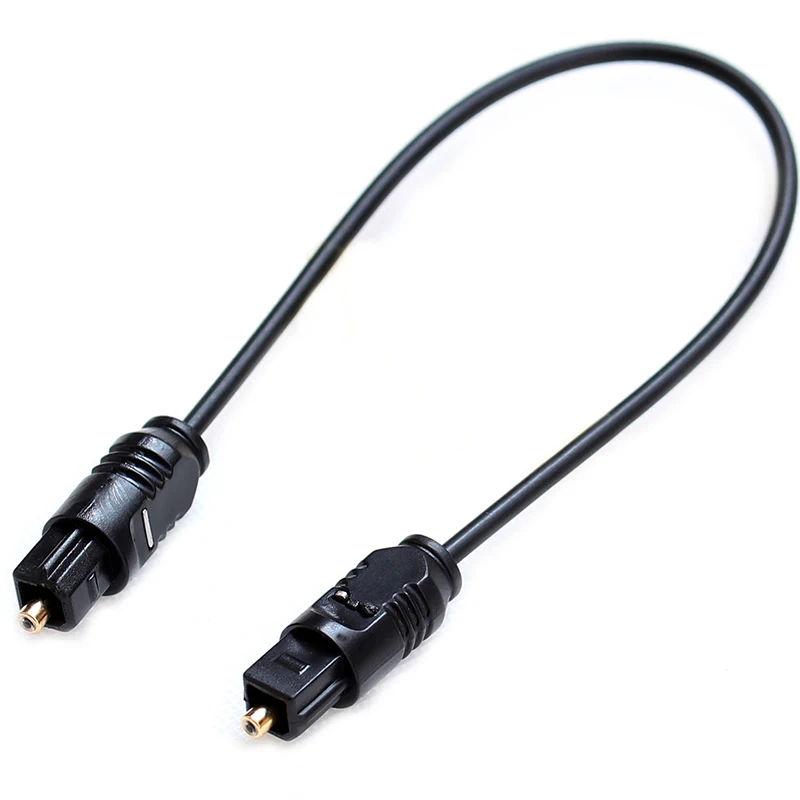
i spent 2.5USD on a short optical cable on AE and it works fine 🤐
 
Think we need an explanation from @WiiM Team I thought I was the only one that had this issue, but clearly not the case...
was your ticket closed? i will definitely open a ticket from the app the next this happens. it just doesn't happen very often to me TBH .
also, I'm really not sure if using the feedback option from the app can actually collect any useful information to send back to WiiM when it comes to Vibelink issues (actually it stopped appearing for me in the app so..yea)
 
was your ticket closed? i will definitely open a ticket from the app the next this happens. it just doesn't happen very often to me TBH .
also, I'm really not sure if using the feedback option from the app can actually collect any useful information to send back to WiiM when it comes to Vibelink issues (actually it stopped appearing for me in the app so..yea)
Unsure I'd have to check but I've open a new ticket as soon as it happens three maybe four times...
Last time I talked to edan I asked if it was a hardware fault, he said no we think it's software.. No mention of others having the identical problem..
Edit.. if I reboot the ultra it's fine then until next time..
 
Unsure I'd have to check but I've open a new ticket as soon as it happens three maybe four times...
Last time I talked to edan I asked if it was a hardware fault, he said no we think it's software.. No mention of others having the identical problem..
Edit.. if I reboot the ultra it's fine then until next time..
just a thought - maybe try using the optical cable that came with the Ultra/Vibelink, just to see if it makes any difference (instead of the short coax cable)
* i'm suggesting this to rule out some weird issue with the coax cable or the Vibelink coax input, being "too sensitive"
 
Last edited:
just a thought - maybe try using the optical cable that came with the Ultra/Vibelink, just to see if it makes any difference (instead of the short coax cable)
* i'm suggesting this to rule out some weird issue with the coax cable or the Vibelink coax input, being "too sensitive"
I'll dig it out and give it a go, hopefully the behaviour continues or it's pointless having any other connections from the ultra..
 
Software bugs do not disappear by factory reset. (Michaels law #1)

At least with my Vibe+Ultra, I've never once encountered the same issue you're having.

Are you controlling Vibe's power using the WiiM app? If not, you also have the option to hide Vibe from the WiiM app. By denying the WiiM app's "Nearby Devices" permission, the WiiM app will no longer connect to Vibe via Bluetooth.
 
Back
Top