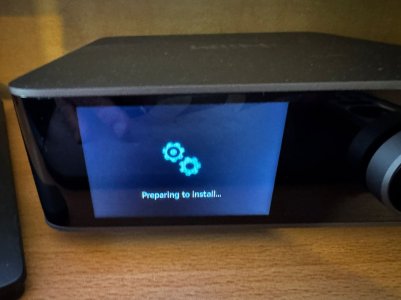
WiiM Amp Ultra Firmware v5.2.739555 Update - Dec 23, 2025

Please review the WiiM Amp Ultra update release notes below. If you encounter any issues, feel free to reach out to us. This firmware update is being rolled out in stages, with devices updating sequentially over the next few days.

5.2.739555 (In Progress)

Release date:

Dec 23, 2025

General Improvements:

  1. Wi-Fi: Stronger connection stability; improved compatibility with Wi-Fi 7 routers.
  2. Audio Spectrum: Added Audio Spectrum visualization. Better timing alignment with playback.
  3. Queue: Better track order retention in shuffle and faster queue operations across NAS/USB/Samba/Local, TIDAL, Qobuz, Radio Paradise, YouTube, Deezer, and SoundCloud.
  4. Multi-room: Improved multicast logic for more reliable discovery/connectivity; reduced stutter when using Bluetooth input.

Music Services:

  1. Qobuz: Stabilized progress bar; fixed shuffle dropouts, playback-mode mismatch, and missing artist/track metadata.
  2. Soundtrack: Updated SDK; fixed disconnects when renaming the device during playback.
  3. Amazon Music: Fixed position reset after back-to-back seeks.
  4. USB Library: Fixed disappearing album art.
  5. TIDAL Connect: Fixed playback interruptions after ~1 hour.
  6. TuneIn: Now consistently selects the highest available stream quality.
  7. Radio: Resolved failures for certain station formats.

Bug Fixes:

  1. Google Cast: Device now retains its assigned room after reboot.
  2. VU Meter: Restored operation with Dolby audio in multi-room playback.
 
Last edited:
I installed this and for the first time in months I have had to adjust the volume. It sat at 40 for months but now I need 45 to get the same volume. Did the update change something?
 
The WiiM Amp Ultra did have Wi-Fi 6e support pretty much right from the beginning. :unsure:

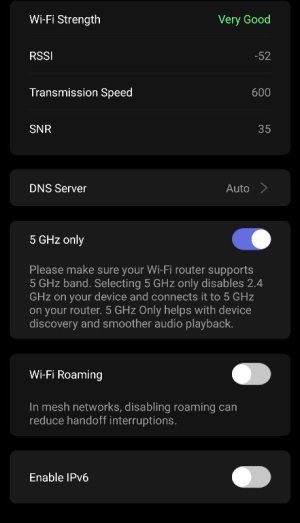
Mine is currently connected to my 6 GHz Wi-Fi and the access point is configured as Wi-Fi 7.
Hmm. What are your settings inside Wiim app?
 
Hmm. What are your settings inside Wiim app?
Nothing special.

IMG_20251229_223923.jpg

I know it's connected to the 6 GHz access point because I have different SSIDs for each frequency band.

IP configuration is automatic, of course, with the Wi-Fi router always assigning the same address through DHCP.
 
Ok. Little higher is crucial info. Access point and "your phone is connected to". My phone is 6e always on and the last to digits are ( example ) 10 but Wiim's connection is different ( 5ghz ).
So , access point for 6e is with 10 at the end but Wiim is at smth else.
 
Ok. Little higher is crucial info. Access point and "your phone is connected to". My phone is 6e always on and the last to digits are ( example ) 10 but Wiim's connection is different ( 5ghz ).
So , access point for 6e is with 10 at the end but Wiim is at smth else.
I won't show you any of my MAC addresses anyway. :)

But I already told you that I can tell from the SSID that my WiiM Amp Ultra is connected to the 6 GHz AP. I can also ensure you that the MAC address of the AP my phone is connected to (6 GHz) is the same as the MAC address the WAU connects to, so there's no display error.

What's not correct in the WHA GUI is that it shows the "5 GHz only" toggle switch when it is really connected to a 6 GHz AP, because that's what it is.
 
Haha. Sry, i dont want your real data. Ok, so you are telling me that AP i the same as your phone is connected? So, my Wiim doesnt like my router then.
 
Haha. Sry, i dont want your real data. Ok, so you are telling me that AP i the same as your phone is connected? So, my Wiim doesnt like my router then.
I also posted here about successfully connecting via Wi-Fi 6E. There's a screenshot toward the end of that post.

However, for some reason I don't understand, even when I put the Amp Ultra into setup mode now, the 6GHz band SSID no longer appears in the list. I suspect there's something I need to do on the router side.
 
Ok. So it makes 2 of us. It's not a crucial for me as i try to connect all my things via ethernet, but definitely my router has its own life :D
 
However, for some reason I don't understand, even when I put the Amp Ultra into setup mode now, the 6GHz band SSID no longer appears in the list. I suspect there's something I need to do on the router side.
Interestingly, the same thing happened to me (at least with this current firmware 5.2.739555), but the WiiM Amp Ultra connected to the 6 GHz AP later automatically ... so yes, not all is perfect yet. But support for Wi-Fi 6e has been there since the original firmware release.
 
I installed this and for the first time in months I have had to adjust the volume. It sat at 40 for months but now I need 45 to get the same volume. Did the update change something?

I thought I was the only one! I'm experiencing the same thing!
 
I thought I was the only one! I'm experiencing the same thing!
And @cooky560 do both/either of you use the PEQ and/or RoomFit™? I wonder if LinkPlay implemented some negative pregain to eliminate digital clipping if there’s any sort of PEQ or room correction boosts.

-Ed
 
And @cooky560 do both/either of you use the PEQ and/or RoomFit™? I wonder if LinkPlay implemented some negative pregain to eliminate digital clipping if there’s any sort of PEQ or room correction boosts.

-Ed
It has also been noted that the VU meter is now showing about -7 dBFS lower on input than before.

Post in thread 'WiiM Ultra Firmware v5.2.739061 Update - Dec 18, 2025' https://forum.wiimhome.com/threads/...-2-739061-update-dec-18-2025.8826/post-164711
 
Back
Top