WiiM Amp Ultra Firmware v5.2.813343 Update - Apr 9, 2026

Please review the WiiM Amp Ultra update release notes below. If you encounter any issues, feel free to reach out to us. This firmware update is being rolled out in stages, with devices updating sequentially over the next few days.

5.2.813343 (In Progress)

Release date:

Apr 9, 2026

Highlights:
  1. Sub & Main Speaker Sync: Automatically aligns subwoofer and main speakers for improved timing at the listening position.
  2. Per-Input Screen Control: Enable or disable the screen display for each input mode.
  3. Spotify Smart Play: Resume your latest listening session with a single tap.
  4. Surround Setup: Simplified setup with full backward compatibility. (requires upcoming app update).
Screen:
  1. Playback Screen: Added a vinyl-style playback screen for a more immersive experience.
  2. Localization: Added French language support.
Playback & Audio:
  1. Playback Latency: Reduced delay when starting playback.
  2. EQ: Improved responsiveness when adjusting and switching EQ settings.
  3. Line In: Fixed distortion during extended playback sessions.
  4. Bass Output: Fixed low bass levels for Apple TV (Dolby 5.1).
Radio & Streaming Services:
  1. TIDAL Connect: Upgraded SDK to resolve unexpected playback interruptions.
  2. Soundtrack: Updated SDK for improved playback stability and performance.
  3. TuneIn: Fixed playback issues for certain stations and improved resume behavior after long pauses.
  4. Deezer: Fixed unexpected playback interruptions.
General Improvements:
  1. Wi-Fi: Improved network stability and enhanced compatibility with Wi-Fi 7 routers.
  2. HDMI ARC: Disabling automatic audio output now correctly keeps WiiM in standby and defaults to the TV speakers.
  3. HTTP Server: Improved concurrency and stability under high load.
  4. Audio Input: Fixed playback crash issues.
  5. Remote: Fixed occasional disconnection and unexpected max volume issues.
  6. Alarm: Fixed incorrect alarm and preset volume behavior.
  7. Roon: Fixed occasional crash issues.
  8. EQ: Enables EQ for Dolby 5.1 playback.
  9. Alarm: Fixes BBC and vTuner alarms defaulting to the chime.
  10. Spectrum Display: Improves dynamic visualization.
  11. Qobuz Connect: Fixed occasional playback stopping issues.
 
Last edited:
Still no SoundCloud scrub/skipp long tracks....all other competition can do it.
Welcome.

I'd suggest raising a feeback request from the '... More / Feedback and Tickets' menu in the wiim app with details of what you'd like to see.
I have to admit that I'm not entirely sure what you mean by scrub and why it / skipping seems to be an issue just with long tracks.
 
Hi, when will you do something about the YouTube Music Premium app in the Wiim Amp Ultra menu? I can't add or remove songs from the list, only listening is available... Regards
 
Is the sub/main sync done using the mic at the listening position (phone or calibrated mic)?
The old way of doing it used a mic built into the amp...
That’s a question I’d also like to have answered.

However, the external software that allows you to do this costs over €300. That’s almost the cost of a WU and half the cost of a WAU.
 
Hi, when will you do something about the YouTube Music Premium app in the Wiim Amp Ultra menu? I can't add or remove songs from the list, only listening is available... Regards
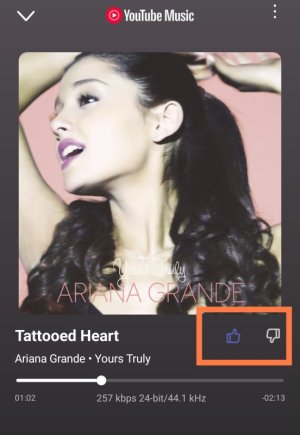
Did you know that if you tap the "Like" button, you can add that track to the "Highly Rated Tracks" playlist in the YTM app? And if you tap "Unlike," you can remove it from the playlist.

3294.jpg
I think good at you add the track to this list for now, and then add it to another playlist in the YTM app later.
 
Which software were you thinking of that doesn't need a PC? Doesn't everyone have a PC? You only need to do it once unless you move the speakers.
My perspective is a bit different.
The Wiim Amp Ultra is a standalone device; the Wiim Ultra is a streamer/DAC.

The comparison should be made within this segment, and in that regard, I’m on the same level as DIRAC.
 
I must be getting old 😂


I was late to computers. My first one was second hand. I think it had 512 mb RAM, Ubuntu 7.04 and ran the old slimdevices slimserver software with 2 squeezeboxes no problem at all.

I think my car keys have more processing power than that now,
 
Welcome.

I'd suggest raising a feeback request from the '... More / Feedback and Tickets' menu in the wiim app with details of what you'd like to see.
I have to admit that I'm not entirely sure what you mean by scrub and why it / skipping seems to be an issue just with long tracks.
Thank you 🙏

By scrub/skipp I mean that when you listen to some song, or in my case where I listen long DJ sets, you can skip to some time position in that track. It's pretty normal to be able to do it, except with Wiim and thats a huge let down, because I need to listen that long tracks from the beginning every single time.
I have HEOS system, it can do it....I have Eversolo system, it can do it....only Wiim can't....
 
I just re-ran Roomfit, but I always get an error.
There always goes something wrong when it wants to measure the right speaker.
 
I just re-ran Roomfit, but I always get an error.
There always goes something wrong when it wants to measure the right speaker.
This is often due to local issues with the phone and app.

Some don't like to hear this, but rebooting your phone and clearing the cache of the WiiM Home App (if you're on Android) often cures this.
 
Back
Top