WiiM Amp Ultra screen buttons unresponsive

Denus01

Member
Joined
Nov 25, 2025
Messages
8
I just received my first WiiM: the Amp Ultra which is a very nice amplifier.
The setup went fine, including the latest (end Nov) firmware update.
But I noticed that the buttons onscreen are not always responsive, or even working at all.
I can swap to the left and the right without any issues, but the buttons on the main screen are very hard (and sometimes even impossible) to activate.
Trying to solve this, the AC power has been cut off for 30 secs, I also did a factory reset: everything that could solve the issue but the screen stays quite unresponsive.
I'm using my phone to setup the device (glad to have that option) but this seems to be a software issue since the left and right sweeping is working great.
 
I just received my first WiiM: the Amp Ultra which is a very nice amplifier.
The setup went fine, including the latest (end Nov) firmware update.
But I noticed that the buttons onscreen are not always responsive, or even working at all.
I can swap to the left and the right without any issues, but the buttons on the main screen are very hard (and sometimes even impossible) to activate.
Trying to solve this, the AC power has been cut off for 30 secs, I also did a factory reset: everything that could solve the issue but the screen stays quite unresponsive.
I'm using my phone to setup the device (glad to have that option) but this seems to be a software issue since the left and right sweeping is working great.
Hi

You can swipe the screen with your finger, yet nothing happens when you tap it? That sounds rather peculiar.

If your fingertips are excessively dry, the screen may not respond. Try breathing on your finger to moisten it slightly.
 
Hi

You can swipe the screen with your finger, yet nothing happens when you tap it? That sounds rather peculiar.

If your fingertips are excessively dry, the screen may not respond. Try breathing on your finger to moisten it slightly.


It's working a bit better indeed, but it's still difficult to toggle a setting (like the Adaptive Brightness button for example).
Sometimes it's working after a few attempts, sometimes it doesn't react at all.
But hey: no big deal: my phone can do the job way better anyway.

And yes, I have dry hands, although my iPhone doesn't care a bit... ;)
 
It's working a bit better indeed, but it's still difficult to toggle a setting (like the Adaptive Brightness button for example).
Sometimes it's working after a few attempts, sometimes it doesn't react at all.
But hey: no big deal: my phone can do the job way better anyway.

And yes, I have dry hands, although my iPhone doesn't care a bit... ;)

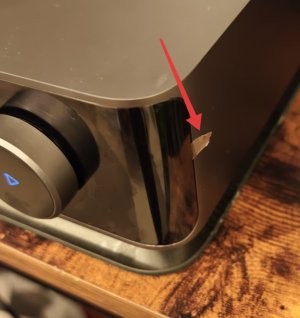
The Amp Ultra screen has a protective film applied. (If you have the courage to remove it) Removing the film may improve responsiveness.

Pull the tab on the right side to remove the film.
1484.jpg


I'm a very chicken, so I haven't removed it yet.😄
 
The Amp Ultra screen has a protective film applied. (If you have the courage to remove it) Removing the film may improve responsiveness.

Pull the tab on the right side to remove the film.
View attachment 30094


I'm a very chicken, so I haven't removed it yet.😄
I don’t even use the touch screen, when I have the touch screen of my phone or tablet close at hand. 🤔
 
I'm still laughing, but @Wiimer is very sage, so follow his advice.
I don't have any such touch screen issues with my Ultra, nor with my amp ultra when I had it in a desktop setting.
Trouble is, it's probably not even worth sending feedback via the app as it won't have registered the presses for the logs to be useful.
 
I don't have any such touch screen issues with my Ultra, nor with my amp ultra when I had it in a desktop setting.

Which finger do you use to touch it?

Mine responds better when touched with the thumb rather than the index finger.

(Please don't laugh, it's a serious question.😂😂😂)
 
I use my index finger. And yes, the protection film has been removed.
Fact is that the sensitivity of the touchscreen could be a bit improved (by software).
 
I just received my first WiiM: the Amp Ultra which is a very nice amplifier.
The setup went fine, including the latest (end Nov) firmware update.
But I noticed that the buttons onscreen are not always responsive, or even working at all.
I can swap to the left and the right without any issues, but the buttons on the main screen are very hard (and sometimes even impossible) to activate.
Trying to solve this, the AC power has been cut off for 30 secs, I also did a factory reset: everything that could solve the issue but the screen stays quite unresponsive.
I'm using my phone to setup the device (glad to have that option) but this seems to be a software issue since the left and right sweeping is working great.
Though I'm reluctant to get dragged into the jokes, it’s not just you; I also find the amp ultra touchscreen to be unresponsive and finicky. Fortunately I rarely need to use it because I mainly rely on the app or remote.
 
Can you test if the screen reacts better when the Amp Ultra is powered on for a few minutes after it was switched off (power) for a short while? Maybe it's cpu usage is (very) high and/or cache files are being processed/cleaned-up and the user interface becomes sluggish because of that.
 
Can you test if the screen reacts better when the Amp Ultra is powered on for a few minutes after it was switched off (power) for a short while? Maybe it's cpu usage is (very) high and/or cache files are being processed/cleaned-up and the user interface becomes sluggish because of that.
Well, it seems the amp is now reacting better that the first day for some reason.
The icons at the borders are a little more difficult to activate but nothing serious though.
I'm happy how it works now.
 
I have the same problem with the Amp Ultra. However I don't think the issue is lack of sensitivity, but rather that the touchscreen is extremely scoll-happy. When I deliberately keep my hand perfectly still, the buttons work completely fine. If the finger moves even a few pixels when trying to press a button, it blocks the button and starts scrolling instead -- I can see the screen starts moving just a little bit and I already know the button won't work. Really annoying. I believe adjusting the scroll threshold would fix it.
 
Back
Top