

Welcome to the forum and thanks for sharing that infoJust had a similar issue here for the first time (2 years of use). The Spotify Android app only showed my WiiM pro plus being available using Chromecast. The solution for me was to enable Chromecast on the WiiM home app (it was previously disabled), then go back onto the same tab and disable ,"send device usage " (this probably did nothing) and "allow google cast service". This then restored the direct Wiim ProPlus AD36 option in Spotify.

You are using an out of date browser. It may not display this or other websites correctly.
You should upgrade or use an alternative browser.
You should upgrade or use an alternative browser.
Spotify WiiM Pro Plus will only show up as a Chromecast Device in Spotify for Android
- Thread starter mackid1993
- Start date
D
Deleted member 28380
Guest
Seeing threads like these makes me understand why vinyl is back … 
Last edited by a moderator:
Kennygwood1
New Member
- Joined
- Mar 11, 2026
- Messages
- 2
It was a 15 minute fix for me so it hasn't made me think about buying any vinyl yetSeeing threads like these makes me understand why vinyl is back …


- Joined
- Mar 2, 2024
- Messages
- 4,265
Records never went away!Seeing threads like these makes me understand why vinyl is back …

@RyanWithWiiM @WiiM Support @WiiM Team
This is still an issue on Android devices! When enabling the built-in Chromecast on my Ultra, in the Spotify "device" menu, it only shows up as a Google Cast target. There's no option to select Spotify Connect instead. This used to be possible up until around September - October.
Seems like NAD have somehow implemented a fix, by letting the same device show up 2 times in the device list - a compromise I could live with:
This is still an issue on Android devices! When enabling the built-in Chromecast on my Ultra, in the Spotify "device" menu, it only shows up as a Google Cast target. There's no option to select Spotify Connect instead. This used to be possible up until around September - October.
Seems like NAD have somehow implemented a fix, by letting the same device show up 2 times in the device list - a compromise I could live with:

I checked it, but I don't think it's been fixed yet..looks to be fixed now, on Spotify 9.1.44.2120
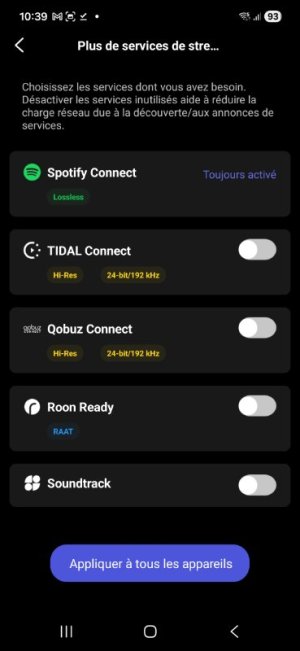
Already explained by WiiM - it's a condition of using the Spotify Connect SDK that you can't switch it off.I'm taking advantage of this topic...
in wiin home -android- "plus"
Spotify connect ..Always "on"
?
HeheAlready explained by WiiM - it's a condition of using the Spotify Connect SDK that you can't switch it off.
Not a reply... because, exactly, I don't need Spotify Connect at all...
;-))
slartibartfast
Major Contributor
- Joined
- Apr 18, 2024
- Messages
- 6,243
Not for me. If Google cast is enabled then that is the only player to show up in Spotify. Spotify connect doesn't appearlooks to be fixed now, on Spotify 9.1.44.2120
The fix suggested in comment #60 worked after I toggled the setting off a few times and refreshed the Spotify speaker list. Also rebooted my WiiM Sound to get it to appear in the Spotify list with the three dot menu to allow me to choose Google cast or connect.Not for me. If Google cast is enabled then that is the only player to show up in Spotify. Spotify connect doesn't appear
Achim2026
Active Member
My 5 Cent as a none Spotify user, but from reading a lot.Hehe
Not a reply... because, exactly, I don't need Spotify Connect at all...
;-))
Many manufacturers treat Spotify Connect as a "core feature” (like AirPlay or Bluetooth) and not as an optional streaming service.
Spotify does indirectly require that devices are quickly discoverable and reliably reachable, otherwise, they won’t pass certification. But eventually it is totally different.

slartibartfast
Major Contributor
- Joined
- Apr 18, 2024
- Messages
- 6,243
Maybe rebooting did the trick but I do now get the choice of connect or GooglecastThe fix suggested in comment #60 worked after I toggled the setting off a few times and refreshed the Spotify speaker list. Also rebooted my WiiM Sound to get it to appear in the Spotify list with the three dot menu to allow me to choose Google cast or connect.


Who are "the others"?but it's worth noting that the others don't seem to impose it.
For example, in my screenshot a little further up...Who are "the others"?
Achim2026
Active Member
It is that simple. If it annoys you, you have to figure out how much. If the answer is: "Too much" the decision for me would be easy. I would buy something else. Otherwise if the answer is: "Not too much" it would be again easy for me. I will accept it.
I do not know in which forum but I've seen a list with URLs you can block in your router if you do not use the service and think Spotify is looking too deep.
I do not know in which forum but I've seen a list with URLs you can block in your router if you do not use the service and think Spotify is looking too deep.
Post in thread 'WiiM Pro Plus will only show up as a Chromecast Device in Spotify for Android' https://forum.wiimhome.com/threads/...evice-in-spotify-for-android.8085/post-182850
Just to know if there's a real technical necessity...
And noted that this practice is specific to Spotify...
;-)
(Reading your responses, "between the lines," it seems more like a commercial policy than a technical one...)
Just to know if there's a real technical necessity...
And noted that this practice is specific to Spotify...
;-)
(Reading your responses, "between the lines," it seems more like a commercial policy than a technical one...)
Last edited:
Are you talking about the other streaming services? Playing your guessing games can be really, really tough at times.For example, in my screenshot a little further up...
If so, yes, they don't demand this behaviour. But Spotify does. Period. As @Achim2026 said, if you cannot accept it, don't buy any device with built-in Spotify Connect.
That's all you can do.
Similar threads
- Replies
- 6
- Views
- 469

- Question
- Replies
- 18
- Views
- 665

- Replies
- 6
- Views
- 1K
- Replies
- 10
- Views
- 2K
