๐ŸŽ‰ WiiM Home TV App Update โ€” Now Available for Android TV & Fire TV!

We're excited to announce a new update to the WiiM Home TV App for Android TV and Fire TV!

Here's what's new:


๐Ÿ  New: Home Page The biggest addition in this update is the all-new Home page, giving you quick access to your favorite content right from the moment you open the app. From the Home page you can browse:
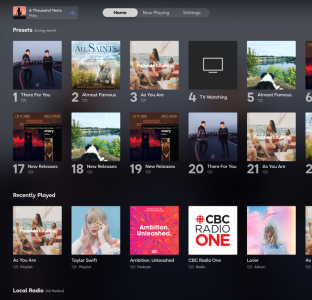
  • Presets โ€“ Your saved stations and playlists, ready for instant playback
  • Recently Played โ€“ Jump back into what you were listening to
  • Local Radio โ€“ Explore stations in your region
  • Popular Music Stations โ€“ Browse what's trending
  • BBC Radio โ€“ A curated selection of BBC broadcasts
1775153301858.png
(Home page support for Apple TV is coming soon!)


๐ŸŽต Improved Playback Screen
1775153443734.png
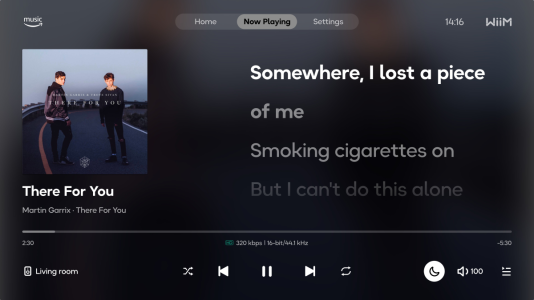
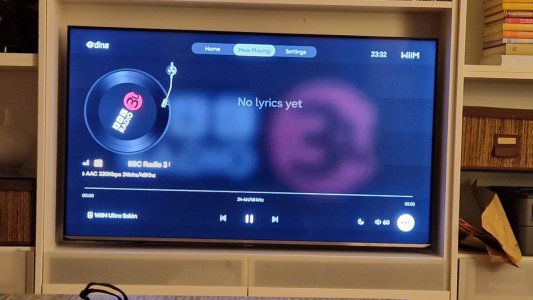
When lyrics aren't available for the currently playing track, the Now Playing screen now displays a large album cover for a cleaner, more immersive visual experience.


๐ŸŽฏ Better Focus Handling

We've made improvements to focus management across the app to reduce instances of focus loss โ€” making navigation with your TV remote smoother and more reliable.


๐Ÿ‘‰ To learn more about everything the WiiM Home TV App has to offer, check out our full guide here.

Update your app today and bring your listening experience to the big screen! ๐Ÿ“บ๐Ÿ”Š
 
After seeing all of the hype, I thought I would try this again, but no, Iโ€™m afraid that itโ€™s still not for me. :unsure:

I donโ€™t like anything about it, and shall continue to use an iPad, or iPhone for my display or control device of choice. ๐Ÿ™‚
 
What does anyone reckon - should I raise a request for this?

When on the volume icon, pressing up or down should change the volume directly, without needing to press 'enter' to bring up the volume control.
Right now, pressing down makes the volume icon jiggle.
Pressing up takes it to the track progress bar, and pressing down from the bar always takes it to the play/pause icon rather than back to whatever was selected before pressing up.
 
Last edited:
What does anyone reckon - should I raise a request for this?

When on the volume icon, pressing up or down should change the volume directly, without needing to press 'enter' to bring up the volume control.
Right now, pressing down makes the volume icon jiggle.
Pressing up takes it to the track progress bar, and pessing down from the bar always takes it to the play/pause icon rather than back to whatever was selected before pressing up.
It would be nice to have it change directly.
 
What does anyone reckon - should I raise a request for this?

When on the volume icon, pressing up or down should change the volume directly, without needing to press 'enter' to bring up the volume control.
Right now, pressing down makes the volume icon jiggle.
Pressing up takes it to the track progress bar, and pessing down from the bar always takes it to the play/pause icon rather than back to whatever was selected before pressing up.
Yes, I don't use the volume bar because it's a hassle. (I use WiiM remote.) Also, I'd love it if I could adjust the volume using the up and down buttons while viewing album art in full-screen mode.
 
Maybe I'm not getting it, but what is the benefit of listening to music through a TV. I believe the initial concept of WiiM was to allow streaming content to an analogue or digital system.

Or is this a media streamer for content provider like Netflix et al.
 
Maybe I'm not getting it, but what is the benefit of listening to music through a TV. I believe the initial concept of WiiM was to allow streaming content to an analogue or digital system.

Or is this a media streamer for content provider like Netflix et al.
The app is presented on the TV but the audio is still through the speakers. It's just an alternative (and less featured) app similar to the phone/tablet app. The media streaming is still just music and not Netflix. Bottom line, you can control a subset of features through an app on a firestick, but the full features come through the phone app.
 
Maybe I'm not getting it, but what is the benefit of listening to music through a TV. I believe the initial concept of WiiM was to allow streaming content to an analogue or digital system.

Or is this a media streamer for content provider like Netflix et al.
The WiiM Home app was developed in response to those who mistakenly thought that the hdmi connection on the Ultra fed the now playing metadata and artwork back to your tv - it doesn't, it's hdmi arc audio input only. So the WiiM Home TV app is really just a remote display with limited control of what's playing on any of your WiiM devices on your local network and it doesn't need a physical connection to your tv.

However, users being users will ask that features are added to that remote display to extend it well beyond its initial raison-d'รชtre.
 
Maybe I'm not getting it, but what is the benefit of listening to music through a TV. I believe the initial concept of WiiM was to allow streaming content to an analogue or digital system.

Or is this a media streamer for content provider like Netflix et al.
For me it's very simple. I dislike faffing about with my smartphone to play music. I much prefer using a remote to select and play music. I can do this with Emby. I would be nice to be able to use the other Wiim features with the TV remote.

Especially because I always leave my phone in the kitchen\car\upstairs etc.

At the moment the Wiim TV app doesn't do much more than the Wiim remote, but it's nice to see development and the potential.
 
We're excited to announce a new update to the WiiM Home TV App for Android TV and Fire TV!

Here's what's new:


๐Ÿ  New: Home Page The biggest addition in this update is the all-new Home page, giving you quick access to your favorite content right from the moment you open the app. From the Home page you can browse:
  • Presets โ€“ Your saved stations and playlists, ready for instant playback
  • Recently Played โ€“ Jump back into what you were listening to
  • Local Radio โ€“ Explore stations in your region
  • Popular Music Stations โ€“ Browse what's trending
  • BBC Radio โ€“ A curated selection of BBC broadcasts
View attachment 36202
(Home page support for Apple TV is coming soon!)


๐ŸŽต Improved Playback Screen
View attachment 36203
When lyrics aren't available for the currently playing track, the Now Playing screen now displays a large album cover for a cleaner, more immersive visual experience.


๐ŸŽฏ Better Focus Handling

We've made improvements to focus management across the app to reduce instances of focus loss โ€” making navigation with your TV remote smoother and more reliable.


๐Ÿ‘‰ To learn more about everything the WiiM Home TV App has to offer, check out our full guide here.

Update your app today and bring your listening experience to the big screen! ๐Ÿ“บ๐Ÿ”Š
Any chance a Roku App/Channel would be created?
 
I'm guessing you can just screenshare that to the TV anyway?

I don't do a lot of screensharing, but that's what I always assumed (before this app arrived) that that's what it'd do.
 
I'm guessing you can just screenshare that to the TV anyway?

I don't do a lot of screensharing, but that's what I always assumed (before this app arrived) that that's what it'd do.
If you do that from your phone, or even your tablet, it won't fill your screen and you might end up with a small portrait layout in the middle of the screen with space either side. It's far from a satisfactory experience.
 
Back
Top