Adding better bluetooth transmission

rarewolf

Member
Joined
Jan 1, 2023
Messages
40
While considering adding better Bluetooth output to my WiiM Pro, I ran across the setting “enable automatic optical sensing”, and I wonder if this is the best output port while SPDIF coax is connected to my headphone DAC/amp(?). That is, if the external Bt xmitter pairs with TWS will the WiiM automatically select it for output in spite of coax being connected to a live DAC? If not, would turning off the DAC make optical available?

Cheers
 
While considering adding better Bluetooth output to my WiiM Pro, I ran across the setting “enable automatic optical sensing”, and I wonder if this is the best output port while SPDIF coax is connected to my headphone DAC/amp(?). That is, if the external Bt xmitter pairs with TWS will the WiiM automatically select it for output in spite of coax being connected to a live DAC? If not, would turning off the DAC make optical available?

Cheers
The Optical Auto-sensing function is for input only. It is not for output.

You might also consider a Bluetooth transmitter adapter with a USB connection.
 
The USB adapter has been tested here.

 
You might also consider a Bluetooth transmitter adapter with a USB connection.
Usb? Not with a wiim pro... :)

If the bluetooth transmitter takes an optical input then you could use the pro's optical out to it.
You'd have to manually switch between optical and coax, which can be made a little simpler with presets.
 
Usb? Not with a wiim pro... :)

If the bluetooth transmitter takes an optical input then you could use the pro's optical out to it.
You'd have to manually switch between optical and coax, which can be made a little simpler with presets.
Sorry, I completely missed that.🙏
Thanks for correcting🙂
 
Usb? Not with a wiim pro... :)

If the bluetooth transmitter takes an optical input then you could use the pro's optical out to it.
You'd have to manually switch between optical and coax, which can be made a little simpler with presets.

Thanks Mr Ee… That had just occurred to me this morning, wondering if both optical and coax could be made live, or if I wanted to put up with the inconvenience of getting into the WiiM app to switch it over.

Can you point me at an example of creating/using a “preset”?

Thanks all for the USB suggestion. I have the Sennheiser HDB 630 Bt cans and I am familiar with the Sennheiser. BTD 700, why is why I want decent Bt from the WiiM… but alas…

Edit: I found the FAQ and how to use presets. It’s only a bit simpler than changing the output, but I can at least put a time limit on it and expect the normal output for the next session with my wired cans…

Edit2: I’m surprised that I cannot find anything about selecting a preset with Alexa! How do you select a preset with the WiiM Pro’s front button, or does having only a single preset simplify selection ?
 
Last edited:
You can always buy a WiiM remote 1 or 2 and use it with your Pro. Then you will have 4 preset buttons (8 presets max) at your disposal.

Thanks, but no thanks … another remote is the last thing I want cluttering my bedside table…:rolleyes:
 
Edit2: I’m surprised that I cannot find anything about selecting a preset with Alexa! How do you select a preset with the WiiM Pro’s front button, or does having only a single preset simplify selection ?
Each press of the preset button advances to the next preset.

One press selects Preset 1, two presses select Preset 2, three presses select...
 
Each press of the preset button advances to the next preset.

One press selects Preset 1, two presses select Preset 2, three presses select...

Thanks @Wiimer! I tried it out, and without haptic feedback or a beep it was difficult to tell is anything changed, but I did hear a slight click which did enable the optical out. Enabling a single preset should work well, but without any kind of feedback I imagine engaging one of many presets might be a challenge…(?)
 
Thanks @Wiimer! I tried it out, and without haptic feedback or a beep it was difficult to tell is anything changed, but I did hear a slight click which did enable the optical out. Enabling a single preset should work well, but without any kind of feedback I imagine engaging one of many presets might be a challenge…(?)
Well, yes. The Pro doesn't have a screen, so it is inconvenient in that respect. If you have an unused tablet or smartphone, you could place it next to the Pro and use it as a screen.

Or, purchasing a WiiM remote will enable you to activate 1~8 presets.
 
I setup a Bt transmitter today, and even had it working. However, as soon as I was satisfied, and only wanted to shut down entirely, to again hopefully find that all I need do is run the “out from optical” preset and press play. Ot did not work, and I was not able to get it to work again, in spite of pairing properly with my Bt headphones and optical output glowing red…

Not that I think the problem is the WiiM, but I did want to eliminate me having done something stupid and someone else having already asked the dumb question. I’ve already posted an detailed query to Avantree support… any thoughts from the WiiM perspective?
 
I setup a Bt transmitter today, and even had it working. However, as soon as I was satisfied, and only wanted to shut down entirely, to again hopefully find that all I need do is run the “out from optical” preset and press play. Ot did not work, and I was not able to get it to work again, in spite of pairing properly with my Bt headphones and optical output glowing red…

Not that I think the problem is the WiiM, but I did want to eliminate me having done something stupid and someone else having already asked the dumb question. I’ve already posted an detailed query to Avantree support… any thoughts from the WiiM perspective?
I'm not sure if this will be of any help, but could you tell us the model of the transmitter?
 
As long as we don’t dump shade on the transmitter (… when it’s probably the transmitteeme …), the Avantree mdl is the “AudiKast 4”

Of possible import… I fired up the WiiM tonight expecting coax output, but it was still delivering output to optical. I then remembered I had been troubleshooting by directly manipulating the opt/coax output in settings, and remembered that when it did work, that optical had been selected via the preset. That is, all failures had occurred after making direct changes to opt/coax output. I cannot imagine why it should make a difference, but it is coincidental
 
As long as we don’t dump shade on the transmitter (… when it’s probably the transmitteeme …), the Avantree mdl is the “AudiKast 4”

Of possible import… I fired up the WiiM tonight expecting coax output, but it was still delivering output to optical. I then remembered I had been troubleshooting by directly manipulating the opt/coax output in settings, and remembered that when it did work, that optical had been selected via the preset. That is, all failures had occurred after making direct changes to opt/coax output. I cannot imagine why it should make a difference, but it is coincidental

There are a few things I need you to check.

- The WiiM output must be set to Optical.
- Ensure the connection between the Avantree and your headphones is active.
- Please ensure that Avantree's Auracast is switched off.
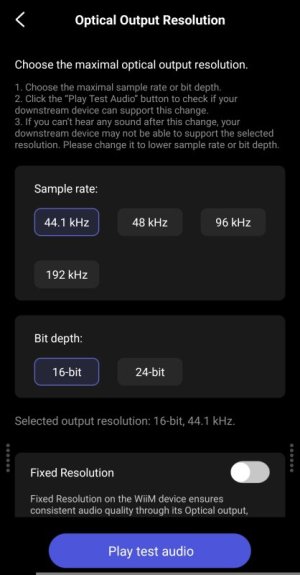
- In the WiiM app's audio settings, switch the Optical Output Resolution to 16bit/44.1kHz and check if a test tone plays. If sound is produced, then try 24bit/96kHz next.

1508.jpg

If that still does not work, please connect the WiiM's Line-out to the Avantree's AUX-in and perform a functionality test. (Please set the WiiM's output to Line-Out.)
 
There are a few things I need you to check.

- The WiiM output must be set to Optical.
Check
- Ensure the connection between the Avantree and your headphones is active.

During my i itial setup I had made sure the Bt on all other devices had been disabled. I checked the Bt connection by turning the Bt cans off and watching the transmitter Bt LED turn off.

- Please ensure that Avantree's Auracast is switched off.

It’s either Bt or Ac, and the Bt LED was lit
- In the WiiM app's audio settings, switch the Optical Output Resolution to 16bit/44.1kHz and check if a test tone plays. If sound is produced, then try 24bit/96kHz next.

I believe I had been testing with 44.1kHz CDQ for avoiding possible wifi dropouts, but the optical had been configured for 192kHz, and for Bt I can certainly be just as happy with handing off CDQ to Bt compression. This just may be the problem. I’ll report back…

If it is the problem, and depending on how far I may need to fall back on audio resolution, does this limit me to what can be played (CDQ vs HDQ), or will the WiiM downsample HDQ? If the latter, are better WiiMs advised for downsampling? For example, I’ve been considering upgrading to the Pro+ just for USB output…

If that still does not work, please connect the WiiM's Line-out to the Avantree's AUX-in and perform a functionality test. (Please set the WiiM's output to Line-Out.)

I’m not aware of a WiiM “functionality test”, or are you simply asking me to see if this works? That is, I’m hoping not to depend on the WiiM’s DAC, but to rely solely on the Qualcom’s Bt to convert the PCM… or, return this unit for another…

Thanks for your input!,
 
I believe I had been testing with 44.1kHz CDQ for avoiding possible wifi dropouts, but the optical had been configured for 192kHz, and for Bt I can certainly be just as happy with handing off CDQ to Bt compression. This just may be the problem. I’ll report back…

If it is the problem, and depending on how far I may need to fall back on audio resolution, does this limit me to what can be played (CDQ vs HDQ), or will the WiiM downsample HDQ? If the latter, are better WiiMs advised for downsampling? For example, I’ve been considering upgrading to the Pro+ just for USB output…

For music streaming services such as Amazon Music, WiiM does not downsample. Streaming services play the highest resolution music file that the device can handle.

Furthermore, I believe Avantree's Bluetooth codec supports up to 24-bit/96kHz (or 48kHz).

I’m not aware of a WiiM “functionality test”, or are you simply asking me to see if this works?
Yes, I wanted you to check whether sound comes out properly via the Aux input. My apologies for not explaining it clearly.


For example, I’ve been considering upgrading to the Pro+ just for USB output…
The Pro+ USB port is for power supply. USB output is available on the Ultra, Amp, Amp Pro, and Amp Ultra models.
 
For music streaming services such as Amazon Music, WiiM does not downsample. Streaming services play the highest resolution music file that the device can handle.

Furthermore, I believe Avantree's Bluetooth codec supports up to 24-bit/96kHz (or 48kHz).


I’m subscribed to AM but more often that not I’m streaming from my Jriver library, for which much of it is 96kHz or better. Are saying the WiiM will downsample HDQ to CDQ if I fix the optical output to CDQ?
 
I’m subscribed to AM but more often that not I’m streaming from my Jriver library, for which much of it is 96kHz or better. Are saying the WiiM will downsample HDQ to CDQ if I fix the optical output to CDQ?
Sorry I'm not sure I have never used it.
In any case, it is compressed via Bluetooth transmission.
 
Back
Top